Describe Azure Architecture and Services · Topic 3 of 4
Azure Storage Services
AZ-900 Azure storage: Blob, Files, Queue, Table and disks, access tiers, LRS, ZRS, GRS and GZRS redundancy, AzCopy, File Sync, Azure Migrate and Data Box.
- 6 min
- Includes a diagram
- Blob is for objects, Files for shares, Queue for messages, Table for NoSQL data, Disks for VM drives.
- Tiers are Hot, Cool, Cold and Archive. Archive is offline and cheapest to store.
- LRS is one datacenter, ZRS spans zones, GRS and GZRS add a second region.
What it is
Azure Storage is a set of services for keeping data in the cloud. Most of them live inside a storage account, which is the container that holds your data and sets its performance and redundancy.
The exam asks you to pick the right storage service, choose a tier by how often data is used, pick a redundancy option for the failure you must survive, and name the right tool to move data.
How it works
Storage services
| Service | What it stores | Typical use |
|---|---|---|
| Blob Storage | Unstructured objects such as images, video, documents and backups | Serving files to a browser, backup and archive, streaming |
| Azure Files | Managed file shares reached over SMB or NFS | Replacing on premises file servers, shared folders |
| Queue Storage | Messages passed between parts of an application | Decoupling application components |
| Table Storage | Structured NoSQL key and attribute data | Large amounts of simple structured data |
| Azure Disks | Managed disks that act as virtual machine drives | The operating system and data disks of a VM |
Storage account options
Standard accounts use hard disk drives and suit most workloads. Premium accounts use solid state drives for low latency and high performance. A general purpose v2 account supports blobs, files, queues and tables and is the usual choice. A storage account name must be unique across Azure.
Access tiers for blobs
A tier trades storage cost against access cost.
| Tier | Use for | Notes |
|---|---|---|
| Hot | Data used often | Highest storage cost, lowest access cost |
| Cool | Data used rarely | Lower storage cost, stored at least 30 days |
| Cold | Data used very rarely | Lower again, stored at least 90 days |
| Archive | Data kept for years and almost never read | Lowest cost, stored at least 180 days, offline until rehydrated |
Archive data cannot be read directly. You must first rehydrate it to an online tier, which can take hours.
Redundancy options
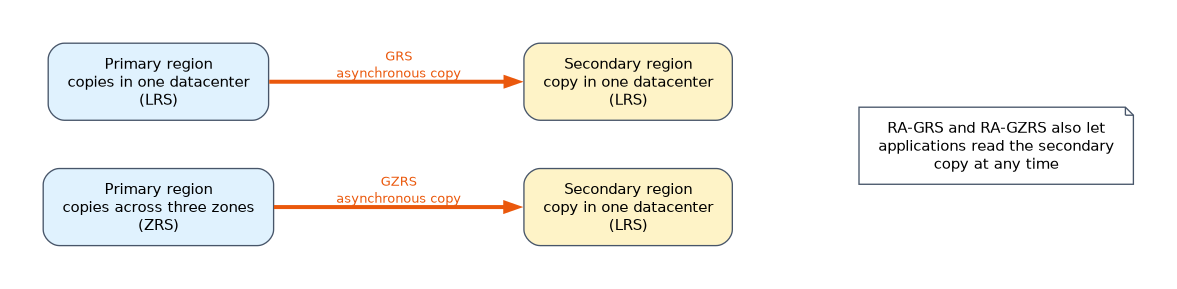 Redundancy keeps copies of your data so it survives a failure.
| Option | Copies | Survives |
|---|---|---|
| LRS (locally redundant) | Copies within one datacenter | Disk, server and rack failure |
| ZRS (zone redundant) | Copies across three or more availability zones in one region | The loss of a datacenter |
| GRS (geo redundant) | LRS in the main region plus a copy in a paired region | A whole region outage |
| GZRS (geo zone redundant) | ZRS in the main region plus a copy in a paired region | A zone loss and a region outage |
The geo options also come in read access versions, RA-GRS and RA-GZRS, which let applications read the secondary copy at any time. With plain GRS and GZRS the secondary is used only after a failover.
Moving files
- AzCopy: a command line tool that copies blobs and files to and from a storage account.
- Azure Storage Explorer: a graphical app for browsing and managing storage on Windows, macOS and Linux.
- Azure File Sync: keeps on premises Windows file servers in step with an Azure Files share, caching the most used files locally.
Migration options
Azure Migrate is the central hub for discovering, assessing and migrating servers, databases and apps to Azure. Azure Data Box is a physical device that Microsoft ships to you. You copy a large amount of data onto it and return it, which suits cases where the network is too slow or too costly.
Choosing the right storage
Questions describe data and ask for the service.
| The data or need | Service |
|---|---|
| Photos and videos served to a website | Blob Storage |
| A shared drive for several servers and users | Azure Files |
| A drive attached to a virtual machine | Azure Disks |
| Messages waiting for an application to process | Queue Storage |
| Simple structured data with no joins | Table Storage |
Files, Blob and Disks compared
| Blob | Azure Files | Azure Disks | |
|---|---|---|---|
| Access | HTTP or HTTPS | SMB or NFS file share | Attached to a VM |
| Best for | Objects and backups | Shared folders | Operating system and data drives |
| Mounted by many machines | No | Yes | Normally one VM |
Redundancy choice by need
If the question stresses the lowest cost, choose locally redundant storage. If it stresses surviving the loss of a datacenter inside a region, choose zone-redundant storage. If it stresses surviving the loss of a whole region, choose geo-redundant or geo-zone-redundant storage.
How the exam asks about this
- "Which tier has the lowest storage cost but needs hours to read?" Archive.
- "Which redundancy option survives a regional outage?" GRS or GZRS.
- "Which tool copies files from the command line?" AzCopy. "Which tool is a graphical app?" Azure Storage Explorer.
- "How do you move many terabytes when the network is too slow?" Azure Data Box.
- "Which service migrates servers and databases?" Azure Migrate.
What to remember for the exam
- Blob is for objects, Files for shares, Queue for messages, Table for NoSQL data, Disks for VM drives.
- Tiers are Hot, Cool, Cold and Archive. Archive is offline and cheapest to store.
- LRS is one datacenter, ZRS spans zones, GRS and GZRS add a second region.
- RA versions allow reading the secondary copy at any time.
- AzCopy is command line, Storage Explorer is graphical, File Sync links on premises servers to Azure Files.
- Azure Migrate moves workloads. Data Box moves large data offline.
"Survive a whole region outage" points to GRS or GZRS. "Read the secondary region without a failover" points to RA-GRS or RA-GZRS.
Common mistakes
Picking Archive for data you read often. Archive needs hours to rehydrate and charges early deletion before 180 days.
Assuming ZRS protects against a region failure. ZRS stays in one region. You need GRS or GZRS for a second region.
Mixing up Files and Blob. Files gives a mountable SMB or NFS share. Blob stores objects accessed over HTTP.
Using Data Box when the network is fine. It is for large volumes or slow links.
Moving data to a cooler tier before the minimum storage period ends can add an early deletion charge.
Check yourself
Which storage service provides managed file shares over SMB?
Azure Files.
Which redundancy option keeps copies in a second region and lets you read them at any time?
RA-GRS, or RA-GZRS if you also want zone redundancy.
Which tool keeps on premises Windows file servers synchronised with Azure Files?
Azure File Sync.
Topic 3 of 4 in Describe Azure Architecture and Services
Test yourself on Describe Azure Architecture and Services
The full Microsoft AZ-900 question bank has 500 questions, with timed practice exams and an explanation for every answer.
This study guide is independent and is not affiliated with, endorsed by, or sponsored by Microsoft. Vendor names, certification names and exam codes are trademarks of their respective owners and are used for identification only.