Describe Azure Architecture and Services · Topic 1 of 4
Core Architectural Components of Azure
AZ-900 Azure architecture: regions, region pairs, sovereign regions, availability zones, datacenters, resource groups, subscriptions and management groups.
- 5 min
- Includes a diagram
- A region is a set of datacenters in one area. Region pairs support disaster recovery.
- Sovereign regions such as Azure Government and Azure operated by 21Vianet are isolated for compliance.
- An availability zone is a separate datacenter location within a region, with independent power, cooling and networking.
What it is
Azure has two layers of structure. The physical layer is the datacenters, regions and zones that hold your workloads. The logical layer is the hierarchy of management groups, subscriptions, resource groups and resources that you use to organise, bill and control them.
The exam asks you to tell these layers apart and to recognise each component.
How it works
Regions and region pairs
A region is a geographic area that contains one or more datacenters connected by a low latency network. You pick a region when you create most resources, usually close to your users or to meet data location rules.
Most regions are paired with another region in the same geography, normally hundreds of miles apart. Pairing supports disaster recovery. Azure rolls out planned updates to one region of a pair at a time, and if there is a wide outage it prioritises recovery of one region in each pair.
Sovereign regions
Sovereign regions are separate instances of Azure for special compliance or legal needs, isolated from the main public Azure. Azure Government serves United States government bodies and their partners. Microsoft Azure operated by 21Vianet serves China.
Availability zones
An availability zone is a physically separate location inside a region, with its own power, cooling and networking. A region that supports zones has at least three of them.
Placing copies of a workload in different zones protects it from the failure of one datacenter. Not every region offers availability zones.
Datacenters
A datacenter is a physical building full of servers, storage and networking. You do not choose a particular datacenter. You choose a region, and Azure decides where inside it your resource runs, unless you select an availability zone.
Resources and resource groups
A resource is one manageable item, such as a virtual machine, a storage account or a virtual network. A resource group is a logical container for related resources.
Each resource belongs to exactly one resource group. Resource groups cannot be nested, and deleting a group deletes every resource in it. Grouping resources that share a lifecycle makes them easy to manage together.
Subscriptions
A subscription is the unit of billing and access, and every resource lives in one. An organization often uses several subscriptions to separate environments such as production and testing, or to separate departments for billing.
Management groups
Management groups are containers for subscriptions. They let you apply policy and access rules to many subscriptions at once, and the rules flow down to everything beneath. Management groups can be nested.
The hierarchy
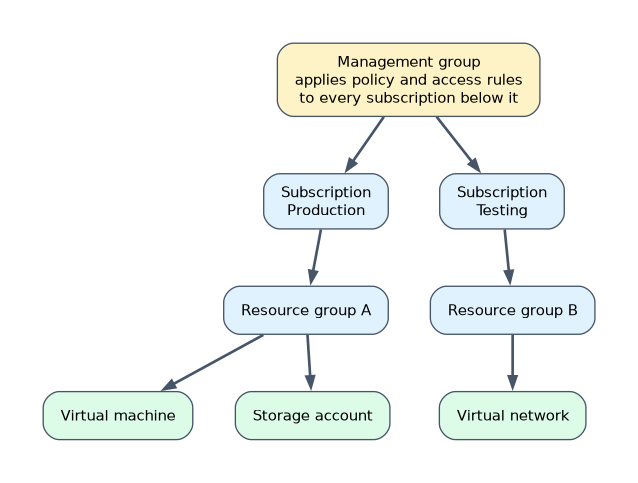
Settings applied at a higher level are inherited by the levels below. A policy on a management group therefore reaches every subscription, resource group and resource underneath.
Choosing a region
You pick a region for most resources. Four things usually decide the choice.
- Distance to users: a closer region means lower latency.
- Compliance and data residency: some rules require data to stay in a country or area.
- Service availability: not every service or size is offered in every region.
- Price: the same resource can cost a different amount in different regions.
Zonal and zone-redundant services
Availability zones can be used in two ways.
| Type | What it means | Example |
|---|---|---|
| Zonal | You pin a resource to one specific zone | A virtual machine placed in zone 1 |
| Zone-redundant | Azure spreads the service across zones for you | Zone-redundant storage |
For zonal resources you design the resilience, for example by running a copy in a second zone. For zone-redundant services Azure does it automatically.
A worked example of the hierarchy
Contoso wants to organise its Azure environment.
- A management group called Corp holds all the subscriptions, and a policy that restricts regions is applied once there.
- Two subscriptions, Production and Development, keep billing and access separate.
- In each subscription, a resource group holds each application, so that the whole application can be deleted together.
- The resources themselves, such as virtual machines and storage accounts, sit inside the groups.
Because settings flow down the tree, the region policy on Corp reaches every resource beneath it.
How the exam asks about this
- "Which feature protects against the failure of a single datacenter in a region?" Availability zones.
- "Which feature protects against the failure of a whole region?" A second region, such as a region pair.
- "Which container applies billing and access boundaries?" The subscription.
- "Which container applies policy across many subscriptions?" A management group.
- Questions about moving or deleting a resource group are really testing that it contains every resource in it.
What to remember for the exam
- A region is a set of datacenters in one area. Region pairs support disaster recovery.
- Sovereign regions such as Azure Government and Azure operated by 21Vianet are isolated for compliance.
- An availability zone is a separate datacenter location within a region, with independent power, cooling and networking.
- A resource belongs to one resource group. Resource groups cannot be nested.
- A subscription is a billing and access boundary.
- Management groups organise subscriptions and pass settings down.
- The order from top to bottom is management group, subscription, resource group, resource.
"Protect against a datacenter failure" points to availability zones. "Protect against a whole region failure" points to a region pair or another region.
Common mistakes
Choosing a datacenter. You choose a region, not a datacenter.
Mixing up zones and regions. A zone is inside a region. A region contains zones.
Putting a resource in two resource groups. Each resource belongs to exactly one group, although it can be moved.
Forgetting that deleting a resource group deletes its contents. Everything inside goes with it.
Deleting a resource group removes all resources in it. Check what a group contains before you delete it.
Check yourself
What is the Azure term for a physically separate location inside a region?
An availability zone.
Which container sits between management groups and resources and is the billing boundary?
The subscription.
Can a resource belong to more than one resource group?
No, each resource belongs to exactly one resource group.
Topic 1 of 4 in Describe Azure Architecture and Services
Test yourself on Describe Azure Architecture and Services
The full Microsoft AZ-900 question bank has 500 questions, with timed practice exams and an explanation for every answer.
This study guide is independent and is not affiliated with, endorsed by, or sponsored by Microsoft. Vendor names, certification names and exam codes are trademarks of their respective owners and are used for identification only.