Pipelines: design and implement pipelines · Topic 1 of 3
Deployment Automation Tools and Agent Infrastructure
AZ-400 platforms and agents: GitHub Actions versus Azure Pipelines, hosted and self-hosted agents and runners, scale sets, cost and connectivity.
- 6 min
- Includes a diagram
- Hosted: no maintenance, fresh machine, no private network. Self-hosted: private access, special tools, you maintain it.
- Agents and runners connect outbound to the service. No inbound ports are needed.
- Elastic self-hosted options: scale set agents, Managed DevOps Pools, Actions Runner Controller.
What it is
Two decisions come first. Which automation platform runs the pipelines (GitHub Actions or Azure Pipelines, sometimes both), and where the work runs: on hosted machines that the provider maintains, or on self-hosted agents or runners that you manage.
The exam wants a design that balances cost, tool selection, licenses, connectivity and maintainability.
How it works
GitHub Actions or Azure Pipelines
| Aspect | GitHub Actions | Azure Pipelines |
|---|---|---|
| Definition | Workflow files in .github/workflows/ | azure-pipelines.yml or a classic editor pipeline |
| Building blocks | Events, jobs, steps, actions from the Marketplace | Stages, jobs, steps, tasks from the Marketplace |
| Compute | GitHub-hosted or self-hosted runners, in runner groups | Microsoft-hosted or self-hosted agents, in agent pools |
| Source | GitHub repositories | GitHub, Azure Repos, Bitbucket, others |
| Extras | Close to code, pull requests and security features, environments, reusable workflows | Environments, classic release pipelines, deployment groups, Azure Boards and Test Plans integration |
Neither is "better". Use GitHub Actions when the code and collaboration are in GitHub. Use Azure Pipelines when the organization is built around Azure DevOps (Boards, Test Plans, classic releases) or needs its feature set. Many organizations run Azure Pipelines against GitHub repositories, or use both.
Hosted agents and runners
| Option | Characteristics |
|---|---|
| Microsoft-hosted agents | Fresh virtual machine per job, common tools preinstalled, images patched by Microsoft, Windows, Linux and macOS images. Nothing to maintain. Cannot reach private networks directly |
| GitHub-hosted runners | Same model for Actions: Ubuntu, Windows and macOS images, and larger runners for more CPU and memory. Options exist for networking into Azure virtual networks |
Hosted options are the right default: no patching, clean state each time, quick to start.
Self-hosted agents and runners
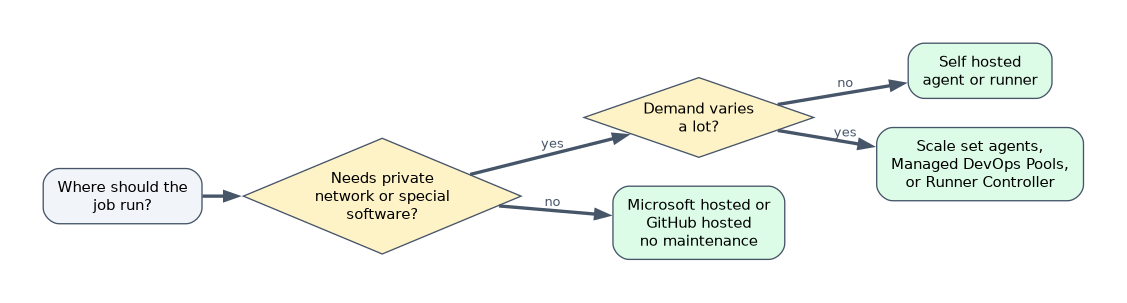 Choose self-hosted when you need something the hosted pools cannot give.
| Reason | Why |
|---|---|
| Private network access | Deploy to on premises servers or private endpoints in a virtual network |
| Special software or hardware | Large toolchains, GPUs, licensed tools, specific OS versions |
| Performance | Bigger machines and persistent caches that survive between runs |
| Compliance | Code and secrets must stay inside your boundary |
You then own patching, capacity and security. Some design points:
- An agent or runner makes outbound HTTPS connections to the service and polls for jobs. You do not need to open inbound ports.
- Use ephemeral agents (a clean machine for every job) where possible so one job cannot affect the next, and build the machine image with a repeatable process.
- Do not attach self-hosted runners to public repositories that accept forks, because a pull request from a fork could run code on your machine.
- Use labels (runners) or capabilities and demands (agents) so jobs land on the right machine.
Scaling self-hosted compute
| Option | What it gives you |
|---|---|
| Azure Virtual Machine Scale Set agents | An Azure Pipelines pool backed by a scale set that grows and shrinks with the queue |
| Managed DevOps Pools | A managed pool where Microsoft handles scaling and the machines run in your Azure subscription and can join your virtual network |
| Actions Runner Controller | Runs GitHub self-hosted runners on Kubernetes and scales them with demand |
| Containers as agents | Run the agent in a container for isolation and quick replacement |
Cost, licensing and maintainability
| Concern | Design guidance |
|---|---|
| Cost | Hosted charges by usage or by licensed parallel jobs. Self-hosted costs the machines plus operations time. Scale to zero when idle, use cheaper capacity for non urgent work, and use caching to cut run time |
| Parallelism and licensing | Azure Pipelines limits how many jobs run at once by parallel jobs, licensed separately for Microsoft-hosted and self-hosted. A free tier exists with limits. GitHub plans include minutes and concurrency by plan, with extra billed |
| Software licenses | A tool that needs a license on the build machine must be licensed on your own agents too |
| Tool selection | Use tool installer tasks and actions (for example UseDotNet@2, NodeTool@0) so the pipeline declares the versions it needs |
| Maintainability | Keep a single agent image definition, rebuild it on a schedule, and keep agents on a supported version |
Choosing quickly
| Requirement | Answer |
|---|---|
| Deploy to servers in a private network | Self-hosted agent or runner inside the network |
| No infrastructure to maintain | Microsoft-hosted or GitHub-hosted |
| Burst capacity that scales to zero | Scale set agents or Managed DevOps Pools |
| Kubernetes based runners for GitHub | Actions Runner Controller |
| Code in GitHub with Azure DevOps work tracking | Azure Pipelines using the GitHub app, or Actions with Boards linking |
A worked scenario
A company builds in GitHub but deploys into virtual machines in a private network. Builds and tests run on GitHub-hosted runners because they need no private access. The deployment job uses a self-hosted runner with a label prod-network, running in a locked down subnet, with the runner registered at the organization level in a restricted runner group. Because deployments are infrequent, the runners are ephemeral and created on demand.
What to remember for the exam
- Hosted: no maintenance, fresh machine, no private network. Self-hosted: private access, special tools, you maintain it.
- Agents and runners connect outbound to the service. No inbound ports are needed.
- Elastic self-hosted options: scale set agents, Managed DevOps Pools, Actions Runner Controller.
- Azure Pipelines has agent pools, demands and parallel jobs. GitHub has runner groups and labels.
- Avoid self-hosted runners on public repositories that accept fork pull requests.
A self-hosted agent that is reused across jobs keeps files and credentials from earlier jobs unless you clean it. Prefer ephemeral agents.
How the exam asks about this
- "Deploy to on premises servers from a cloud pipeline." A self-hosted agent or runner in that network.
- "Minimize administration for builds." Hosted agents or runners.
- "Agents must scale with the number of queued jobs." Scale set agents or Managed DevOps Pools.
- "Restrict which repositories can use a set of runners." Runner groups.
Common mistakes
Opening inbound firewall ports for agents. They only need outbound HTTPS.
Using self-hosted just to save money. Operations time often costs more than hosted minutes.
Forgetting parallel job limits. Jobs queue even with idle machines when no parallel job is available.
Mixing sensitive and public work on one runner. Isolate by group.
Check yourself
Which agent type can reach resources inside a private network?
A self-hosted agent or runner placed in that network.
Which connection direction does an agent use to get jobs?
Outbound HTTPS from the agent to the service.
Which Azure Pipelines feature scales an agent pool with the queue using scale sets?
Virtual Machine Scale Set agents.
Topic 1 of 3 in Pipelines: design and implement pipelines
Test yourself on Pipelines: design and implement pipelines
The full Microsoft AZ-400 question bank has 766 questions, with timed practice exams and an explanation for every answer.
This study guide is independent and is not affiliated with, endorsed by, or sponsored by Microsoft. Vendor names, certification names and exam codes are trademarks of their respective owners and are used for identification only.