Pipelines: design and implement deployments · Topic 1 of 3
Deployment Strategies and Minimizing Downtime
AZ-400 deployment strategies: blue-green, canary, ring, rolling and A/B testing, App Service slots, load balancing and ordering dependent deployments.
- 6 min
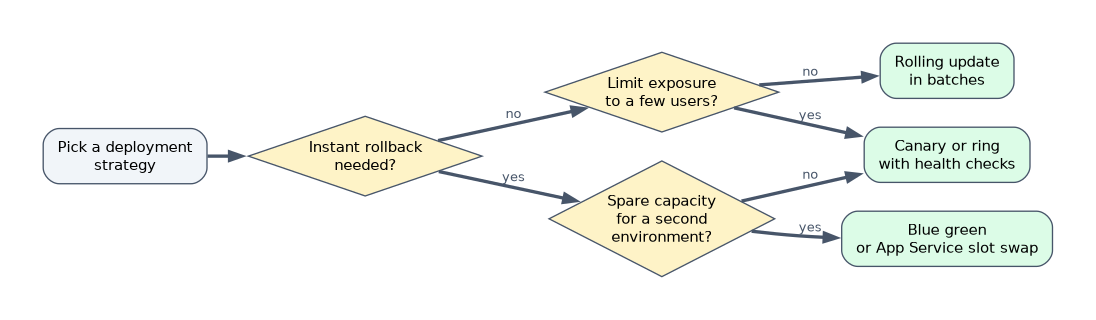
- Includes a diagram
- Blue-green: two environments, switch traffic, instant rollback, double capacity. Canary: a small share first. Ring: groups in order. Rolling: batches.
- Azure Pipelines strategies:
runOnce,rolling(VMs),canary. - Slots need Standard tier or above. Slot settings stay put. Swap back to roll back.
What it is
A deployment strategy is how a new version replaces the old one. The choice trades off three things: risk (how many users see a bad version), downtime (can users notice) and cost (how much extra infrastructure). There is no best strategy, only the one that fits the requirement.
How it works
The strategies
| Strategy | How it works | Rollback | Cost and notes |
|---|---|---|---|
| Recreate (in place) | Stop the old version, start the new one | Redeploy the old one | Cheapest. Causes downtime |
| Rolling | Update a few instances at a time while the rest serve traffic | Roll back the batch or redeploy | No extra full environment. Old and new run side by side during the roll |
| Blue-green | Two identical environments. Deploy to the idle one (green), test it, then switch all traffic from blue | Switch back to blue, nearly instant | Needs double capacity for the switch. Database changes must work with both versions |
| Canary | Send a small percentage of traffic or a few instances to the new version, watch, then increase | Route the percentage back to the old version | Real traffic finds issues with limited impact |
| Ring | Release to rings of users in order: internal users, early adopters, a wider group, everyone. Move on when signals are healthy | Stop and fix before the next ring | Good for large user bases and client software |
| Progressive exposure | The general idea behind canary and ring: expose gradually and use measurements to continue | Stop the expansion | Often driven by feature flags |
| A/B testing | Show two variants to different groups to compare a business metric, such as conversion | Keep the winning variant | A testing method, not a safety strategy. Uses flags or traffic split plus telemetry |
Canary compares versions for safety. A/B compares variants for outcomes.
Strategies in Azure Pipelines
A deployment job takes a strategy.
- deployment: Web
  environment: production.vm-pool
  strategy:
    rolling:
      maxParallel: 25%
      deploy:
        steps:
- script: ./deploy.sh| Strategy | Notes |
|---|---|
runOnce | Run the steps once. The simplest option |
rolling | Update a number or percentage of targets at a time (maxParallel). Applies to virtual machine resources in an environment |
canary | Deploy to an increasing share, defined by increments such as 10 then 20 percent, with hooks to run checks between steps |
Each strategy offers lifecycle hooks such as preDeploy, deploy, routeTraffic, postRouteTraffic and on: failure/success, where you place the verification and rollback steps.
Minimizing downtime
| Technique | How it helps |
|---|---|
| Load balancer with health probes | Remove an instance from rotation, update it, and add it back only when its probe passes. Connection draining lets requests finish |
| Rolling updates | Only part of the capacity is updated at once. Kubernetes rolling updates use maxSurge and maxUnavailable |
| Deployment slots (App Service) | Deploy to a staging slot, warm it up and swap it into production. Users never see a cold start |
| Traffic routing services | Azure Front Door, Application Gateway or Traffic Manager shift traffic between environments or regions |
| Backward compatible changes | New code works with the old database schema and old code works with the new one (see the database page) |
| Readiness probes | Kubernetes sends traffic only to pods that report ready |
App Service deployment slots
Slots are live apps with their own host name that share the App Service plan. They need the Standard, Premium or Isolated tier.
- Deploy the new version to the staging slot.
- Azure applies the target slot's settings to the staging instance, restarts it and warms it up before the swap.
- Swap changes which slot receives production traffic. The previous production version is now in the staging slot.
- If a problem appears, swap back for an instant rollback.
Settings marked as slot settings (deployment slot settings) stay with the slot and do not move in a swap, such as a connection string that points to a test database. Swap with preview applies the production settings to the staging slot first so you can verify before completing the swap. You can also route a percentage of traffic to a slot for a canary style test.
Ordering dependent deployments
Some components must deploy in order: the database before the API, the API before the web front end, a shared service before its consumers.
- Use
dependsOnbetween stages and jobs inside one pipeline. - Use pipeline resource triggers so a downstream pipeline starts when an upstream one completes.
- Use an exclusive lock or sequential
lockBehaviorso two runs do not deploy to the same environment at once. - Keep version compatibility rules: the new API must still work with the previous front end, so a failure of the second deployment does not strand the first.
Choosing quickly
| Requirement | Answer |
|---|---|
| Instant rollback with no mixed versions | Blue-green |
| Reduce the risk by exposing a small share first | Canary |
| Release to employees before customers | Ring |
| No extra environment and some capacity always up | Rolling |
| Zero downtime on App Service and instant rollback | Deployment slots and swap |
| Learn which design converts better | A/B testing |
A worked scenario
An online shop on App Service must release during business hours with no downtime and a one click rollback. The pipeline deploys to a staging slot, runs a smoke test on the slot URL, uses swap with preview, then completes the swap. The connection string is a slot setting. If the error rate rises, the team swaps back.
What to remember for the exam
- Blue-green: two environments, switch traffic, instant rollback, double capacity. Canary: a small share first. Ring: groups in order. Rolling: batches.
- Azure Pipelines strategies:
runOnce,rolling(VMs),canary. - Slots need Standard tier or above. Slot settings stay put. Swap back to roll back.
- A/B testing compares variants for a business outcome.
- Order dependent deployments with
dependsOn, pipeline triggers and locks.
"Zero downtime for an App Service web app" is almost always deployment slots with swap.
How the exam asks about this
- "Release to a small percentage of users and watch error rates." Canary.
- "Switch all traffic to a new identical environment and keep the old one for rollback." Blue-green.
- "Verify the new version with production settings before it takes traffic." Swap with preview.
- "Deploy to VMs in batches of 25 percent." Rolling strategy with
maxParallel.
Common mistakes
Calling A/B testing a deployment strategy. It measures outcomes, not safety.
Forgetting slot settings. A swap can send production traffic to a test database.
Assuming blue-green is cheap. It needs capacity for two environments during the switch.
Ignoring the database. A strategy that is easy for code can fail on schema changes.
Check yourself
Which strategy keeps the old environment ready so you can switch back instantly?
Blue-green.
What must an App Service plan tier be to use deployment slots?
Standard, Premium or Isolated.
Which Azure Pipelines strategy increases the share of the new version in steps such as 10 percent then 20 percent?
canary with increments.
Topic 1 of 3 in Pipelines: design and implement deployments
Test yourself on Pipelines: design and implement deployments
The full Microsoft AZ-400 question bank has 766 questions, with timed practice exams and an explanation for every answer.
This study guide is independent and is not affiliated with, endorsed by, or sponsored by Microsoft. Vendor names, certification names and exam codes are trademarks of their respective owners and are used for identification only.