Design and implement a source control strategy · Topic 1 of 3
Branching Strategies and Pull Request Policies
AZ-400 branching: trunk based, feature and release strategies, plus Azure Repos branch policies and GitHub branch protection rules for pull requests.
- 5 min
- Includes a diagram
- Trunk based plus feature flags suits continuous delivery. Release branches suit versioned products and hotfix backports.
- Azure Repos uses branch policies (reviewers, work item links, comments, merge types, build validation, status checks).
- GitHub uses branch protection rules and rulesets (pull request, status checks, code owners, signed commits, linear history, merge queue).
What it is
A branching strategy is the team's agreement on where work happens and how it reaches production. A pull request workflow is how changes are reviewed and merged. Branch policies (Azure Repos) and branch protection rules (GitHub) make that agreement enforceable, so nobody can skip review by accident.
The exam asks you to pick a strategy from a description of the team and then configure the protection that fits.
How it works
The three strategies
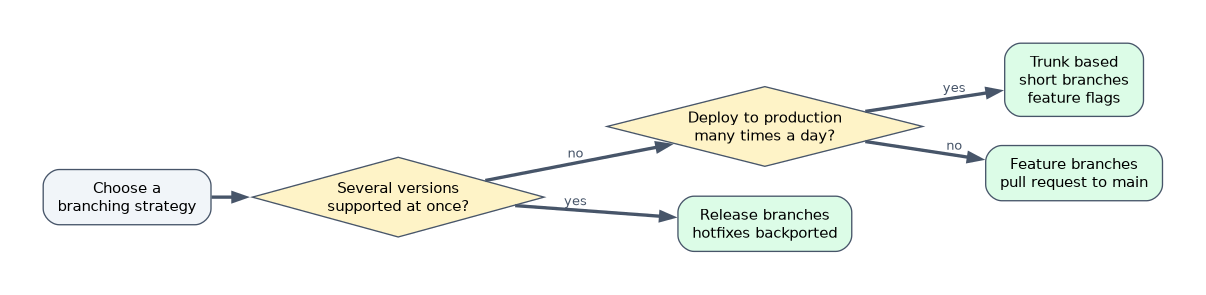
| Strategy | How it works | Best for |
|---|---|---|
| Trunk based | Everyone integrates into one main branch (the trunk) in very small, frequent changes. Branches, if any, live for hours or a day or two. Unfinished work stays hidden behind feature flags | Continuous integration and continuous delivery, high automation, one version in production |
| Feature branch | Each feature or fix gets its own branch from main. A pull request merges it back after review | Most teams. Good isolation, clear review point |
| Release branch | A branch is cut from main for each release. Only stabilization and hotfixes go there, and fixes are merged back to main | Products with several supported versions, scheduled releases, long stabilization |
Gitflow combines these with long lived develop, release and hotfix branches. It adds ceremony, so it fits scheduled releases better than continuous delivery.
Naming helps people and tools. Common prefixes are feature/, bugfix/, hotfix/ and release/, and some teams use users/<name>/<topic> for personal branches.
Pull request workflow
- Branch from the target branch.
- Push commits and open a pull request that links the work item or issue.
- Automated checks run: build, tests, linters, scans.
- Reviewers comment, request changes or approve.
- The change merges when every rule passes, and the source branch is deleted.
Azure Repos branch policies
Set on a branch (usually main) under Repos > Branches > Branch policies.
| Policy | Effect |
|---|---|
| Require a minimum number of reviewers | Sets how many approvals are needed. Options include allowing requestors to approve their own changes, and resetting votes when new commits are pushed |
| Check for linked work items | The pull request must reference a work item |
| Check for comment resolution | All comments must be resolved |
| Limit merge types | Choose from merge (no fast forward), squash, rebase and fast forward, or rebase with merge commit |
| Build validation | A pipeline must pass before the pull request can complete. It can be required or optional, with a trigger and an expiry |
| Status checks | Require a successful status from an external service |
| Automatically included reviewers | Add people or groups as reviewers, optionally based on file path |
With a branch policy in place, direct pushes to the branch are blocked and all changes go through pull requests. Users with the Bypass policies when pushing or Bypass policies when completing pull requests permission can override, so grant it sparingly.
GitHub branch protection rules and rulesets
Set under repository Settings > Branches, or with rulesets that can apply to several branches or tags by pattern.
| Rule | Effect |
|---|---|
| Require a pull request before merging | Blocks direct pushes. Can require a number of approvals, dismiss stale approvals on new commits and require review from code owners (defined in a CODEOWNERS file) |
| Require status checks to pass | Named checks (workflow jobs) must succeed, optionally on an up to date branch |
| Require conversation resolution | All review comments resolved |
| Require signed commits | Commits must be verified |
| Require linear history | No merge commits, so squash or rebase merge only |
| Require a merge queue | Pull requests merge one at a time after passing checks on the latest base |
| Restrict who can push | Limit to named people or teams |
| Do not allow bypassing the above settings | Applies the rules to administrators too |
| Allow force pushes / allow deletions | Off by default for protected branches. Leave off |
Merge types compared
| Type | Result |
|---|---|
| Merge commit | Keeps full history of the branch plus a merge commit |
| Squash | Combines all branch commits into one commit on the target. Clean history, loses detail |
| Rebase | Replays commits on the tip of the target, giving a linear history |
A worked scenario
A team ships a SaaS product several times a day and wants a linear history. They choose trunk based development with short feature branches and feature flags. On main they require a pull request with one approval, require the build validation pipeline, require comment resolution, and limit merges to squash. Hotfixes are not a special branch: they are small changes through the same pull request path.
What to remember for the exam
- Trunk based plus feature flags suits continuous delivery. Release branches suit versioned products and hotfix backports.
- Azure Repos uses branch policies (reviewers, work item links, comments, merge types, build validation, status checks).
- GitHub uses branch protection rules and rulesets (pull request, status checks, code owners, signed commits, linear history, merge queue).
- Build validation or required status checks are how a pipeline gates a pull request.
- Squash merge gives one commit per pull request. A policy that limits merge types enforces it.
Granting a group the bypass permission makes every policy optional for that group. Review who has it.
How the exam asks about this
- "Require a pipeline to pass before a pull request can complete in Azure Repos." Build validation.
- "Require review by the owners of the changed files in GitHub." Code owners with required reviews.
- "Keep the history of main linear." Squash or rebase merge, or require linear history.
- "Prevent anyone, including admins, from pushing straight to main." Branch policy or rule with no bypass.
Common mistakes
Long lived feature branches. They diverge and cause painful merges. Keep them short.
Policies on the wrong branch. Protect the release branches as well as main.
Optional build validation. If it is optional, a failing pull request can still complete.
Treating CODEOWNERS as enough. Code owners only block merging when the rule to require their review is on.
Check yourself
Which strategy relies on feature flags and very short lived branches?
Trunk based development.
Which Azure Repos policy makes a pipeline run on a pull request and gate completion?
Build validation.
Which GitHub setting forces review by the owners listed in CODEOWNERS?
Require review from code owners, in a branch protection rule or ruleset.
Topic 1 of 3 in Design and implement a source control strategy
Test yourself on Design and implement a source control strategy
The full Microsoft AZ-400 question bank has 766 questions, with timed practice exams and an explanation for every answer.
This study guide is independent and is not affiliated with, endorsed by, or sponsored by Microsoft. Vendor names, certification names and exam codes are trademarks of their respective owners and are used for identification only.