Design infrastructure solutions · Topic 10 of 10
Load Balancing and Routing
AZ-305 load balancing: choose between Azure Front Door, Application Gateway, Traffic Manager and Load Balancer by protocol and scope, and route traffic globally.
- 5 min
- Includes a diagram
- Load Balancer is regional layer 4. Application Gateway is regional layer 7 with WAF. Front Door is global layer 7. Traffic Manager is global DNS for any protocol.
- Traffic Manager methods: priority, weighted, performance, geographic, multivalue and subnet. Nest profiles for combined needs.
- Geographic routing keeps users in a region. Performance routing does not guarantee it.
What it is
Azure has four main load balancing services, and the exam asks you to pick one from a short scenario. Two questions decide it: is the traffic HTTP and HTTPS (layer 7) or other protocols (layer 4), and does the application run in one region or several? Beyond load balancing, you also design routing: how traffic reaches the right place across regions, on premises and through appliances.
How it works
The four services
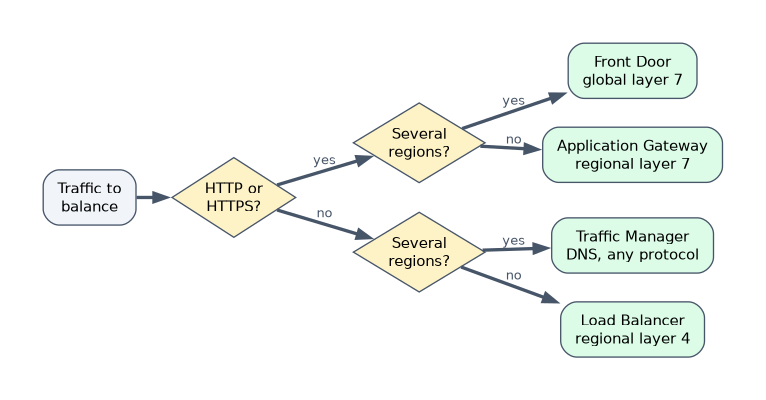
| Service | Layer and scope | Key traits |
|---|---|---|
| Azure Load Balancer (Standard) | Layer 4, regional | TCP and UDP, very low latency, health probes, zone redundant frontend, HA ports, internal or public. No awareness of URLs or cookies |
| Application Gateway (v2) | Layer 7, regional | HTTP and HTTPS, TLS termination, URL path and host based routing, cookie affinity, WAF, autoscaling, zone redundant. Also offers layer 4 TCP and TLS proxy modes |
| Azure Front Door | Layer 7, global | Anycast edge, CDN caching, TLS offload, WAF, origin health probes, fast failover. HTTP and HTTPS only. Private origins need Premium with Private Link |
| Azure Traffic Manager | DNS based, global | Returns the endpoint by DNS, works with any protocol, never sees traffic, so failover is slower because of DNS caching and TTLs |
Memorise the matrix: regional layer 4 is Load Balancer, regional layer 7 is Application Gateway, global layer 7 is Front Door, global DNS any protocol is Traffic Manager.
Traffic Manager routing methods
| Method | Behaviour |
|---|---|
| Priority | Primary endpoint with ordered failover |
| Weighted | Distribute by weight, such as for gradual migration |
| Performance | Send the user to the lowest latency endpoint |
| Geographic | Send users by location to a mapped endpoint, for data residency |
| Multivalue | Return several healthy endpoints |
| Subnet | Map client IP ranges to endpoints |
Profiles can be nested, for example a geographic parent that maps Europe to a child priority profile (West Europe, then North Europe) and the rest of the world to East US. Use geographic routing when users in a region must stay in that region even if the nearby region is down. Performance routing may send them elsewhere.
Front Door and Application Gateway in practice
- Front Door suits global web apps needing fast failover, edge caching and WAF in one service, with routing rules, rules engine, session affinity and rate limiting.
- Application Gateway suits regional web apps needing TLS termination, path based routing, mutual TLS, rewrite rules and WAF inside a VNet, including routing to private backends.
- Behind Front Door, use Application Gateway for regional layer 7 control, or an internal Standard Load Balancer to distribute across scale sets or network virtual appliances in a region.
- Microsoft advises using Front Door or Traffic Manager for global routing, usually not both, though nested designs exist for specific needs. For most multi region HTTP and HTTPS, prefer Front Door.
Load balancing non web traffic
For SFTP or other TCP protocols across regions, use Traffic Manager (with geographic or priority routing), or a cross region Standard Load Balancer that fronts regional load balancers with a static global IP. For appliances (NVAs) with no failover of their own, use an internal Standard Load Balancer with HA ports and a zone redundant frontend as the next hop of user defined routes.
Routing inside and between networks
| Need | Tool |
|---|---|
| Override system routes, send traffic through a firewall | User defined routes (UDRs) |
| Exchange routes with NVAs dynamically using BGP | Azure Route Server |
| Automatic routing between branches and VNets | Virtual WAN hub router |
| Hybrid name resolution | DNS Private Resolver and Private DNS zones |
| Control outbound paths | NAT Gateway, firewall UDRs |
Choosing quickly
| Requirement | Answer |
|---|---|
| Regional web app, path routing and WAF | Application Gateway with WAF |
| Global web app, edge caching, quick failover | Azure Front Door |
| TCP port 22 endpoints in several regions, EU users only to EU | Traffic Manager, geographic parent with a priority child |
| Distribute traffic between tiers inside a VNet | Internal Standard Load Balancer |
| Gradual migration, 10 percent to Azure | Traffic Manager weighted routing |
| Survive a zone failure for an appliance next hop | Internal Standard Load Balancer, zone redundant, HA ports |
A worked scenario
A retailer runs a global storefront, a regional order API and an SFTP file exchange. The storefront uses Front Door Premium with WAF and caching, with Application Gateway behind it in each region for private backends. The order API runs behind an internal Standard Load Balancer between tiers. The SFTP endpoints in four regions use a geographic Traffic Manager parent that maps EU countries to a priority child profile, so EU customers never reach non EU endpoints.
What to remember for the exam
- Load Balancer is regional layer 4. Application Gateway is regional layer 7 with WAF. Front Door is global layer 7. Traffic Manager is global DNS for any protocol.
- Traffic Manager methods: priority, weighted, performance, geographic, multivalue and subnet. Nest profiles for combined needs.
- Geographic routing keeps users in a region. Performance routing does not guarantee it.
- Front Door and Application Gateway both provide WAF. Front Door is HTTP and HTTPS only.
- UDRs and Route Server control routing. HA ports on an internal Standard Load Balancer serve appliances.
Ask protocol first, then scope. HTTP and global is Front Door. Non HTTP and global is Traffic Manager.
How the exam asks about this
- "Route by URL path to different backend pools in one region, with WAF." Application Gateway.
- "Global HTTP app with fast failover and caching." Azure Front Door.
- "Keep European users on European endpoints, failing over inside Europe." Traffic Manager geographic with a nested priority profile.
- "A single next hop for NVAs across zones." An internal Standard Load Balancer with HA ports.
Common mistakes
Using Traffic Manager when fast failover is needed. DNS caching delays it.
Using Front Door for non HTTP traffic.
A performance profile for data residency.
Combining Front Door and Traffic Manager without a reason.
Check yourself
Which service is global, layer 7 and HTTP and HTTPS only?
Azure Front Door.
Which Traffic Manager method keeps users in their region?
Geographic.
Which service is DNS based and works with any protocol?
Azure Traffic Manager.
Topic 10 of 10 in Design infrastructure solutions
Test yourself on Design infrastructure solutions
The full Microsoft AZ-305 question bank has 755 questions, with timed practice exams and an explanation for every answer.
This study guide is independent and is not affiliated with, endorsed by, or sponsored by Microsoft. Vendor names, certification names and exam codes are trademarks of their respective owners and are used for identification only.