Manage Azure Identities and Governance · Topic 2 of 4
Azure RBAC and Role Assignments
AZ-104 Azure RBAC: built-in roles, scope and inheritance, role assignments, custom roles, Azure roles versus Entra roles and how to read an access assignment.
- 5 min
- Includes a diagram
- An assignment is who, which role and which scope.
- Assignments are inherited downward and are additive.
- Owner can grant access. Contributor cannot. Reader only views.
What it is
Azure role-based access control (RBAC) decides what an identity can do to Azure resources. It is separate from Microsoft Entra roles, which control the directory itself.
Every permission is granted through a role assignment. The exam asks you to pick the right built-in role, choose the right scope and read an existing assignment.
How it works
The three parts of an assignment
A role assignment answers three questions.
- Who: a user, a group, a service principal or a managed identity.
- Which role: a collection of allowed actions.
- Which scope: a management group, a subscription, a resource group or a single resource.
Scope and inheritance
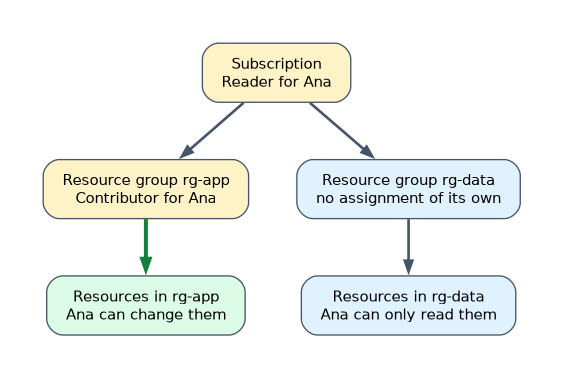 An assignment at a scope applies to everything beneath it. A role given on a subscription reaches every resource group and resource in that subscription. Permissions add together, so a user who has Reader on a subscription and Contributor on one resource group can change that group and only read the rest.
Always give the narrowest scope that works. This is the principle of least privilege.
Built-in roles
| Role | What it allows |
|---|---|
| Owner | Everything, including giving access to others |
| Contributor | Create and manage resources, but not give access to others |
| Reader | View resources only |
| User Access Administrator | Manage access to resources, but not the resources themselves |
Many roles are specific to a service, such as Virtual Machine Contributor, Network Contributor and Storage Blob Data Reader. Use these when a team needs one service only.
Control plane and data plane
Roles list actions for management operations, such as creating a storage account, and data actions for reading or writing the data inside a service, such as reading a blob. Contributor can manage a storage account but cannot read blob data through RBAC. A data role such as Storage Blob Data Reader is needed for that.
Custom roles
When no built-in role fits, you create a custom role. It is a JSON definition that lists actions, optional not-actions, data actions and the assignable scopes where the role can be used. You create it in the portal, with the CLI or with PowerShell, and then assign it like any other role.
Assigning a role from the command line
az role assignment create --assignee user@contoso.com --role "Reader" --scope /subscriptions/<id>/resourceGroups/rg-app
New-AzRoleAssignment -SignInName user@contoso.com -RoleDefinitionName "Reader" -ResourceGroupName rg-app
Interpreting access
On the Access control (IAM) page of any scope, Role assignments lists who has access, including assignments inherited from above, and Check access shows what one identity can do. The access you see is the combined result of every assignment that reaches that scope.
Azure roles and Entra roles
Azure roles manage Azure resources. Microsoft Entra roles, such as User Administrator, manage the directory. They are assigned in different places and do not grant each other. A Global Administrator can turn on elevate access, which grants User Access Administrator at the root scope so that they can manage access across all subscriptions.
A custom role definition
A custom role is a JSON document. This one lets operators start, stop and view virtual machines, and nothing else.
{
  "Name": "VM Operator",
  "IsCustom": true,
  "Description": "Start, stop and view virtual machines",
  "Actions": [
    "Microsoft.Compute/virtualMachines/read",
    "Microsoft.Compute/virtualMachines/start/action",
    "Microsoft.Compute/virtualMachines/powerOff/action"
  ],
  "NotActions": [],
  "AssignableScopes": ["/subscriptions/<subscription id>"]
}
Managed identities and RBAC
An application that runs in Azure should not store a password. A managed identity gives the resource its own identity in Microsoft Entra ID, and you give that identity a role like any other principal.
| Type | Lifecycle |
|---|---|
| System assigned | Created with the resource and deleted with it |
| User assigned | Created on its own and can be shared by several resources |
For example, a web app with a system assigned identity can be given Storage Blob Data Reader on a storage account, and then read blobs with no key in its code.
Deny assignments
A deny assignment blocks an action even where a role assignment allows it. Azure creates them for some managed services. You cannot create your own with a role assignment, so for everyday control you use Azure Policy and locks instead.
How the exam asks about this
- "A team must manage networks but not virtual machines." Network Contributor at the resource group.
- "Give a pipeline access without a password." A managed identity with a role.
- "Who can give access to others?" Owner and User Access Administrator.
- "Why can a Contributor not read blobs?" Blob data needs a data role such as Storage Blob Data Reader.
- Read assignments from the narrowest scope upward, because every level adds to the access.
What to remember for the exam
- An assignment is who, which role and which scope.
- Assignments are inherited downward and are additive.
- Owner can grant access. Contributor cannot. Reader only views.
- User Access Administrator manages access only.
- Actions are control plane. Data actions are data plane, and Contributor has no blob data access.
- Custom roles are JSON and are limited to their assignable scopes.
- Azure roles and Entra roles are separate systems.
"Let the team create and manage VMs but nothing else" points to a service role such as Virtual Machine Contributor at the resource group scope.
Common mistakes
Assigning Owner for convenience. It gives the right to grant access to others, which is rarely needed.
Expecting Contributor to read blob data. Data access needs a data role.
Confusing Azure roles with Entra roles. User Administrator does not give access to a subscription.
Assigning at a broad scope. A subscription assignment reaches every resource group beneath it.
Check yourself
Which built-in role can create resources but not give access to others?
Contributor.
What are the three parts of a role assignment?
The identity, the role and the scope.
Where do you see who has access, including inherited assignments?
Access control (IAM) on the scope, under Role assignments.
Topic 2 of 4 in Manage Azure Identities and Governance
Test yourself on Manage Azure Identities and Governance
The full Microsoft AZ-104 question bank has 650 questions, with timed practice exams and an explanation for every answer.
This study guide is independent and is not affiliated with, endorsed by, or sponsored by Microsoft. Vendor names, certification names and exam codes are trademarks of their respective owners and are used for identification only.