Implement and Manage Virtual Networking · Topic 1 of 3
Virtual Networks, Peering and Routes
AZ-104 virtual networks: address spaces and subnets, VNet peering and transit, Standard public IPs, user defined routes and Network Watcher troubleshooting.
- 5 min
- Includes a diagram
- Azure reserves five addresses in each subnet.
- Peered VNets cannot have overlapping address spaces. Peering is not transitive.
- A complete peering has a link on each side.
What it is
An Azure virtual network (VNet) is your private network in the cloud. Resources in it talk to each other using private IP addresses, and you decide how the network connects to others and to the internet.
This page covers building a VNet, connecting VNets with peering, public IP addresses, steering traffic with routes, and finding faults with Network Watcher.
How it works
Address space and subnets
A VNet has one or more address spaces written in CIDR form, such as 10.1.0.0/16. You divide it into subnets, such as 10.1.2.0/24, and resources get an address from their subnet. Subnets in one VNet cannot overlap.
Azure reserves five addresses in every subnet: the network address, the broadcast address and three for Azure services. A /29 subnet, with eight addresses, therefore has three usable ones.
VNet peering
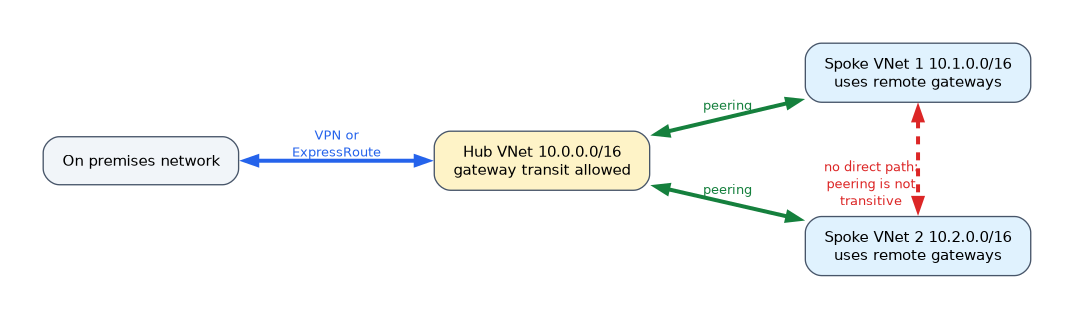 Peering connects two VNets so that resources communicate over the Microsoft backbone, using private addresses.
- The address spaces of the two VNets must not overlap.
- Peering works across regions, which is called global peering, and across subscriptions.
- Peering is not transitive. If A is peered with B and B with C, then A and C cannot talk unless they are peered too, or traffic is routed through an appliance in B.
- Each side has its own peering link, so a complete peering has two links, and both must show Connected.
- A hub VNet can share its VPN or ExpressRoute gateway. The hub sets allow gateway transit, and the peered VNet sets use remote gateways.
To peer VNets in different tenants, the administrator needs the Network Contributor role, or equivalent permissions, on the remote VNet.
Public IP addresses
A public IP address lets a resource be reached from the internet. Use the Standard SKU. It is static, can be zone redundant and is secure by default, which means it is closed to inbound traffic until a network security group allows it. The Basic SKU has been retired.
User defined routes
Azure creates system routes so that subnets can reach each other and the internet. To change the path, you create a route table, add routes and associate it with a subnet.
Each route has an address prefix and a next hop type.
| Next hop | Meaning |
|---|---|
| Virtual network | Deliver inside the VNet |
| Internet | Send to the internet |
| Virtual appliance | Send to a firewall or router at a given IP address |
| Virtual network gateway | Send to a VPN or ExpressRoute gateway |
| None | Drop the traffic |
The most specific prefix wins, which is called longest prefix match. If two routes have the same prefix, a user defined route beats a BGP route, which beats a system route. A network virtual appliance must have IP forwarding turned on, or it will drop the traffic that is not addressed to it.
Troubleshooting connectivity
Azure Network Watcher has a tool for each question.
| Tool | Answers |
|---|---|
| IP flow verify | Does an NSG rule allow or deny this packet? |
| Next hop | Where does traffic from this VM go next? |
| Effective routes | Which routes apply to this network interface? |
| Connection troubleshoot | Can this source reach that destination, and where does it fail? |
Working out usable addresses
Azure reserves five addresses in every subnet, so the usable count is the total minus five.
| Subnet size | Total addresses | Usable in Azure |
|---|---|---|
| /24 | 256 | 251 |
| /26 | 64 | 59 |
| /27 | 32 | 27 |
| /28 | 16 | 11 |
| /29 | 8 | 3 |
Peering settings
| Setting | Meaning |
|---|---|
| Allow virtual network access | Lets the two networks talk to each other |
| Allow forwarded traffic | Lets traffic that did not start in the peered network in |
| Allow gateway transit | The hub shares its VPN or ExpressRoute gateway |
| Use remote gateways | The spoke uses the hub's gateway |
Public IP address options
| Property | Standard SKU |
|---|---|
| Allocation | Static |
| Zones | Can be zone redundant |
| Inbound traffic | Closed until a network security group allows it |
The Basic SKU has been retired, so new designs use Standard.
A troubleshooting walk
A VM cannot reach another VM in a peered network. First check that both peering links show Connected and the address spaces do not overlap. Then use Network Watcher: IP flow verify shows whether an NSG blocks the packet, Next hop shows where the traffic is sent, and Effective routes shows the routes in force. A user defined route that points to a firewall without IP forwarding is a common cause.
How the exam asks about this
- "Spokes must reach each other through the hub." A route through a virtual appliance, since peering is not transitive.
- "Share the hub's gateway." Gateway transit on the hub and use remote gateways on the spoke.
- "Find which NSG rule drops a packet." IP flow verify.
- "Send all traffic through a firewall." A user defined route with a virtual appliance next hop.
What to remember for the exam
- Azure reserves five addresses in each subnet.
- Peered VNets cannot have overlapping address spaces. Peering is not transitive.
- A complete peering has a link on each side.
- Gateway transit on the hub and use remote gateways on the spoke share a gateway.
- Use Standard public IPs. They are closed to inbound traffic until an NSG allows it.
- The most specific route wins. A virtual appliance needs IP forwarding.
- IP flow verify checks NSG rules. Next hop and effective routes check routing.
"Traffic must go through a firewall" points to a user defined route with a virtual appliance next hop.
Common mistakes
Peering VNets with overlapping address spaces. It is rejected. Choose distinct ranges in advance.
Expecting peering to be transitive. A spoke cannot reach another spoke through the hub without routing.
Forgetting IP forwarding on the appliance. The appliance drops the forwarded traffic.
Opening a Standard public IP and finding it unreachable. An NSG must allow the traffic.
Check yourself
How many addresses does Azure reserve in each subnet?
Five.
Is VNet peering transitive?
No, each pair of networks must be peered, or traffic must be routed through an appliance.
Which Network Watcher tool tells you whether an NSG rule allows a packet?
IP flow verify.
Topic 1 of 3 in Implement and Manage Virtual Networking
Test yourself on Implement and Manage Virtual Networking
The full Microsoft AZ-104 question bank has 650 questions, with timed practice exams and an explanation for every answer.
This study guide is independent and is not affiliated with, endorsed by, or sponsored by Microsoft. Vendor names, certification names and exam codes are trademarks of their respective owners and are used for identification only.