Deploy and Manage Azure Compute Resources · Topic 5 of 5
Azure App Service
AZ-104 App Service: plans and tiers, scaling up and out, TLS certificates, custom domains, backup, networking settings and deployment slots with swap.
- 5 min
- Includes a diagram
- Apps share the resources of their App Service plan.
- Custom domain TLS needs Basic. Autoscale, slots and backup need Standard.
- Scale up changes size or tier. Scale out changes instance count.
What it is
Azure App Service hosts web apps and APIs without you managing servers. You supply the code or a container, and Azure runs, patches and scales the platform.
Every app runs in an App Service plan. The plan defines the region, the operating system, the size and the pricing tier, and every app in the plan shares those resources.
How it works
Plans and tiers
The pricing tier sets the features available. The tiers are Free, Shared, Basic, Standard, Premium and Isolated.
| Feature | Lowest tier that has it |
|---|---|
| Custom domain with TLS binding | Basic |
| Autoscale | Standard |
| Deployment slots | Standard |
| Backup and restore | Standard |
Several apps can share one plan, which is cheaper than a plan for each app.
az appservice plan create --name plan-web --resource-group rg-app --sku S1Scaling
- Scale up changes the plan to a larger size or higher tier, for more CPU, memory and features.
- Scale out changes the number of instances that run the app.
az appservice plan update --name plan-web --resource-group rg-app --sku P1v3
az appservice plan update --name plan-web --resource-group rg-app --number-of-workers 3
Scale out can be manual or automatic. Autoscale rules use metrics such as CPU percentage, or a schedule, with a minimum and maximum instance count, and need the Standard tier or above.
Custom domains
To use your own name, such as www.contoso.com, you map it to the app.
- For a subdomain, create a CNAME record that points to the app's default
azurewebsites.netname. - For the root domain, create an A record to the app's IP address and a TXT record, named asuid, that proves you own the domain.
Certificates and TLS
Certificates secure traffic to a custom domain. You can create a free App Service managed certificate, import a certificate from Azure Key Vault, or upload your own file. A certificate is then bound to the custom domain.
Turn on HTTPS Only to redirect HTTP to HTTPS, and set a minimum TLS version, such as 1.2.
Backup
Backup saves the app's content and configuration to a storage account, on a schedule that you set, with a retention you choose. It needs the Standard tier or above. You can restore to the same app or to a new one.
Networking settings
- VNet integration lets the app make outbound calls into a virtual network.
- Private endpoints give the app a private IP so that it is reached privately.
- Access restrictions allow or deny inbound traffic by IP address range or subnet.
Deployment slots
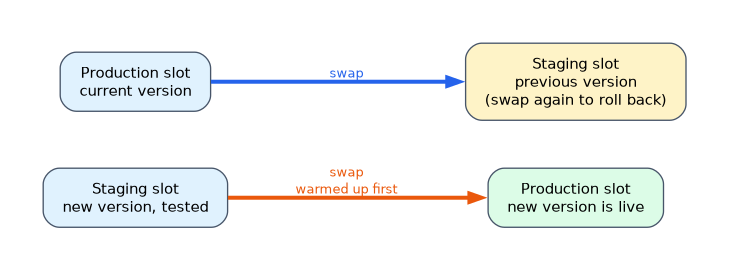 A deployment slot is a live app with its own host name, running beside the production slot. You deploy a new version to a staging slot, test it, and swap it into production. The swap warms the new version first, so users see little or no downtime, and you can swap back to roll back.
- Settings marked as deployment slot settings stay with their slot when swapping, such as a connection string for the staging database.
- Traffic routing can send a percentage of production requests to a slot for a test.
- Slots need the Standard tier or above.
Deployment methods
Code reaches an App Service app in several ways.
- Zip deploy: upload a package of the built application.
- Git or GitHub Actions: deploy automatically when code is pushed.
- A container image: pull from a registry such as Azure Container Registry.
- FTPS: upload files directly, usually for simple sites.
App settings and connection strings
Settings that differ between environments belong in the app configuration, not in the code. Application settings and connection strings are given to the app as environment values. Marking a setting as a deployment slot setting makes it stay with its slot, so a staging slot keeps pointing at the staging database after a swap.
Troubleshooting an app
| Tool | Shows |
|---|---|
| Log stream | Live application and web server logs |
| Diagnose and solve problems | Guided checks for common failures such as high CPU |
| Metrics | CPU, memory and request counts for the plan and the app |
A worked scenario
A team wants to test a release with a few users, then release it without downtime. They use a Standard or higher plan, deploy to a staging slot, and route ten percent of production traffic to it. When the results look good, they swap the slot into production, and keep the old version in the staging slot in case they must swap back.
How the exam asks about this
- "Release with no downtime and easy rollback." A deployment slot swap.
- "Scale automatically on CPU." Autoscale, which needs Standard or higher.
- "Free certificate for a custom domain." An App Service managed certificate.
- "Private access to the app." A private endpoint. "Reach a database in a VNet." VNet integration.
What to remember for the exam
- Apps share the resources of their App Service plan.
- Custom domain TLS needs Basic. Autoscale, slots and backup need Standard.
- Scale up changes size or tier. Scale out changes instance count.
- A subdomain uses a CNAME. The root domain uses an A record and a TXT record.
- A managed certificate is free. Turn on HTTPS Only to force HTTPS.
- VNet integration is outbound. Private endpoints are inbound.
- Swapping slots promotes a tested version, and slot settings stay with the slot.
"Test a new version and switch with no downtime" points to a deployment slot swap on the Standard tier or above.
Common mistakes
Choosing Basic for slots or autoscale. They need Standard.
Expecting slot settings to move with a swap. Settings marked as slot specific stay behind.
Confusing scale up with scale out. Up changes the size. Out changes the instance count.
Confusing VNet integration with a private endpoint. One is for outbound calls, the other for inbound access.
Check yourself
What does a swap do to a deployment slot?
Warms the staging version and promotes it to production.
Which DNS records map a root domain to an App Service app?
An A record and a TXT verification record.
Which tier is the lowest that supports deployment slots?
Standard.
Topic 5 of 5 in Deploy and Manage Azure Compute Resources
Test yourself on Deploy and Manage Azure Compute Resources
The full Microsoft AZ-104 question bank has 650 questions, with timed practice exams and an explanation for every answer.
This study guide is independent and is not affiliated with, endorsed by, or sponsored by Microsoft. Vendor names, certification names and exam codes are trademarks of their respective owners and are used for identification only.