Information Extraction in Foundry · Topic 1 of 2
Content Understanding for Documents and Images
AI-901 Content Understanding: analyzers, prebuilt analyzers, custom analyzers with field schemas, confidence scores, grounding and the Studio.
- 5 min
- Includes a diagram
- An analyzer defines how content is processed: extraction settings, field schema and models.
- Prebuilt analyzers include layout, document search, invoice, receipt, contract, ID and image analyzers.
- Custom analyzers start from a base analyzer and add a field schema. Fields are extracted, classified or generated.
What it is
Azure Content Understanding in Foundry Tools is a service that processes documents, images, audio and video and returns structured output. It uses generative AI to read content and produce fields you define, with no complex prompt writing. It is part of the Microsoft Foundry resource in Azure.
The central idea is the analyzer. An analyzer defines how a kind of content is processed: how content is extracted, which fields to return, and which models to use. Once defined, it applies those settings the same way to every input.
How it works
The parts of the service
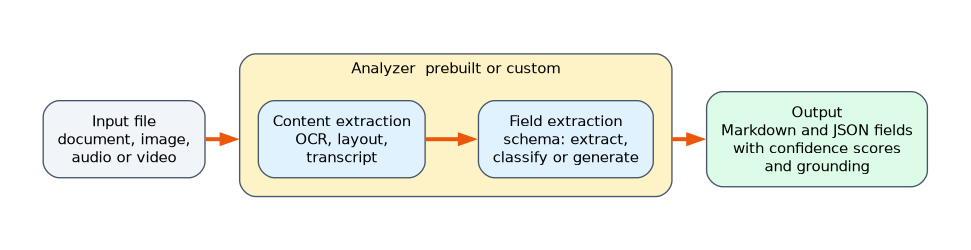
| Component | What it does |
|---|---|
| Input | The file to process: a document, image, audio or video |
| Analyzer | The configuration that decides how the content is processed |
| Content extraction | Reads the text with OCR, finds layout such as paragraphs and tables, and normalises the content |
| Field extraction | Returns key value pairs that match your schema |
| Confidence scores | An estimate from 0 to 1 of how reliable each field value is |
| Grounding | Identifies where in the source each value came from |
| Structured output | Markdown for search and reading, or JSON that matches your schema |
Prebuilt analyzers
You can start without building anything, by using a prebuilt analyzer.
| Analyzer | What it is for |
|---|---|
prebuilt-read | Basic OCR: words, paragraphs, formulas and barcodes |
prebuilt-layout | OCR plus layout: tables, figures, sections and structure |
prebuilt-documentSearch | Document ingestion for search and retrieval augmented generation, with Markdown, figure descriptions and a summary |
prebuilt-invoice, prebuilt-receipt, prebuilt-contract, prebuilt-idDocument | Domain analyzers with ready made fields for those document types |
prebuilt-imageSearch | Describes the content of an image for search and retrieval |
A prebuilt analyzer is called by its ID, for example prebuilt-invoice, and returns the fields that suit that document type.
Custom analyzers
When the prebuilt choices do not match your documents, you build a custom analyzer. You start from a base analyzer for the kind of content, such as prebuilt-document or prebuilt-image, and add your own field schema.
A schema lists each field with a name, a type and a description, and a method that says how the value is found.
| Method | What it does | Example |
|---|---|---|
| Extract | Copies a value as it appears in the content, for documents | The due date on an invoice |
| Classify | Chooses from a fixed set of categories | The type of a chart, or the sentiment of a call |
| Generate | Writes a value from the content | A short summary of a contract |
Images
For an image, an analyzer can generate a description, extract text, classify what the image shows, or pull out named fields. A custom image analyzer might return fields such as "chart type" and "title" for each uploaded chart, using the classify and extract methods.
Confidence and review
Each field value can include a confidence score and a grounding reference to its source. Together they support straight through processing: values with a high score go straight into a system, and values with a low score are sent to a person, who can see where in the document the value was found.
Where you work
| Tool | Used for |
|---|---|
| Content Understanding in the Foundry portal | Trying analyzers and building workflows in the Foundry experience |
| Content Understanding Studio | Building and refining custom analyzers with sample files, defining the schema and testing it without writing code |
A team that wants to try a custom image analyzer on five sample photos and refine its schema before writing any code would use Content Understanding Studio.
Result structure
A result contains the content, which has Markdown and the fields. Each field has a type, such as string or number, a value, such as valueString for a string field, and often a confidence. The extracted text of a string field is returned in valueString.
A worked scenario
An insurance company receives claim forms, photos of damage and receipts. For receipts it uses the prebuilt analyzer prebuilt-receipt, which returns merchant, date and total. For its own claim form it builds a custom analyzer on prebuilt-document, with fields for policy number, incident date and a generated one line description, and tests it in Content Understanding Studio on a few sample forms. For damage photos it creates a custom image analyzer that classifies the damage type. Fields with a confidence above a chosen threshold flow into the claims system, and the rest go to an assessor.
What to remember for the exam
- An analyzer defines how content is processed: extraction settings, field schema and models.
- Prebuilt analyzers include layout, document search, invoice, receipt, contract, ID and image analyzers.
- Custom analyzers start from a base analyzer and add a field schema. Fields are extracted, classified or generated.
- Confidence scores estimate reliability, and grounding shows the source of each value.
- Content Understanding Studio builds and tests custom analyzers without code. A string field's text is in
valueString.
"Define a schema and test it on sample files before writing code" points to Content Understanding Studio.
How the exam asks about this
- "Which property holds the extracted text of a string field?" valueString.
- "A team wants to try a custom image analyzer on five photos before coding. Where?" Content Understanding Studio.
- "Which field method chooses from a fixed set of categories?" Classify.
- "Which analyzer type is the parent when you create a custom document analyzer?" A base analyzer such as prebuilt-document.
Common mistakes
Building a custom analyzer when a prebuilt one fits. Use the prebuilt analyzer first.
Treating every value as certain. Use confidence scores to decide what needs review.
Confusing layout and field extraction. Layout finds structure. Fields return the named values you want.
Expecting free form output without a schema. Fields come from the schema you define.
Check yourself
What does an analyzer define?
How content is processed: the extraction settings, the field schema and the models used.
What are the three ways a field value can be produced?
Extract, classify and generate.
What do confidence scores allow?
Straight through processing of reliable values, with low scoring values sent for review.
Topic 1 of 2 in Information Extraction in Foundry
Test yourself on Information Extraction in Foundry
The full Microsoft AI-901 question bank has 511 questions, with timed practice exams and an explanation for every answer.
This study guide is independent and is not affiliated with, endorsed by, or sponsored by Microsoft. Vendor names, certification names and exam codes are trademarks of their respective owners and are used for identification only.