Generative AI Apps and Agents in Foundry · Topic 2 of 4
Deploying a Model in the Foundry Portal
AI-901 Foundry portal: resources and projects, deploying a model from the catalog, the chat playground, project endpoint and keys, quotas, and Foundry roles.
- 5 min
- Includes a diagram
- A project belongs to a Foundry resource and has its own endpoint.
- You deploy a catalog model to get an endpoint, a deployment name and a quota.
- The chat playground tests prompts and parameters without code and can show sample code.
What it is
The Microsoft Foundry portal is the web interface where you build with AI models. In it you create a project, pick a model from the catalog, deploy it, and try it in a playground, all without writing code. When the model behaves as you want, you copy the endpoint and call it from an application.
How it works
Resources and projects
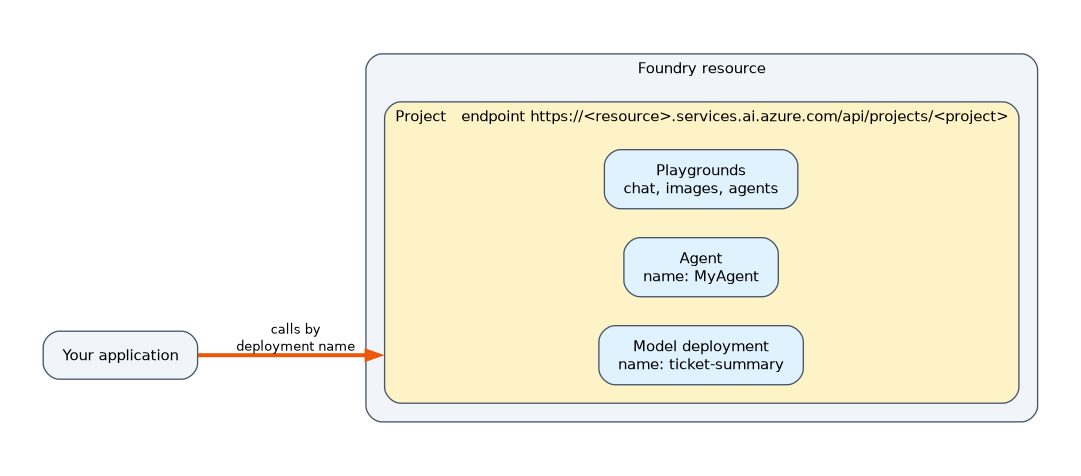 A Foundry resource is the Azure resource that holds your models and AI services. A project lives inside it and organises your work: deployments, agents, files and settings. Each project has an endpoint in the form
 https://<resource-name>.services.ai.azure.com/api/projects/<project-name>, which an app uses to reach everything in the project.
Deploying a model
- Open the Foundry portal and select your project.
- Open the model catalog, and use filters, descriptions and benchmarks to compare models.
- Select a model and choose Deploy.
- Give the deployment a name. Your code will use this name to call the model.
- Choose the deployment type and a quota in tokens per minute.
- Confirm. When it finishes you have an endpoint and credentials for the deployment.
You do not download the model or train it. Deployment makes it available to call.
Playgrounds
A playground lets you try a model without code.
| Playground | What you do there |
|---|---|
| Chat playground | Type a system message, send prompts, adjust parameters such as temperature and see the replies |
| Images playground | Enter a prompt and view a picture from an image generation deployment |
| Agents playground | Edit an agent's instructions, add tools and chat with the agent |
The chat playground can also show the code, which gives you a ready made Python or REST sample that matches your settings. It is a quick way to move from testing to building.
Authentication and access
An app can authenticate in two ways.
| Method | Notes |
|---|---|
| Microsoft Entra ID | Recommended. People and apps sign in, and access is granted with roles. A managed identity needs no stored secret |
| API key | Simple, but a secret to protect. Keep it in an environment variable or Azure Key Vault, never in code |
Foundry uses role based access control. The Foundry User role lets a person build and use agents and models in a project. Higher roles manage the resource and its projects. People who only need to use a deployment should get the lowest role that works.
Quotas and limits
Each deployment has a quota of tokens per minute, and requests per minute follow from it. Going over the quota returns HTTP 429. You can raise the quota, spread load across deployments, or have the app retry with backoff.
Choosing where to test
| Goal | Where |
|---|---|
| Try a prompt on a candidate model | The chat playground |
| Compare cost and quality of models | Model benchmarks |
| Try image generation | The Images playground |
| Edit and test an agent | The Agents playground |
| Move to code | Use the playground's sample code |
A worked scenario
A developer needs a model that summarises support tickets. In the portal they compare two models by their benchmarks, deploy the cheaper one with the name ticket-summary and a modest quota, and open the chat playground. They paste in the system message, try five sample tickets, lower the temperature and add a rule about the format. When the replies look right, they use the playground's code view to copy a Python sample, then replace the key with a managed identity so no secret is stored in the app.
What to remember for the exam
- A project belongs to a Foundry resource and has its own endpoint.
- You deploy a catalog model to get an endpoint, a deployment name and a quota.
- The chat playground tests prompts and parameters without code and can show sample code.
- Entra ID with a managed identity is preferred to keys. Keep any key out of code.
- Exceeding quota gives HTTP 429.
The deployment name is what your code uses to select the model. It is not always the same as the model's own name.
How the exam asks about this
- "Where can a user type a prompt and see an image generation result before writing code?" The Images playground.
- "What must be done before an application can call a catalog model?" Deploy it.
- "How can the app avoid storing a key?" Use a managed identity with Microsoft Entra ID.
- "Where do you edit an agent's instructions without code?" The Agents playground.
Common mistakes
Calling the model by its catalog name. Code uses the deployment name.
Hard coding the key. Use an environment variable, Key Vault or a managed identity.
Giving everyone an owner role. Use the lowest role that lets them work.
Skipping the playground. Testing prompts there is faster than redeploying code.
Check yourself
What does deploying a model create?
A deployment name and an endpoint that applications can call.
What is the project endpoint format?
https://<resource-name>.services.ai.azure.com/api/projects/<project-name>.
Which authentication method avoids storing a secret?
Microsoft Entra ID with a managed identity.
Topic 2 of 4 in Generative AI Apps and Agents in Foundry
Test yourself on Generative AI Apps and Agents in Foundry
The full Microsoft AI-901 question bank has 511 questions, with timed practice exams and an explanation for every answer.
This study guide is independent and is not affiliated with, endorsed by, or sponsored by Microsoft. Vendor names, certification names and exam codes are trademarks of their respective owners and are used for identification only.