Generative AI Apps and Agents in Foundry · Topic 4 of 4
Agents in the Foundry Portal and SDK
AI-901 Foundry agents: creating and testing an agent in the portal, instructions and tools, function calling, and a client using conversations and responses.
- 5 min
- Includes a diagram
- An agent is a model plus instructions plus tools.
- You create and test agents in the portal's agents playground, then call them from a client.
- Code interpreter, file search and function calling need no extra connection. Bing grounding and Azure AI Search need a connection.
What it is
An agent is a model packaged with instructions and tools, so it can carry out a task for a user and not just answer a single question. Once created, it behaves consistently without you repeating the instructions in every request. A single agent solution uses one agent. Multi agent solutions combine several.
In Foundry you can create and test an agent in the portal, then call it from a small client application.
How it works
Creating an agent in the portal
- In your project, open Agents and choose Create agent.
- Give it a name.
- Select a deployed model.
- Write the instructions, for example "You are a helpful assistant that answers questions about our shipping policy."
- Add tools if the agent needs them.
- Open the agents playground and chat with the agent to test it. Edit the instructions and tools until the replies are right.
Tools
Tools give an agent abilities beyond text generation.
| Tool | What it adds |
|---|---|
| Code interpreter | Runs Python code in a sandbox, for calculations, data analysis and charts |
| File search | Searches over uploaded files, so answers can use your documents |
| Grounding with Bing Search | Uses current web results, and needs a connection to a Bing resource |
| Azure AI Search | Searches your own index, and needs a connection to a search resource |
| Function calling | Lets the agent ask your app to run a function you define |
Some tools need a connection to another Azure resource in the project, such as Bing Search or Azure AI Search. Others, such as code interpreter and function calling, need none.
How function calling works
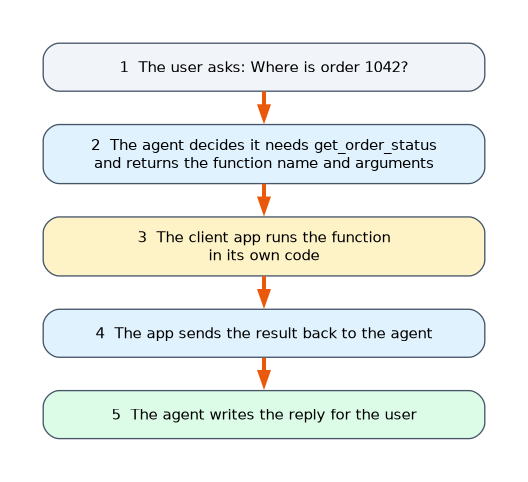 With a function tool, the model does not run your code. It decides when a function is needed and returns the function name and its arguments. Your client app runs the function and returns the result to the agent, which then writes the reply. For example, the agent asks for
 get_order_status with order number 1042, the app queries its own system, and the agent turns the result into a friendly answer.
Calling an agent from Python
A client application creates the agent, starts a conversation, and sends responses requests that name the agent.
from azure.identity import DefaultAzureCredential
from azure.ai.projects import AIProjectClient
from azure.ai.projects.models import PromptAgentDefinition

project = AIProjectClient(
    endpoint="your_project_endpoint",
    credential=DefaultAzureCredential(),
)

# Create the agent, or a new version if it already exists
project.agents.create_version(
    agent_name="MyAgent",
    definition=PromptAgentDefinition(
        model="your-deployment-name",
        instructions="You are a helpful assistant that answers general questions",
    ),
)

# A client already bound to the agent
openai = project.get_openai_client(agent_name="MyAgent")

# A conversation keeps the history across turns
conversation = openai.conversations.create()
reply = openai.responses.create(conversation=conversation.id, input="What is the size of France?")
print(reply.output_text)

follow_up = openai.responses.create(conversation=conversation.id, input="And what is the capital city?")
print(follow_up.output_text)
The follow up works because the conversation holds the history, so the agent knows "the capital city" refers to France.
The older threads and runs pattern
Earlier versions of Foundry agents used different words: you created an agent, created a thread as the conversation, added messages, started a run with the agent, polled until the run finished and read the reply from the thread. These classic agents are deprecated and are scheduled for retirement on March 31, 2027, so new work uses agents with conversations and responses. The older steps still help you understand the ideas: a conversation holds history, a request asks the agent to answer, and the app reads the result. If you poll for a run, use a sensible interval and not a tight loop.
Comparing the pieces
| Piece | Purpose |
|---|---|
| Agent | The model, instructions and tools |
| Version | A saved definition, so you can update an agent without losing the old one |
| Conversation | Holds the history of one chat |
| Response | One request and reply within a conversation |
A worked scenario
A shop wants an assistant that answers questions about orders and its returns policy. In the portal, a developer creates an agent, picks a deployed model, writes instructions that restrict it to shop topics, uploads the policy PDF for file search, and adds a function tool named get_order_status. In the agents playground they ask "Where is order 1042?", and the agent asks for the function. Later, a small Python client creates a conversation and sends each customer's message, running get_order_status in its own code whenever the agent requests it.
What to remember for the exam
- An agent is a model plus instructions plus tools.
- You create and test agents in the portal's agents playground, then call them from a client.
- Code interpreter, file search and function calling need no extra connection. Bing grounding and Azure AI Search need a connection.
- With function calling, the client app runs the function and returns the result.
- The current pattern uses conversations and responses. Threads and runs are the older classic pattern.
"Who runs the function code?" is always your client application, never the model or the agent service.
How the exam asks about this
- "Which agent tools need a connection to another Azure resource?" Grounding with Bing Search and Azure AI Search.
- "When the agent decides to call a function tool, who runs the code?" The client app.
- "A client polls run status in a tight loop and is throttled. What is better?" Poll at a longer interval.
- "Where can you test an agent without writing code?" The agents playground.
Common mistakes
Believing the model runs your function. It only proposes the call.
Forgetting to add a connection. Bing and Azure AI Search tools will not work without one.
Putting rules only in the user message. An agent's standing rules belong in its instructions.
Starting from the old threads and runs model. Current agents use conversations and responses.
Check yourself
What three things make up an agent?
A model, instructions and tools.
Who runs the code of a function tool?
The client application, which returns the result to the agent.
Which tools need a connection to another Azure resource?
Grounding with Bing Search and Azure AI Search.
Topic 4 of 4 in Generative AI Apps and Agents in Foundry
Test yourself on Generative AI Apps and Agents in Foundry
The full Microsoft AI-901 question bank has 511 questions, with timed practice exams and an explanation for every answer.
This study guide is independent and is not affiliated with, endorsed by, or sponsored by Microsoft. Vendor names, certification names and exam codes are trademarks of their respective owners and are used for identification only.