Design and Implement an MLOps Infrastructure · Topic 3 of 4
GitHub Access, Bicep and GitHub Actions Automation
AI-300 MLOps IaC: secure GitHub to Azure access with OIDC, deploy Machine Learning workspaces with Bicep and Azure CLI, and automate it in GitHub Actions.
- 5 min
- Includes a diagram
- Federated credentials trust a repo, branch or environment through the subject claim.
- The workflow needs
permissions: id-token: writeand theazure/loginaction. - The tenant, client and subscription IDs are identifiers, not secrets.
What it is
Infrastructure as code (IaC) means the workspace, storage and compute are described in files and deployed by a pipeline, not clicked together. Bicep describes the Azure resources, Azure CLI deploys them, and GitHub Actions runs the deployment on a pull request or merge. The pipeline must sign in to Azure without a stored secret, which is what OpenID Connect (OIDC) federation gives you.
How it works
Secure access from GitHub to Azure
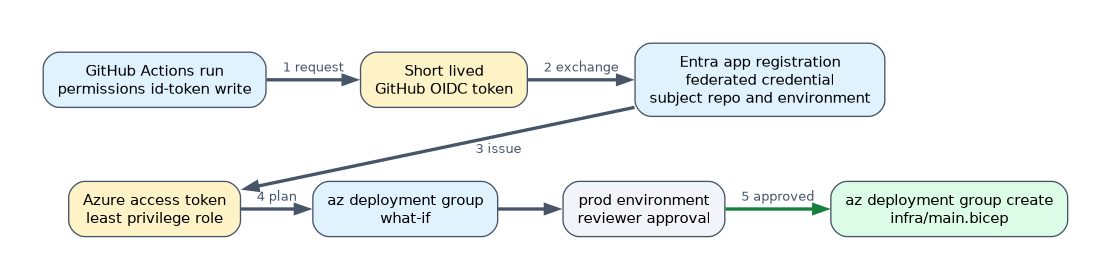
Create a Microsoft Entra app registration (or a user assigned managed identity) and add a federated credential that trusts your repository. GitHub then issues a short lived token for each run, and Azure exchanges it for an access token. No client secret exists to leak or rotate.
| Item | Value |
|---|---|
| Federated credential issuer | https://token.actions.githubusercontent.com |
| Subject (example) | repo:contoso/ml-platform:environment:prod or repo:contoso/ml-platform:ref:refs/heads/main |
| Role assignment | Least privilege on the resource group, for example Contributor for deployment |
| Repository variables | AZURE_CLIENT_ID, AZURE_TENANT_ID, AZURE_SUBSCRIPTION_ID (identifiers, not secrets) |
The workflow must be allowed to request the token with permissions: id-token: write.
For people, GitHub integration also means working in Git from the workspace: a compute instance terminal can clone a repository with an SSH key or a personal access token, and the notebooks UI can use Git on files in your user folder. Never commit tokens or keys to the repository.
Bicep for the workspace
param location string = resourceGroup().location
param prefix string

resource sa 'Microsoft.Storage/storageAccounts@2023-01-01' = {
  name: '${prefix}sa'
  location: location
  sku: { name: 'Standard_LRS' }
  kind: 'StorageV2'
}

resource kv 'Microsoft.KeyVault/vaults@2023-02-01' = {
  name: '${prefix}-kv'
  location: location
  properties: {
    tenantId: subscription().tenantId
    sku: { family: 'A', name: 'standard' }
    enableRbacAuthorization: true
  }
}

resource ai 'Microsoft.Insights/components@2020-02-02' = {
  name: '${prefix}-appi'
  location: location
  kind: 'web'
  properties: { Application_Type: 'web' }
}

resource ws 'Microsoft.MachineLearningServices/workspaces@2024-04-01' = {
  name: '${prefix}-mlw'
  location: location
  identity: { type: 'SystemAssigned' }
  properties: {
    friendlyName: '${prefix} workspace'
    storageAccount: sa.id
    keyVault: kv.id
    applicationInsights: ai.id
    publicNetworkAccess: 'Enabled'
  }
}

resource cluster 'Microsoft.MachineLearningServices/workspaces/computes@2024-04-01' = {
  parent: ws
  name: 'cpu-cluster'
  location: location
  properties: {
    computeType: 'AmlCompute'
    properties: {
      vmSize: 'STANDARD_DS3_V2'
      scaleSettings: { minNodeCount: 0, maxNodeCount: 4 }
    }
  }
}
Bicep resolves dependencies from the symbolic references (sa.id), so you do not list the deployment order. Use parameters (or .bicepparam files) for per environment values and modules to reuse a pattern.
Deploy with Azure CLI
az group create --name rg-ml-dev --location eastus
az deployment group what-if --resource-group rg-ml-dev --template-file main.bicep --parameters prefix=contosodev
az deployment group create  --resource-group rg-ml-dev --template-file main.bicep --parameters prefix=contosodev
what-if previews the changes. Deployments are idempotent: running the same template again updates only what changed. Use incremental mode (the default) so resources not in the template are kept.
GitHub Actions workflow
name: deploy-ml-infra
on:
  push:
    branches: [main]
permissions:
  id-token: write
  contents: read
jobs:
  deploy:
    runs-on: ubuntu-latest
    environment: prod
    steps:
      - uses: actions/checkout@v4
      - uses: azure/login@v2
        with:
          client-id: ${{ vars.AZURE_CLIENT_ID }}
          tenant-id: ${{ vars.AZURE_TENANT_ID }}
          subscription-id: ${{ vars.AZURE_SUBSCRIPTION_ID }}
      - name: What if
        run: az deployment group what-if -g rg-ml-prod -f infra/main.bicep -p prefix=contosoprod
      - name: Deploy
        run: az deployment group create -g rg-ml-prod -f infra/main.bicep -p prefix=contosoprod
Using a GitHub environment named prod lets you require reviewers before the job runs, and the federated credential subject can be tied to that environment.
A worked example
A team keeps infra/main.bicep in Git. A pull request runs what-if and posts the plan for review; merging to main triggers the deploy job in the prod environment, which waits for approval. The same template with a different prefix builds dev and test.
How the exam asks about this
- "Deploy from GitHub Actions without storing a service principal secret." OIDC federated credential plus
id-token: write. - "Preview what a Bicep deployment will change."
az deployment group what-if. - "Create the same workspace in dev, test and prod." One Bicep template with parameters.
What to remember for the exam
- Federated credentials trust a repo, branch or environment through the subject claim.
- The workflow needs
permissions: id-token: writeand theazure/loginaction. - The tenant, client and subscription IDs are identifiers, not secrets.
- Bicep deploys to a resource group with
az deployment group create;what-ifpreviews. - The workspace resource type is
Microsoft.MachineLearningServices/workspaces.
A JSON service principal secret stored in GitHub secrets works but is the answer the exam marks wrong when OIDC is an option.
Common mistakes
Granting Owner to the pipeline. Give the identity only the role needed on the resource group.
Hard coding names. Use parameters, or two environments collide.
Skipping the review step. Run what-if on pull requests so changes are seen before they happen.
Check yourself
How does a workflow authenticate without a stored secret?
Through OIDC federation, using a federated credential and
id-token: write.Which command previews a Bicep deployment?
az deployment group what-if.Why use a GitHub environment for production?
It can require approval, and the federated credential subject can be limited to it.
Topic 3 of 4 in Design and Implement an MLOps Infrastructure
Test yourself on Design and Implement an MLOps Infrastructure
The full Microsoft AI-300 question bank has 650 questions, with timed practice exams and an explanation for every answer.
This study guide is independent and is not affiliated with, endorsed by, or sponsored by Microsoft. Vendor names, certification names and exam codes are trademarks of their respective owners and are used for identification only.