Plan and Manage an Azure AI Solution · Topic 2 of 4
Setting Up AI Solutions in Foundry
AI-103 setup: Foundry resources and projects, deployment types such as Global Standard and Provisioned, deployment settings and CI/CD for projects.
- 4 min
- Includes a diagram
- A Foundry resource holds projects; each project has its own endpoint.
- Global Standard is the default; Data Zone and Standard add residency; Provisioned reserves capacity; Batch is discounted and asynchronous.
- Data at rest stays in the geography; the deployment type controls where inference runs.
What it is
Before you can call a model or run an agent, you set up the Azure side: a Foundry resource, one or more Foundry projects inside it, and model deployments with the right deployment type. AI-103 also expects you to automate this with continuous integration and continuous delivery (CI/CD).
How it works
Resources and projects
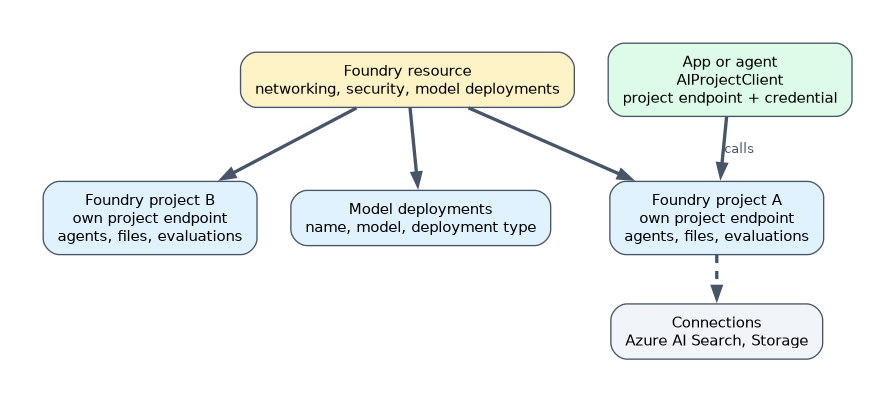
| Item | What it holds |
|---|---|
| Foundry resource | The Azure resource for the platform: networking, security settings, connected resources and model deployments shared by its projects |
| Foundry project | A workspace for one app or team: agents, files, evaluations, connections; it has its own project endpoint |
| Connections | Links to other resources, such as Azure AI Search or Azure Storage, used by the project |
Apps usually connect to a project through its project endpoint with the Foundry SDK.
Deployment options
A model in the catalog is used through a deployment, which gives it a name your code calls. Models deployed with the serverless API option use deployment types that decide where data is processed and how you pay:
| Deployment type | Processing location | Billing | Use when |
|---|---|---|---|
| Global Standard | Any Azure region | Pay per token | Default for most workloads; launches first, broadest availability |
| Data Zone Standard | Within a data zone (for example EU or US) | Pay per token | Data zone compliance |
| Standard | Within the Azure geography | Pay per token | Geography compliance, lower volume |
| Global, Data Zone or Regional Provisioned | As named | Reserved capacity in provisioned throughput units (PTU) | Predictable, high throughput and latency |
| Global or Data Zone Batch | As named | 50% discount, asynchronous, 24-hour target turnaround | Large jobs that can wait for results |
| Developer | Any Azure region | Pay per token, no SLA | Evaluating fine-tuned models only; deleted after 24 hours |
Microsoft's guidance is to start with Global Standard and move to another type only for a specific reason such as data residency, reserved throughput or batch processing. Data stored at rest stays in the resource's geography for all types; the type controls where inference is processed.
Some open-source and custom models run on managed compute instead, which does not use these deployment types.
Configuring a deployment
Key settings include the deployment name, the model and version, the deployment type, the rate limit (tokens per minute), the version upgrade policy and the guardrail or content filter applied. Agents are configured with a model deployment, instructions and tools.
Designing the Azure infrastructure
An AI app usually needs more than a model: Azure AI Search for retrieval, Azure Storage for files, Key Vault for secrets where keys are unavoidable, Application Insights for monitoring, and a virtual network with private endpoints for isolation.
CI/CD for Foundry projects
- Define resources as infrastructure as code (Bicep, ARM templates or Terraform) so environments are repeatable.
- Store prompts, agent definitions and evaluation datasets in source control.
- In the pipeline, deploy to a test project, run evaluations, and only promote to production if quality and safety thresholds pass.
- Use a managed identity or service principal with least privilege for the pipeline, not personal credentials.
If a question says the data must stay in the EU but the team wants pay-per-token pricing, choose a Data Zone Standard deployment.
How the exam asks about this
- "Which deployment type should most new workloads start with?" Global Standard.
- "A workload needs guaranteed throughput and predictable latency." A provisioned deployment.
- "A nightly job classifies millions of records and results can wait." A batch deployment.
What to remember for the exam
- A Foundry resource holds projects; each project has its own endpoint.
- Global Standard is the default; Data Zone and Standard add residency; Provisioned reserves capacity; Batch is discounted and asynchronous.
- Data at rest stays in the geography; the deployment type controls where inference runs.
- Automate setup with infrastructure as code and gate releases on evaluations.
- Pipelines use managed identities or service principals, not personal accounts.
Provisioned deployments are billed for reserved capacity whether or not you use it. They suit steady, high volume, not occasional traffic.
Common mistakes
Choosing Global Standard when data must stay in a region. Use a data zone or geography type.
Choosing Provisioned for spiky, low traffic. Pay-per-token is cheaper.
Deploying to production without evaluation gates. Run evaluations in the pipeline first.
Check yourself
What does a Foundry project provide that the resource does not?
A workspace for one app or team, with its own project endpoint, agents, files, evaluations and connections.
Which deployment type suits large asynchronous jobs at lower cost?
A batch deployment, Global Batch or Data Zone Batch.
Why add evaluations to a CI/CD pipeline?
To stop a model or prompt change from reaching production unless it meets quality and safety thresholds.
Topic 2 of 4 in Plan and Manage an Azure AI Solution
Test yourself on Plan and Manage an Azure AI Solution
The full Microsoft AI-103 question bank has 648 questions, with timed practice exams and an explanation for every answer.
This study guide is independent and is not affiliated with, endorsed by, or sponsored by Microsoft. Vendor names, certification names and exam codes are trademarks of their respective owners and are used for identification only.