Implement Information Extraction Solutions · Topic 1 of 2
Retrieval and Grounding Pipelines
AI-103 retrieval: ingesting and indexing content in Azure AI Search, chunking and embeddings, skills for enrichment, and vector, hybrid and semantic search.
- 4 min
- Includes a diagram
- Data source, indexer, skillset, index and vectorizer are the main parts.
- Skills: OCR, text split, embedding, layout extraction, custom skills.
- Chunk with overlap and keep metadata for filters and citations.
What it is
A retrieval pipeline prepares content so an app or agent can find the right passages to ground its answers. In Azure, the core service is Azure AI Search: it ingests content, enriches it with skills, stores text and vectors in an index, and answers keyword, vector, hybrid and semantic queries.
How it works
Main components of Azure AI Search
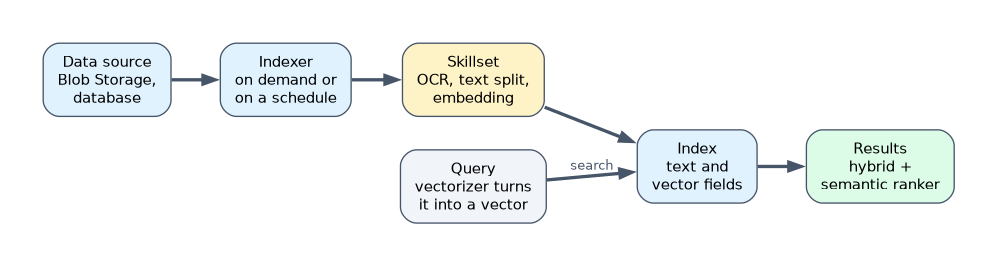
| Component | Role |
|---|---|
| Data source | Where content comes from, such as Azure Blob Storage or a database |
| Indexer | Reads the data source, on demand or on a schedule, and loads documents into the index |
| Skillset | A set of enrichment steps the indexer runs on each document |
| Index | The searchable store of fields, including text and vector fields |
| Vectorizer | Turns a query into a vector at search time using an embedding model |
Enrichment with skills
| Skill type | Example use |
|---|---|
| OCR | Read text in images and scanned pages |
| Text split (chunking) | Break long documents into passages of a set size, often with overlap |
| Embedding | Create vectors for each chunk with an embedding model |
| Layout or document extraction | Keep headings, tables and structure |
| Custom skills | Call your own code or API for extra enrichment |
Integrated vectorization lets Azure AI Search chunk and embed content during indexing and vectorize queries automatically.
Images, audio and video need processing before they can be searched: OCR and image skills handle images, and Azure Content Understanding (which has a skill in Azure AI Search, plus prebuilt image, audio and video search analyzers) turns media into descriptions and transcripts that can be chunked and indexed.
Chunking
- Chunks must be small enough to be precise and fit the prompt, but large enough to keep meaning.
- Overlap between chunks avoids cutting a fact in half.
- Keep useful metadata on each chunk, such as the title, section and source URL, for filtering and citations.
Search types
| Type | When to use |
|---|---|
| Keyword (full text) | Exact terms, IDs, codes |
| Vector | Meaning-based matches for natural language questions |
| Hybrid | Combines keyword and vector results; a strong default for RAG |
| Semantic ranker | Reranks the top results with a language model and can return captions and answers |
| Filters | Restrict results by metadata, such as department or date |
Grounding apps and agents
- An app runs the query and adds the top chunks to the prompt.
- An agent can use the Azure AI Search tool to query the index itself, with citations.
- Newer agentic retrieval uses a knowledge base that can have a model plan several subqueries over one or more knowledge sources, run them in parallel and merge the results for complex questions.
- The identity that queries the index needs a data role on the search service, such as Search Index Data Reader for read-only access.
A worked example: a policy assistant gives vague answers. The team adds overlapping chunks with section titles, switches to hybrid search with the semantic ranker, and filters by the user's country, so answers cite the right section.
When users search in natural language but also need exact codes to match, choose hybrid search.
How the exam asks about this
- "Scanned PDFs return no search results." Add OCR to the skillset.
- "Improve the order of the top results without changing the index." Enable the semantic ranker.
- "Chunk and embed content automatically during indexing." Use integrated vectorization.
What to remember for the exam
- Data source, indexer, skillset, index and vectorizer are the main parts.
- Skills: OCR, text split, embedding, layout extraction, custom skills.
- Chunk with overlap and keep metadata for filters and citations.
- Hybrid search is the default for RAG; the semantic ranker reranks top results.
- Agents query indexes through the Azure AI Search tool; the identity needs a search data role.
A vector index alone does not find exact part numbers reliably. Combine it with keyword search.
Common mistakes
Indexing scanned images without OCR. Their text stays invisible to search.
Using huge chunks. They dilute relevance and waste prompt space.
Forgetting the query identity's role. Without a data role, queries fail.
Check yourself
What does an indexer do?
It reads content from a data source, runs the skillset and loads the results into the index, often on a schedule.
Why add overlap between chunks?
So a fact or sentence is not split across two chunks and lost.
What does the semantic ranker add?
It reranks the top search results with a language model and can return captions and answers.
Topic 1 of 2 in Implement Information Extraction Solutions
Test yourself on Implement Information Extraction Solutions
The full Microsoft AI-103 question bank has 648 questions, with timed practice exams and an explanation for every answer.
This study guide is independent and is not affiliated with, endorsed by, or sponsored by Microsoft. Vendor names, certification names and exam codes are trademarks of their respective owners and are used for identification only.