Core Features and Objects of Microsoft 365 Services · Topic 5 of 6
Entra ID, Conditional Access and SSO
AB-900 Microsoft Entra ID: Conditional Access policies, single sign on, security groups versus Microsoft 365 groups, app registrations, enterprise apps.
- 5 min
- Includes a diagram
- Entra ID is the identity service, managed in the Microsoft Entra admin center.
- Conditional Access uses signals to allow, require MFA or block. It needs Entra ID P1.
- Report only mode tests a policy without enforcing it.
What it is
Microsoft Entra ID is the cloud identity service behind Microsoft 365. Every Microsoft 365 user, group and sign in lives in it. Around that directory sit the tools that protect access: Conditional Access decides when a sign in is allowed, single sign on (SSO) lets one sign in open many apps, and app registrations and enterprise applications connect apps to the directory.
How it works
Microsoft Entra ID
Microsoft Entra ID stores identities and handles authentication for Microsoft 365, Azure and thousands of other apps. It is managed in the Microsoft Entra admin center. Its main capabilities are:
- Users, groups and devices as directory objects.
- Authentication, including MFA and passwordless sign in.
- Conditional Access and Identity Protection to control and score risk.
- Application management, including SSO.
- Roles, and governance features such as Privileged Identity Management.
It comes in editions: Free (included with Microsoft 365), P1 and P2. Conditional Access and dynamic groups need P1. Identity Protection risk based policies and Privileged Identity Management need P2.
Conditional Access
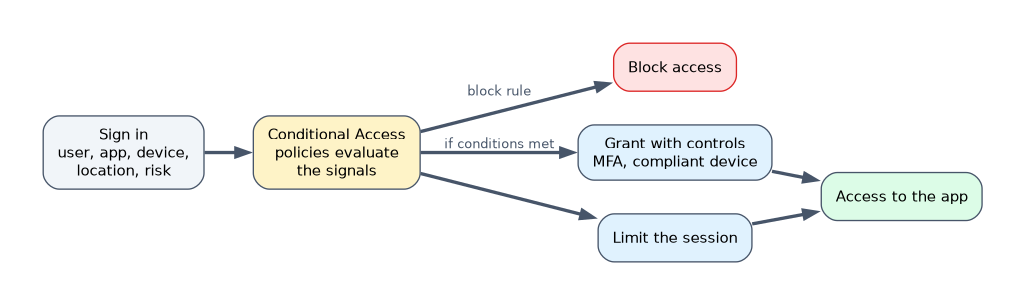 A Conditional Access policy is an if then rule. It reads signals at sign in and applies a decision.
| Signals | Decisions |
|---|---|
| User or group, role | Block access |
| Application being opened | Grant access |
| Device and its state | Require MFA |
| Location | Require a compliant device |
| Sign in risk, user risk | Limit the session |
A policy can be tested in report only mode before it is enforced. Admins usually exclude an emergency access account from policies, so that a mistake does not lock everyone out. Conditional Access requires Entra ID P1. Security defaults are the free alternative, and you cannot use them together with custom Conditional Access policies.
Single sign on
SSO lets a user sign in once and then open many apps without signing in again. Entra ID acts as the identity provider, and the apps trust it.
Benefits:
- Fewer passwords for users to remember and reuse.
- Fewer help desk calls for password resets.
- Better security, since MFA and Conditional Access apply once in a central place.
- Faster access and one place for the admin to grant or remove access.
Users and groups as security objects
| Object | Use it for |
|---|---|
| User | One person or service identity that signs in |
| Security group | Giving permissions, for example access to a resource or a license, to many users at once |
| Microsoft 365 group | Collaboration: a shared mailbox, calendar, SharePoint site and optionally a team |
| Distribution group | Sending email only, not for access |
Group membership can be assigned (an admin adds people) or dynamic (rules based on user properties, which needs P1). To grant access to many people, assign it to a security group instead of to each user.
App registrations and enterprise applications
These two entries in the Entra admin center are easy to mix up.
| App registration | Enterprise application | |
|---|---|---|
| What it is | The definition of an app, the identity an app uses to sign in or call APIs | The instance of that app in your tenant |
| Who uses it | Developers who build or register their own app | Admins who manage access to apps |
| Typical settings | Redirect URIs, secrets and certificates, API permissions | Assigned users and groups, SSO setup, consent, sign in logs |
When you add a gallery app such as a SaaS tool, you work with an enterprise application. When your developers build an app that needs to sign in users or read data, they create an app registration. Each registration creates a matching enterprise application in the tenant.
A worked example
Fabrikam adopts a SaaS expense tool. The admin adds it from the gallery as an enterprise application, assigns the Finance security group, and turns on SSO so finance staff open it with their Microsoft 365 sign in. A Conditional Access policy requires MFA for that app when users are outside the office. Fabrikam's developer also builds an internal portal, and registers it as an app registration to get a client ID and request permission to read user profiles.
How the exam asks about this
- "Which feature requires MFA only when users sign in from outside the office?" Conditional Access.
- "What is the main benefit of SSO?" Users sign in once to reach many apps, with fewer passwords and central control.
- "Where do you assign users to a SaaS app and configure SSO?" Enterprise applications in the Entra admin center.
What to remember for the exam
- Entra ID is the identity service, managed in the Microsoft Entra admin center.
- Conditional Access uses signals to allow, require MFA or block. It needs Entra ID P1.
- Report only mode tests a policy without enforcing it.
- SSO means one sign in for many apps, with fewer passwords.
- App registration is the app definition for developers. Enterprise application is the tenant instance for admins.
Do not lock yourself out. A Conditional Access policy that blocks everyone without an excluded emergency account can stop admins from signing in. Test in report only mode first.
Common mistakes
Mixing up app registrations and enterprise applications. If the question is about assigning users or SSO, the answer is enterprise applications.
Using a distribution group to grant access. It cannot carry permissions. Use a security group.
Thinking security defaults and Conditional Access work together. Custom Conditional Access policies replace security defaults.
Check yourself
What does Conditional Access do?
It evaluates signals such as user, device, location and risk at sign in, and then allows, requires MFA, limits or blocks access.
Which security object should give many users access to a resource?
A security group, instead of assigning access to each user.
Where do admins assign users to an app and set up SSO?
In the Microsoft Entra admin center under Enterprise applications.
Topic 5 of 6 in Core Features and Objects of Microsoft 365 Services
Test yourself on Core Features and Objects of Microsoft 365 Services
The full Microsoft AB-900 question bank has 499 questions, with timed practice exams and an explanation for every answer.
This study guide is independent and is not affiliated with, endorsed by, or sponsored by Microsoft. Vendor names, certification names and exam codes are trademarks of their respective owners and are used for identification only.