Tunnels · Topic 2 of 2
Configuring and Verifying GRE Tunnels
Configure GRE on an MX for the JN0-364: tunnel-services, gr- source and destination, routing into the tunnel, keepalives, verification and fixes.
- 7 min
- Includes a diagram
- On an MX,
set chassis fpc <n> pic <n> tunnel-servicesis required beforegr-interfaces appear. - Configure
tunnel sourceandtunnel destinationunder thegr-unit, plusfamily inet,inet6ormpls. - Source and destination are mirrored on the two ends; a
keymust match.
What it is
On an MX Series router, a GRE tunnel is a logical gr- interface. Each unit has a tunnel source and a tunnel destination, the outer addresses, plus one or more protocol families with their own addresses, the inner side. Traffic is sent into the tunnel by routing it to the gr- interface.
Building a working tunnel takes four steps: enable tunnel services so gr- interfaces exist, configure the tunnel unit on both ends, route traffic into the tunnel, and confirm the endpoints reach each other outside the tunnel.
How it works
Step 1: tunnel services
An MX does not have gr- interfaces until tunnel services are enabled on a PIC. The FPC and PIC numbers you choose become part of the interface name.
user@R1# set chassis fpc 0 pic 0 tunnel-services bandwidth 1g
user@R1# commit
After the commit, the tunnel interfaces for that PIC appear. Use show interfaces terse | match gr- to find the exact names before configuring them.
Step 2: the tunnel unit
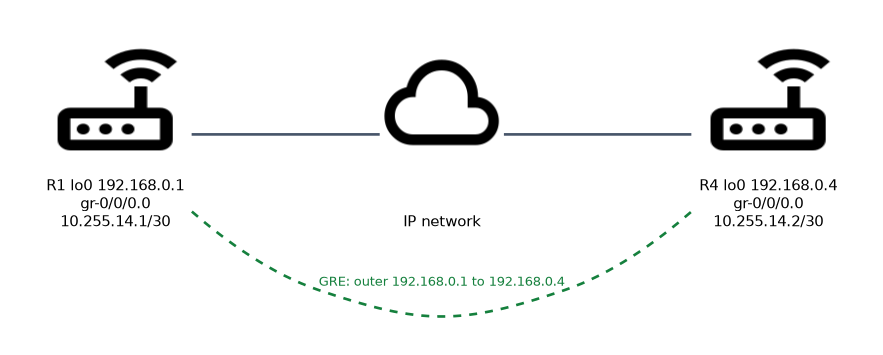 Configure the outer addresses and the inner family on each end. The source is normally the local loopback and the destination the remote router's loopback, both reachable over the physical network.
R1:
user@R1# set interfaces gr-0/0/0 unit 0 tunnel source 192.168.0.1
user@R1# set interfaces gr-0/0/0 unit 0 tunnel destination 192.168.0.4
user@R1# set interfaces gr-0/0/0 unit 0 family inet address 10.255.14.1/30
R4 mirrors it:
user@R4# set interfaces gr-0/0/0 unit 0 tunnel source 192.168.0.4
user@R4# set interfaces gr-0/0/0 unit 0 tunnel destination 192.168.0.1
user@R4# set interfaces gr-0/0/0 unit 0 family inet address 10.255.14.2/30
The same configuration in curly-brace form:
interfaces {
    gr-0/0/0 {
        unit 0 {
            tunnel {
                source 192.168.0.1;
                destination 192.168.0.4;
            }
            family inet {
                address 10.255.14.1/30;
            }
        }
    }
}
The source on one end must equal the destination on the other. Add family inet6 to carry IPv6, or family mpls to carry labeled packets. A key statement under tunnel adds the GRE key field, and both ends must then use the same key.
Statement on the gr- unit | Purpose |
|---|---|
tunnel source | Local outer address |
tunnel destination | Remote outer address |
tunnel key | Adds a GRE key; must match on both ends |
clear-dont-fragment-bit | At the unit level, not under tunnel; clears the DF bit on IPv4 packets entering the tunnel so they can be fragmented |
tunnel routing-instance destination | Looks up the tunnel destination in another routing instance |
Step 3: route traffic into the tunnel
Nothing uses the tunnel until a route points at it. Use a static route or run an IGP on the gr- unit.
user@R1# set routing-options static route 172.16.40.0/24 next-hop 10.255.14.2or
user@R1# set protocols ospf area 0.0.0.1 interface gr-0/0/0.0If you run a routing protocol across the tunnel, keep the tunnel endpoint loopbacks out of it, or the router may learn the route to the tunnel destination through the tunnel itself, which is recursive routing.
Step 4: keepalives (optional)
GRE has no session, so by default the gr- interface does not notice when the far end disappears. Keepalives send probe packets through the tunnel, and when no reply arrives within the hold time the tunnel is marked operationally down.
user@R1# set protocols oam gre-tunnel interface gr-0/0/0.0 keepalive-time 10
user@R1# set protocols oam gre-tunnel interface gr-0/0/0.0 hold-time 30
The hold time must be at least twice the keepalive time. The unit also needs family inet.
Monitoring
| Command | Shows | |
|---|---|---|
| `show interfaces terse \ | match gr-` | Whether the gr- interfaces exist and their admin and link state |
show interfaces gr-0/0/0.0 extensive | Tunnel source and destination, the families, traffic counters and errors | |
show route 192.168.0.4 | How the tunnel destination is reached; it must not be via the tunnel | |
show route 172.16.40.0/24 | Whether traffic is routed to the gr- interface | |
ping 10.255.14.2 | Reachability across the tunnel | |
ping 10.255.14.2 size 1448 do-not-fragment | Whether a full size packet fits: 1448 bytes of ICMP data plus 28 bytes of headers is 1476, the largest inner packet on a 1500 byte link |
user@R1> show interfaces terse | match gr-
gr-0/0/0                up    up
gr-0/0/0.0              up    up   inet     10.255.14.1/30
Troubleshooting checklist
| Symptom | Likely cause |
|---|---|
No gr- interface exists | tunnel-services not enabled on the PIC, or the wrong FPC or PIC number |
gr- unit down | Tunnel source address not valid, or keepalives timed out |
| Up locally but no traffic passes | Source and destination not mirrored, mismatched key, or protocol 47 blocked on the path |
| Tunnel flaps after enabling an IGP | Recursive routing to the tunnel destination |
| Small pings work, large ones fail | MTU: the 24 byte overhead pushes packets past the physical MTU |
Run show route for the tunnel destination address whenever a tunnel misbehaves. If the next hop is the gr- interface itself, you have found a recursive routing problem.
Common mistakes
Configuring gr- units before tunnel services. On an MX, the interface does not exist until tunnel-services is committed under chassis fpc pic.
Swapping source and destination on one end only. Each router's source must be the other router's destination.
Forgetting to route traffic into the tunnel. A configured tunnel with no route pointing to it carries nothing.
Advertising the endpoint loopbacks across the tunnel. This creates recursive routing.
A gr- interface showing up and up does not prove the far end is working. Without keepalives, GRE has no way to detect a dead remote endpoint, so test with ping across the tunnel.
What to remember for the exam
- On an MX,
set chassis fpc <n> pic <n> tunnel-servicesis required beforegr-interfaces appear. - Configure
tunnel sourceandtunnel destinationunder thegr-unit, plusfamily inet,inet6ormpls. - Source and destination are mirrored on the two ends; a
keymust match. - Traffic uses the tunnel only when a route points to the
gr-interface. - Reach the tunnel destination outside the tunnel to avoid recursive routing.
- Keepalives are configured under
protocols oam gre-tunnel interface. - GRE overhead is 24 bytes; test with
ping ... size ... do-not-fragment.
Check yourself
You configure
interfaces gr-0/0/0on an MX, but the interface never appears. What is missing?Tunnel services, enabled with
set chassis fpc <n> pic <n> tunnel-services.The local
gr-unit is up, but the remote router was powered off an hour ago. Why is it still up?GRE is stateless, so without keepalives under
protocols oam gre-tunnelthe router cannot detect the dead far end.What does the tunnel destination address on R1 have to match on R4?
R4's tunnel source address, normally R4's loopback.
Topic 2 of 2 in Tunnels
Test yourself on Tunnels
The full Juniper JNCIS-SP JN0-364 question bank has 860 questions, with timed practice exams and an explanation for every answer.
This study guide is independent and is not affiliated with, endorsed by, or sponsored by Juniper. Vendor names, certification names and exam codes are trademarks of their respective owners and are used for identification only.