High Availability · Topic 5 of 5
VRRP
Learn VRRP for the JN0-364: virtual address and MAC, master election, priority 100, preempt on by default, 1 second adverts, tracking and accept-data.
- 6 min
- Includes a diagram
- Configure under
family inet address <address> vrrp-group <n>withvirtual-address. - Default priority 100; highest priority wins; ties go to the highest IP address.
- Preempt is on by default;
no-preemptdisables it.
What it is
The Virtual Router Redundancy Protocol (VRRP) gives hosts a default gateway that survives a router failure. Two or more routers on the same subnet form a VRRP group that shares a virtual IP address. Hosts use that address as their gateway, and whichever router is currently master answers for it.
If the master fails, a backup router takes over the virtual address and its virtual MAC address within a few seconds. The hosts change nothing, because their gateway address and the MAC address behind it stay the same.
How it works
Election and advertisements
| Item | Value |
|---|---|
| Transport | IP protocol 112 to multicast 224.0.0.18 |
| Virtual MAC (IPv4) | 00:00:5e:00:01 followed by the group number in hex |
| Default priority | 100 |
| Configurable priority | 1 to 255; 255 is used by the address owner |
| Advertisement interval | 1 second by default |
| Preemption | On by default |
The router with the highest priority becomes master. If priorities are equal, the router with the highest primary IP address on the interface wins. Only the master sends advertisements. A backup declares the master dead after roughly three missed advertisements and takes over.
Because preemption is on by default, a router with a higher priority that comes back online takes the master role back. no-preempt stops that, and preempt hold-time delays it so the returning router can finish converging first.
Configuration on an MX interface
On Junos the VRRP group is configured under the interface address it belongs to.
user@R1# set interfaces ge-0/0/1 unit 0 family inet address 10.1.1.2/24 vrrp-group 1 virtual-address 10.1.1.1
user@R1# set interfaces ge-0/0/1 unit 0 family inet address 10.1.1.2/24 vrrp-group 1 priority 200
user@R1# set interfaces ge-0/0/1 unit 0 family inet address 10.1.1.2/24 vrrp-group 1 accept-data
R2 uses its own address, the same group number and virtual address, and the default priority of 100:
user@R2# set interfaces ge-0/0/1 unit 0 family inet address 10.1.1.3/24 vrrp-group 1 virtual-address 10.1.1.1
user@R2# set interfaces ge-0/0/1 unit 0 family inet address 10.1.1.3/24 vrrp-group 1 accept-data
For a VLAN on an MX bridge domain, put the same vrrp-group statements on the IRB unit that is the bridge domain's routing-interface, for example under interfaces irb unit 100 family inet address.
accept-data
By default, a Junos VRRP master that is not the address owner answers ARP for the virtual address but does not accept other packets sent to it. A ping to the virtual address then fails even though forwarding through the gateway works. accept-data lets the master accept those packets.
Tracking
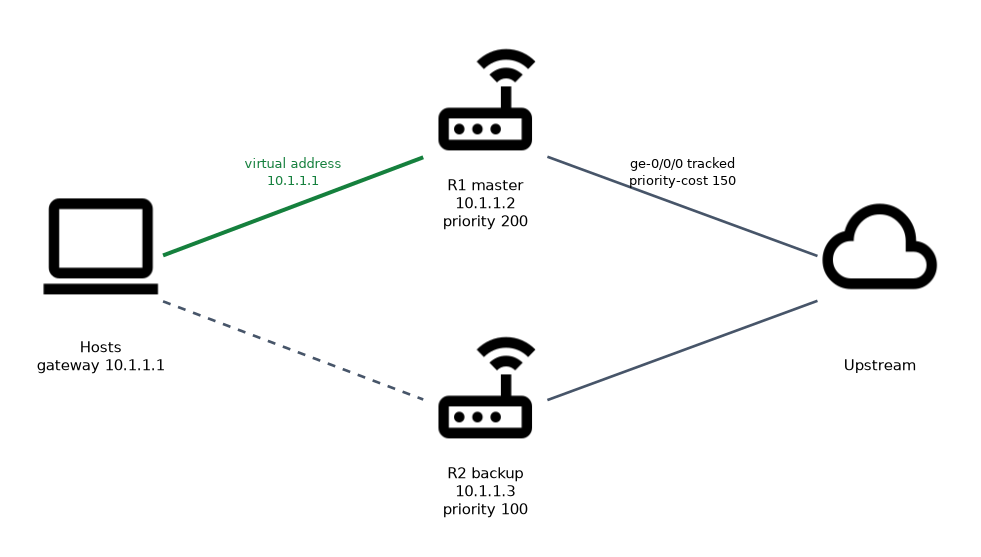 Tracking lowers the priority when something upstream fails, so a router with a dead uplink gives up the master role.
user@R1# set interfaces ge-0/0/1 unit 0 family inet address 10.1.1.2/24 vrrp-group 1 track interface ge-0/0/0 priority-cost 150If ge-0/0/0 goes down, R1's priority drops from 200 to 50. R2, at 100, is now higher, and because preemption is on, R2 becomes master.
track route lowers the priority when a route, for example the default route, disappears.
VRRP for IPv6
IPv6 groups use VRRP version 3. Enable it with set protocols vrrp version-3 and configure groups under family inet6 address with vrrp-inet6-group, a virtual-inet6-address and a virtual-link-local-address.
Monitoring
| Command | Shows |
|---|---|
show vrrp | Each group with interface, state, VR state (master or backup) and the local and virtual addresses |
show vrrp detail | Priority, advertisement interval, preemption, tracking and the current master |
show vrrp summary | A short list of groups and states |
user@R1> show vrrp
Interface     State       Group   VR state VR Mode   Timer    Type   Address
ge-0/0/1.0    up              1   master   Active      A  0.512 lcl    10.1.1.2
                                                                vip    10.1.1.1
Troubleshooting checklist
| Symptom | Likely cause |
|---|---|
| Both routers are master | Advertisements not received: a filter blocks protocol 112, the link between them is broken, or group numbers differ |
| Ping to the virtual address fails but forwarding works | accept-data not configured |
| Original master does not take back the role | no-preempt configured |
| Master does not move when the uplink fails | No track statement, or the priority cost is too small |
Two masters in one group almost always means the routers cannot hear each other's advertisements. Check the group number, the subnet and any firewall filter on the interface first.
Common mistakes
Thinking preemption is off by default. In Junos VRRP, preempt is on. Use no-preempt to disable it.
Expecting the master to answer pings to the virtual address. Without accept-data, a non-owner master does not accept packets addressed to the virtual IP.
Using different group numbers on the two routers. The group number and virtual address must match on every member.
Configuring VRRP at the interface level only. On Junos it hangs off the specific address: family inet address <address> vrrp-group <n>.
A tracking cost that does not bring the priority below the backup's has no effect. Do the subtraction: 200 minus 50 is still above 100, so R1 would stay master.
What to remember for the exam
- Configure under
family inet address <address> vrrp-group <n>withvirtual-address. - Default priority 100; highest priority wins; ties go to the highest IP address.
- Preempt is on by default;
no-preemptdisables it. - Advertisements every 1 second to 224.0.0.18, IP protocol 112.
- Virtual MAC is 00:00:5e:00:01 plus the group number.
accept-datalets the master answer packets sent to the virtual address.track interface ... priority-costlowers priority when an uplink fails.- Verify with
show vrrpandshow vrrp detail.
Check yourself
R1 has priority 200 and R2 the default priority. R1 fails and later recovers. Which router is master afterward?
R1, because preemption is on by default and its priority of 200 beats R2's 100.
Hosts can reach the internet through the virtual gateway, but a ping to the virtual address fails. What is missing?
accept-dataon the VRRP group.R1 at priority 150 tracks its uplink with priority cost 40, and R2 has priority 120. Does R2 become master when R1's uplink fails?
Yes. R1 drops to 110, below R2's 120, and preemption lets R2 take over.
Topic 5 of 5 in High Availability
Test yourself on High Availability
The full Juniper JNCIS-SP JN0-364 question bank has 860 questions, with timed practice exams and an explanation for every answer.
This study guide is independent and is not affiliated with, endorsed by, or sponsored by Juniper. Vendor names, certification names and exam codes are trademarks of their respective owners and are used for identification only.