Asset Security · Topic 2 of 3
Data Lifecycle, Provisioning and Retention
Secure asset provisioning and inventory, data roles, the data lifecycle, data remanence and sanitization, and retention through end of life and end of support.
- 4 min
- Includes a diagram
- Inventory and ownership come first.
- Controller decides; processor processes on its behalf; custodian protects.
- Clear, purge, destroy; match to media and destination.
What it is
Data and assets move through a lifecycle from creation to destruction. At each stage someone must own them, know where they are and protect them. At the end, data must be removed in a way that matches the media and the sensitivity, and assets past end of support must be retired or isolated.
How it works
Provisioning assets securely
- Inventory: a current list of hardware, software and information assets, with location and owner. You cannot protect what you do not know you have.
- Asset ownership: every asset has an accountable owner.
- Asset management: track assets from acquisition through deployment, maintenance and disposal.
- Provisioning: give users and systems only the assets and access they need, following the information's handling rules.
Data roles
| Role | Responsibility |
|---|---|
| Owner / controller | Accountable for the data; decides purpose, classification and access |
| Custodian | Implements protection: backups, permissions, storage |
| Processor | Processes personal data on behalf of the controller |
| User | Uses data according to policy |
| Subject | The person the personal data is about |
Data lifecycle activities
- Collection: collect only what is needed (data minimization) with a lawful basis.
- Location: know where data is stored and processed, including cloud regions, for residency and legal reasons.
- Maintenance: keep data accurate and protected while in use.
- Retention: keep data as long as required by law, contract and business need, then dispose of it.
- Remanence: data left behind after deletion or reformatting.
- Destruction: remove data so it cannot be recovered.
Data remanence and sanitization
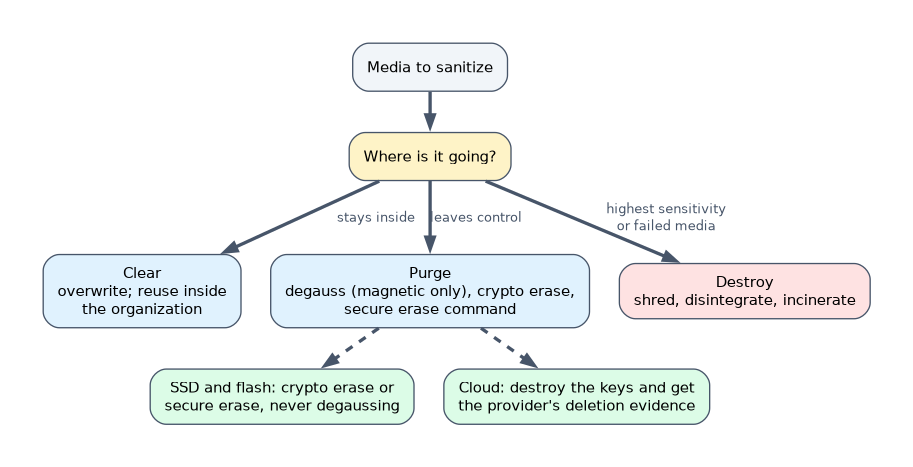
| Method | What it does | Fits |
|---|---|---|
| Clearing | Overwrites data so normal tools cannot recover it | Reuse inside the organization |
| Purging | Removes data so even lab techniques cannot recover it (degaussing, cryptographic erase, secure erase commands) | Media leaving the organization's control |
| Destruction | Physical destruction: shredding, disintegration, incineration | Highest sensitivity or failed media |
Media matters:
- Magnetic hard drives: overwriting or degaussing works.
- Solid-state drives and flash: overwriting is unreliable because of wear leveling and spare blocks; use cryptographic erase, the manufacturer's secure erase command or physical destruction. Degaussing has no effect on flash.
- Cloud storage: you cannot reach the media; use crypto-shredding (destroy the keys) and obtain the provider's deletion evidence.
NIST SP 800-88 groups sanitization into clear, purge and destroy. Match the method to the media type and to where the media is going next.
Retention
A retention schedule says how long each category of records is kept and when it is disposed of. Retention can be overridden by a legal hold: when litigation is expected, relevant data must be preserved, scoped by legal counsel, even if routine deletion would remove it. Keeping data longer than needed increases breach impact and may violate privacy laws.
End of life and end of support
| Term | Meaning |
|---|---|
| End of life (EOL) | Vendor stops selling the product |
| End of support (EOS) | Vendor stops patches and support |
Systems past end of support should be replaced. Until they are, isolate them, add compensating controls and record the accepted risk.
How the exam asks about this
- "2,000 laptops with SSDs are being sold." Verified cryptographic erase or secure-erase command.
- "Litigation notice for two executives' 2021 email." Suspend deletion for that scope under counsel's direction.
- "SaaS contract ending; you cannot inspect the media." Destroy customer-managed keys and obtain deletion certification.
What to remember for the exam
- Inventory and ownership come first.
- Controller decides; processor processes on its behalf; custodian protects.
- Clear, purge, destroy; match to media and destination.
- Degaussing does not work on SSDs; crypto-erase or destruction does.
- Legal holds override routine retention; EOS systems need replacement or isolation.
Formatting or deleting files does not remove data. Remanence remains until media is properly sanitized.
Common mistakes
Degaussing flash media.
Suspending all deletion company-wide for a narrow legal hold, which over-retains personal data.
Keeping data forever "just in case".
Check yourself
Why is overwriting unreliable on SSDs?
Wear leveling and spare blocks mean some data is never overwritten.
What overrides a normal retention schedule?
A legal hold.
How do you sanitize data held by a cloud provider?
Destroy the encryption keys (crypto-shredding) and obtain the provider's deletion evidence.
Topic 2 of 3 in Asset Security
Test yourself on Asset Security
The full ISC2 CISSP question bank has 1,113 questions, with timed practice exams and an explanation for every answer.
This study guide is independent and is not affiliated with, endorsed by, or sponsored by ISC2. Vendor names, certification names and exam codes are trademarks of their respective owners and are used for identification only.