Cloud Data Security · Topic 1 of 7
Cloud Data Concepts and Storage Architectures
CCSP cloud data lifecycle phases, data dispersion and flows, and storage types: long-term, ephemeral, raw, object and volume, with threats to each.
- 5 min
- Includes a diagram
- Lifecycle: Create, Store, Use, Share, Archive, Destroy; protect at rest from the first write.
- Dispersion improves durability but can move data across jurisdictions.
- Data flow diagrams show trust boundaries and cross border movements.
What it is
Cloud data concepts describe how data lives in the cloud: the lifecycle it passes through, how the provider disperses it across hardware and locations, and the flows that carry it between systems and parties.
Storage architecture is where that data rests. Each storage type has its own use, its own threats and its own controls, and the exam expects you to match them.
How it works
Lifecycle phases in the cloud
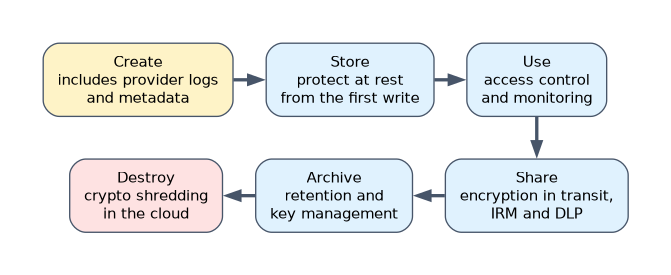 The six CSA phases are Create, Store, Use, Share, Archive and Destroy. In the cloud, Create includes data generated by the provider's services, such as logs and metadata. Store usually happens immediately after creation, so protection at rest must be in place from the first write.
Data may skip phases or exist in several at once. One copy may be in use while a replica is archived and a cached copy sits at the edge.
Data dispersion
Providers spread data across many disks, nodes and often facilities for durability. Techniques include replication and erasure coding (also called bit splitting), where data is cut into fragments with parity so it can be rebuilt even if some fragments are lost.
| Benefit | Risk |
|---|---|
| High durability and availability | Data may cross jurisdictions you did not intend |
| No single disk holds a full readable copy | Harder to prove deletion of every fragment |
| Fragments alone reveal little | More systems and locations in scope |
Choose regions explicitly and confirm in the contract where replicas and backups may be stored.
Data flows
A data flow diagram maps where data enters, which components process it, where it is stored and where it leaves, including third parties. Flows show trust boundary crossings, which is where encryption in transit, authentication and DLP checks belong. They are also the evidence regulators ask for when personal data crosses borders.
Storage types
| Type | What it is | Typical use | Service category |
|---|---|---|---|
| Long-term | Low cost archival storage, often with slow retrieval | Backups, records kept for legal retention | Mainly IaaS and storage services |
| Ephemeral | Temporary storage that disappears when the instance stops | Caches, scratch space | IaaS, PaaS, serverless |
| Raw storage | A physical disk or LUN mapped directly to a virtual machine | High performance or special software needs | IaaS |
| Object storage | Files stored as objects with metadata in buckets, reached by API | Documents, images, backups, data lakes | IaaS and PaaS |
| Volume storage | Block storage attached to an instance like a virtual hard drive | Operating system disks, databases | IaaS |
PaaS adds structured storage (databases) and unstructured storage (blobs, files). SaaS uses information storage and management, where data lives in the application, and content and file storage.
Threats to storage types
| Storage | Main threats | Key controls |
|---|---|---|
| Object | Public bucket misconfiguration, overbroad access policies, leaked access keys | Block public access by default, least privilege policies, encryption, access logging |
| Volume | Snapshot exposed or shared, data remanence after release | Encrypt volumes and snapshots, restrict snapshot sharing |
| Ephemeral | Loss of data and evidence on termination, sensitive data left in temp files | Do not rely on it for anything needed later; ship logs off |
| Raw | Direct hardware access, remanence, weaker isolation | Strict assignment, encryption, sanitization on release |
| Long-term | Unauthorized retrieval, lost keys making archives unreadable, ransomware deleting backups | Separate account, immutability or object lock, key escrow |
Across all types the common threats are unauthorized access, misconfiguration, data leakage between tenants, loss of keys, ransomware, and denial of service against the storage service.
Example: a deny public access policy idea
A storage policy can deny any request that does not arrive over TLS. In a JSON style policy it reads like this:
{
  "Effect": "Deny",
  "Principal": "*",
  "Action": "storage:*",
  "Resource": "bucket/records/*",
  "Condition": { "Bool": { "SecureTransport": "false" } }
}
The names are generic; each provider has its own syntax, but the intent of deny by default is the same.
A worked example
A media company stores customer video uploads in object storage and user account data in a database on a volume. A security review finds snapshots of the database volume shared with an external analytics account, and one bucket readable by anyone.
The architect enables account wide blocking of public access, removes the snapshot share and replaces it with a sanitized extract sent through a documented data flow. Volumes and snapshots are encrypted with a customer managed key, so any future accidental share is unreadable without key access.
How the exam asks about this
- "Which storage type is attached to an instance like a hard drive and typically holds the operating system?" Volume storage.
- "Data is split into fragments with parity across several locations. What is this?" Data dispersion, using erasure coding or bit splitting.
- "What is the MOST common cause of data exposure in object storage?" Misconfigured access permissions, such as public buckets.
What to remember for the exam
- Lifecycle: Create, Store, Use, Share, Archive, Destroy; protect at rest from the first write.
- Dispersion improves durability but can move data across jurisdictions.
- Data flow diagrams show trust boundaries and cross border movements.
- Volume is block storage for instances; object is API based storage with metadata.
- Ephemeral storage disappears with the instance, including any evidence on it.
Do not keep the only copy of anything you need on ephemeral storage. When the instance stops, the data and any forensic evidence are gone.
Common mistakes
Assuming data stays in one place. Replication, backups and caching can put copies in other regions unless you restrict them.
Forgetting snapshots. Encrypting a volume but sharing unencrypted snapshots leaves the same data exposed.
Confusing raw and volume storage. Raw storage maps a physical device to a virtual machine; volume storage is a virtual block device from a pool.
Check yourself
What is data dispersion?
The provider's practice of spreading data, often as fragments with parity, across many devices and locations for durability and availability.
Why are data flow diagrams useful for security?
They show where data crosses trust boundaries and parties, so controls such as encryption and DLP can be placed there.
Which storage type is MOST at risk of losing evidence when an instance is terminated?
Ephemeral storage, because its contents are deleted when the instance stops.
Topic 1 of 7 in Cloud Data Security
Test yourself on Cloud Data Security
The full ISC2 CCSP question bank has 900 questions, with timed practice exams and an explanation for every answer.
This study guide is independent and is not affiliated with, endorsed by, or sponsored by ISC2. Vendor names, certification names and exam codes are trademarks of their respective owners and are used for identification only.