Operations and Business Resilience · Topic 7 of 8
System Resilience and Data Backup
Fault tolerance, RAID, clustering and replication, and full, incremental and differential backups, rotation, off-site storage and restore testing.
- 4 min
- Includes a diagram
- Remove single points of failure with redundancy, clustering and replication.
- Synchronous replication: near-zero data loss, short distance.
- RAID 1 mirrors, RAID 5 has parity, RAID 6 survives two disks, RAID 0 has no redundancy.
What it is
System and operational resilience is the ability of systems and operations to keep running through failures, using redundancy and fault tolerance so a single fault does not cause an outage. Backup and restoration keep copies of data so it can be recovered after loss, corruption or attack. Resilience reduces how often recovery is needed; backups make recovery possible.
How it works
Resilience techniques
| Technique | What it does |
|---|---|
| Redundant components | Dual power supplies, network paths and devices remove single points of failure |
| Clustering | Several servers act as one; if one fails, another takes over (failover) |
| Load balancing | Spreads work across servers for performance and availability |
| Replication | Copies data to another system or site, synchronously or asynchronously |
| Uninterruptible power supply and generators | Keep systems running through power loss |
Synchronous replication writes to both sites before confirming, giving near-zero data loss but needing short distances and fast links. Asynchronous replication confirms first and copies afterwards, allowing long distances with some potential data loss.
RAID
| Level | How it works | Survives |
|---|---|---|
| RAID 0 | Striping across disks, no redundancy | No disk failure |
| RAID 1 | Mirroring: identical copies on two disks | One disk failure |
| RAID 5 | Striping with distributed parity | One disk failure |
| RAID 6 | Striping with double parity | Two disk failures |
| RAID 10 | Mirroring plus striping | At least one disk failure, more depending on which disks fail |
RAID protects against disk failure only. It does not protect against deletion, corruption or ransomware, because those changes are written to every copy.
Backup types
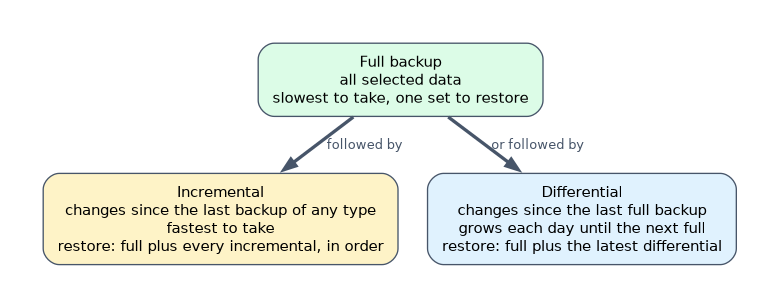
| Type | Copies | Backup speed | Restore |
|---|---|---|---|
| Full | All selected data | Slowest | Fastest: one set |
| Incremental | Changes since the last backup of any type | Fastest | Last full plus every incremental since, in order |
| Differential | Changes since the last full backup | Medium | Last full plus the latest differential |
Storage and protection of backups
- Keep copies off-site at a distance where the same disaster will not affect both.
- Keep at least one copy offline or immutable, so ransomware or a malicious administrator cannot destroy it.
- Encrypt backups, and protect and back up the keys separately.
- Use a rotation scheme such as grandfather-father-son to keep daily, weekly and monthly generations.
- Record backups in a catalog; label and track media.
Restoration
A backup is only proven by a successful restore test. Tests should restore real data to a test environment, check that it is complete and usable, and measure how long it takes against the RTO. Backup job success messages show only that the job ran.
When asked for the BEST evidence that backups can support recovery, choose a documented, successful restoration test, not backup logs or the backup policy.
How the exam asks about this
- "Which backup type needs the full backup plus only the latest set to restore?" Differential.
- "Ransomware encrypted the server and its online backups." Keep offline or immutable copies.
- "RAID 5 is in place, so no backup is needed." Wrong: RAID does not protect against deletion or corruption.
What to remember for the exam
- Remove single points of failure with redundancy, clustering and replication.
- Synchronous replication: near-zero data loss, short distance.
- RAID 1 mirrors, RAID 5 has parity, RAID 6 survives two disks, RAID 0 has no redundancy.
- Incremental is fastest to back up; full is fastest to restore.
- Off-site, offline or immutable, encrypted, and restore-tested.
Storing backups in the same room as the servers, or on storage reachable with the same administrator account, defeats their purpose.
Common mistakes
Treating RAID or replication as a backup. Corruption replicates too.
Never testing restores.
Losing the encryption keys needed to read encrypted backups.
Check yourself
What does RAID 1 provide?
Mirroring of data onto two disks so one disk can fail without data loss.
What is needed to restore from incremental backups?
The last full backup and every incremental backup taken since, applied in order.
What is the best evidence that backups are usable?
A successful, documented restoration test.
Topic 7 of 8 in Operations and Business Resilience
Test yourself on Operations and Business Resilience
The full ISACA CISA question bank has 1,050 questions, with timed practice exams and an explanation for every answer.
This study guide is independent and is not affiliated with, endorsed by, or sponsored by ISACA. Vendor names, certification names and exam codes are trademarks of their respective owners and are used for identification only.