Encryption Technology Applications · Topic 3 of 3
VPN Configuration
Learn IPsec configuration on a USG firewall: ACL, IKE and IPsec proposals, IKE peer, policy, security rules, checks, plus the four SSL VPN access types.
- 6 min
- Includes a diagram
- Order: ACL, IKE proposal, IKE peer, IPsec proposal, IPsec policy, apply on the interface, security policies.
- The two ACLs must mirror each other; proposals, DH group and pre-shared key must match.
- IKE and ESP packets need a local to untrust rule; the protected LAN traffic needs trust to untrust rules.
What it is
Configuring a VPN on a Huawei USG firewall means telling it four things: which traffic to protect, how to protect it, who the peer is, and where to apply the result. For IPsec these map to an ACL, the proposals, the IKE peer and an IPsec policy bound to an interface.
SSL VPN is configured mostly in the web UI, around a virtual gateway that remote users log in to. Both VPN types also need security policies, because the firewall still denies by default.
How it works
IPsec configuration steps
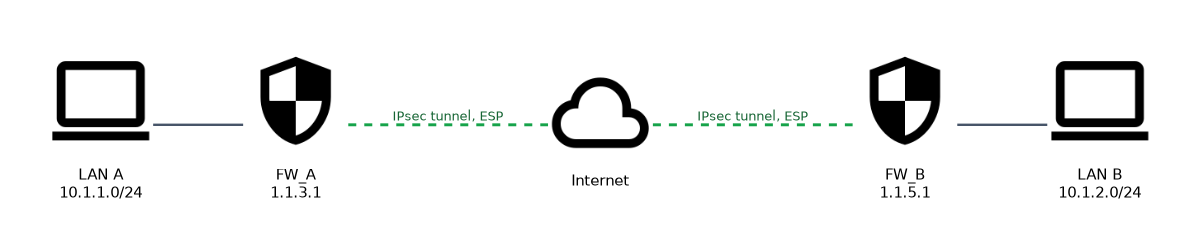 Take a site to site tunnel between FW_A (public 1.1.3.1, LAN 10.1.1.0/24) and FW_B (public 1.1.5.1, LAN 10.1.2.0/24). FW_A needs:
acl number 3000
 rule 5 permit ip source 10.1.1.0 0.0.0.255 destination 10.1.2.0 0.0.0.255
ike proposal 10
 encryption-algorithm aes-256
 dh group14
 authentication-algorithm sha2-256
 authentication-method pre-share
ike peer b
 ike-proposal 10
 remote-address 1.1.5.1
 pre-shared-key Test!1234
ipsec proposal tran1
 transform esp
 encapsulation-mode tunnel
 esp authentication-algorithm sha2-256
 esp encryption-algorithm aes-256
ipsec policy map1 10 isakmp
 security acl 3000
 ike-peer b
 proposal tran1
interface GigabitEthernet1/0/1
ipsec policy map1| Step | What it sets |
|---|---|
| ACL | The interesting traffic to protect; FW_B needs the mirror image (source and destination swapped) |
| IKE proposal | Phase 1 algorithms: encryption, DH group, authentication algorithm and method |
| IKE peer | Which IKE proposal to use, the peer's address and the pre-shared key |
| IPsec proposal | Phase 2: security protocol (ESP or AH), encapsulation mode and algorithms |
| IPsec policy | Ties ACL, IKE peer and IPsec proposal together; isakmp means IKE negotiates the SAs |
| Interface | ipsec policy map1 on the public interface starts protection |
FW_B mirrors this. The pre-shared key and proposal algorithms must match on both ends.
Security policies for IPsec
The firewall checks two different flows, and each needs a rule:
| Flow | Zones | Why |
|---|---|---|
| IKE and ESP packets between the public addresses | local and untrust, both directions | The firewall itself sends and receives the tunnel packets |
| Protected traffic between the two LANs | trust and untrust, both directions | The decrypted original packets still cross zones |
security-policy
 rule name ipsec_tunnel
  source-zone local
  source-zone untrust
  destination-zone local
  destination-zone untrust
  source-address 1.1.3.1 32
  source-address 1.1.5.1 32
  destination-address 1.1.3.1 32
  destination-address 1.1.5.1 32
  action permit
A second rule permits 10.1.1.0/24 and 10.1.2.0/24 between trust and untrust. If source NAT runs on the same outbound interface, add a NAT policy rule with action no-nat for the VPN traffic, so it is not translated before IPsec matches it.
Verifying the tunnel
display ike sashows the IKE SA with the peer, so phase 1 has succeeded.display ipsec sashows the IPsec SAs, with their SPIs, proposal and the protected flow.
No IKE SA means checking peer reachability, the local to untrust policy, the pre-shared key and the IKE proposal. No IPsec SA after phase 1 means checking the IPsec proposal and the mirrored ACLs.
SSL VPN access types
| Access type | What the user gets | Typical resources |
|---|---|---|
| Web proxy | Internal web pages through the virtual gateway; the gateway rewrites the URLs | Intranet web servers |
| File sharing | Internal file shares in the browser | SMB (Windows) and NFS (Linux) shares |
| Port forwarding | TCP applications through a small client that forwards ports | Telnet, SSH, remote desktop, mail |
| Network extension | A virtual network adapter with an address from a pool; full IP access like being on the LAN | Any IP application |
SSL VPN configuration steps
- Create a virtual gateway, with its IP address on the public interface and its port (443 by default).
- Set up users and authentication: local users or a remote server such as RADIUS, through the authentication domain.
- Configure resources for each access type, such as web proxy links, file shares, port forwarding entries or a network extension address pool.
- Create roles and authorize users or groups to the resources.
- Add security policies: untrust to local for HTTPS to the gateway, and rules from the users' traffic to the intranet servers.
A worked example
A new IPsec tunnel will not come up. display ike sa on FW_A shows no entry, and the peer is reachable by ping.
The engineer finds that FW_A uses dh group14 while FW_B's IKE proposal uses dh group2. Phase 1 algorithms must match, so after FW_B is changed to group 14, display ike sa shows the SA and display ipsec sa shows the inbound and outbound SAs.
How the exam asks about this
- "Which command binds an IPsec policy to an interface?" →
ipsec policy map1in the interface view. - "Which zones must the security policy permit for IKE negotiation packets?" → local and untrust.
- "Which SSL VPN access type gives remote users full IP access with a virtual adapter?" → Network extension.
What to remember for the exam
- Order: ACL, IKE proposal, IKE peer, IPsec proposal, IPsec policy, apply on the interface, security policies.
- The two ACLs must mirror each other; proposals, DH group and pre-shared key must match.
- IKE and ESP packets need a local to untrust rule; the protected LAN traffic needs trust to untrust rules.
- Check with
display ike safor phase 1 anddisplay ipsec safor the IPsec SAs. - SSL VPN access types: web proxy, file sharing, port forwarding and network extension.
Source NAT on the same interface can translate VPN traffic before it matches the IPsec ACL. Exclude the VPN flows with a no-nat rule, or the tunnel never carries them.
Common mistakes
Forgetting the local zone. The firewall itself terminates IKE and ESP, so permitting only trust to untrust leaves negotiation blocked.
Copying the ACL unchanged to the peer. The peer's ACL must swap source and destination. An identical ACL matches nothing useful and the IPsec SA does not form.
Expecting port forwarding to carry any traffic. Port forwarding handles specific TCP applications. Only network extension gives full IP connectivity.
Check yourself
What does the keyword
isakmpinipsec policy map1 10 isakmpmean?The IPsec SAs for this policy are negotiated automatically by IKE, not configured manually.
Which SSL VPN access type lets users open SMB shares in a browser?
File sharing, which presents SMB and NFS shares through the virtual gateway.
What should you check first when
display ike sashows no entry?Phase 1 failed, so check reachability, the local to untrust security policy, the pre-shared key and the IKE proposal.
Topic 3 of 3 in Encryption Technology Applications
Test yourself on Encryption Technology Applications
The full Huawei HCIA-Security H12-711 question bank has 600 questions, with timed practice exams and an explanation for every answer.
This study guide is independent and is not affiliated with, endorsed by, or sponsored by Huawei. Vendor names, certification names and exam codes are trademarks of their respective owners and are used for identification only.