Storage Technology Basics · Topic 1 of 1
Storage Basics and Key Storage Technologies
Learn HDD and SSD, IOPS and latency, DAS, NAS and SAN, block, file and object storage, LUNs, thin provisioning, multipathing, iSCSI, FC and NFS.
- 6 min
- Includes a diagram
- DAS is directly attached, NAS shares files over IP, SAN shares blocks over FC or IP.
- Block protocols: SCSI, iSCSI (TCP 3260), FC, FCoE. File protocols: NFS, CIFS/SMB.
- A LUN is a logical disk carved from a RAID group or pool and mapped to hosts.
What it is
Storage keeps data persistently so it survives power off. In a virtualization platform, every VM disk is a file or volume on some storage: local server disks, a shared SAN or NAS array, or distributed storage built from many servers.
Shared storage matters most in the cloud: when several hosts see it, a VM can move between hosts without copying its disks.
How it works
Storage media
| Feature | HDD | SSD |
|---|---|---|
| How it stores | Magnetic platters and moving heads | Flash memory chips, no moving parts |
| Speed | Limited by rotation (7,200, 10,000 or 15,000 rpm) | Much higher IOPS and lower latency |
| Cost per GB | Lower | Higher |
An HDD's access time is seek time (moving the head to the track) plus rotational latency (waiting for the sector) plus transfer time. HDDs use SATA, SAS or NL-SAS interfaces; SSDs use SATA, SAS or NVMe over PCIe.
Three metrics describe storage performance. IOPS counts I/O operations per second, throughput (bandwidth) is MB/s moved, and latency is the time one I/O takes.
Storage architectures
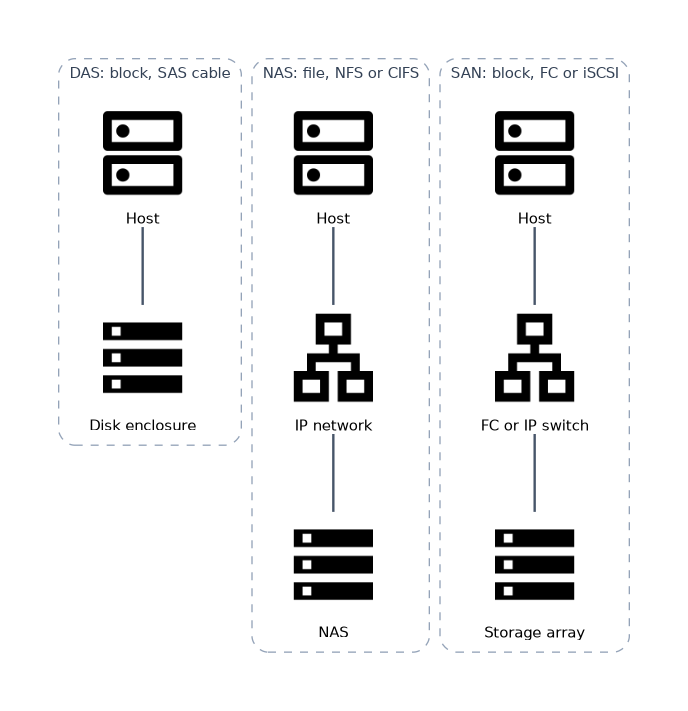
| Architecture | How hosts connect | Access level | Protocols |
|---|---|---|---|
| DAS | Directly attached by cable, no network | Block | SCSI, SAS |
| NAS | Over the IP network to a file server | File | NFS, CIFS/SMB |
| FC SAN | Dedicated Fibre Channel network with FC switches and HBAs | Block | FC |
| IP SAN | Ethernet network | Block | iSCSI |
DAS is simple and cheap but hard to share between hosts. NAS has its own file system and shares files; the host sees folders. SAN gives hosts raw blocks over a network, which the host formats itself.
Distributed storage is a scale-out alternative. Software pools the local disks of many servers into one storage system and grows by adding servers.
Block, file and object
| Type | What the host sees | Typical use |
|---|---|---|
| Block | A raw disk (LUN or volume) | VM disks, databases |
| File | Directories and files over NFS or CIFS | Shared folders, home directories |
| Object | Objects with metadata in buckets, reached over HTTP APIs | Images, backups, big data, internet content |
Parts of a storage system
A storage array has a controller enclosure and one or more disk enclosures. The controller enclosure holds the controllers, their cache, the front-end ports that connect to hosts and the back-end ports that connect to disk enclosures.
Arrays usually have two or more controllers and redundant power and paths, so no single failure stops service.
Key technology: RAID groups and LUNs
The array combines disks into RAID groups or storage pools, using the RAID levels from the server chapter. It then carves logical units, LUNs, from that space. A LUN is what a host sees as a disk.
Hosts reach LUNs through mapping. The array maps a LUN to a host or host group, so only that host sees it.
Key technology: thick and thin provisioning
| Type | Space allocation | Pros and cons |
|---|---|---|
| Thick | All space is allocated when the LUN or disk is created | Predictable performance, but unused space is wasted |
| Thin | Space is allocated only as data is actually written | Saves space and allows overcommitment, but the pool can run out |
With thin provisioning, the space promised to hosts can exceed the physical space.
Key technology: multipathing
A host usually has two or more paths to the same LUN, through different ports, switches and controllers. Multipathing software merges them into one disk, fails over when a path breaks and can balance load across paths.
Storage protocols
| Protocol | What it carries | Network and identifiers |
|---|---|---|
| SCSI | Block commands between an initiator (host) and a target (storage) | Originally a parallel bus; its command set is reused by the others |
| iSCSI | SCSI commands over TCP/IP | Ethernet, TCP port 3260; nodes named by IQN |
| FC | SCSI commands over Fibre Channel | FC switches and HBAs; ports identified by WWN |
| FCoE | FC frames inside Ethernet frames | Needs lossless Ethernet (DCB) |
| NFS | File access, common on Linux and UNIX | IP network, port 2049 |
| CIFS/SMB | File access, common on Windows | IP network, TCP port 445 |
A worked example
A team builds an IP SAN for three virtualization hosts. The array forms a RAID 6 group, creates a 2 TB LUN and maps it to all three hosts. Each host's iSCSI initiator logs in to the array target on TCP port 3260 over two paths.
The LUN becomes one shared datastore for VM disks. If a switch fails, multipathing moves I/O to the second path.
How the exam asks about this
- "Which storage architecture provides file-level access over an IP network?" → NAS.
- "Which protocol carries SCSI commands over TCP/IP?" → iSCSI.
- "Which provisioning type allocates space only when data is written?" → Thin provisioning.
What to remember for the exam
- DAS is directly attached, NAS shares files over IP, SAN shares blocks over FC or IP.
- Block protocols: SCSI, iSCSI (TCP 3260), FC, FCoE. File protocols: NFS, CIFS/SMB.
- A LUN is a logical disk carved from a RAID group or pool and mapped to hosts.
- Thick provisioning allocates all space up front; thin allocates on write and needs capacity monitoring.
- IOPS, throughput and latency are the three performance metrics; SSDs beat HDDs on IOPS and latency.
An IP SAN uses Ethernet but is still a SAN. Running over IP does not make iSCSI a NAS protocol, because it carries blocks, not files.
Common mistakes
Thinking NAS hosts format the storage. A NAS device owns the file system and shares files. With a SAN the host formats the LUN itself.
Assuming thin provisioning creates space. Thin provisioning only delays allocation. If the pool fills, writes fail on every thin volume in it.
Treating multipathing as extra capacity. Multiple paths lead to the same LUN. They add availability and bandwidth, not storage space.
Check yourself
What does a host see when it connects to a SAN?
A raw block device, a LUN, which it formats with its own file system. A NAS instead presents files and folders.
Which TCP port does iSCSI use by default?
TCP port 3260. iSCSI carries SCSI block commands inside TCP/IP over Ethernet.
Why must thin provisioned pools be monitored?
Space is allocated only on write, so promised capacity can exceed physical capacity. If the pool fills, writes fail.
Topic 1 of 1 in Storage Technology Basics
Test yourself on Storage Technology Basics
The full Huawei H13-511 question bank has 600 questions, with timed practice exams and an explanation for every answer.
This study guide is independent and is not affiliated with, endorsed by, or sponsored by Huawei. Vendor names, certification names and exam codes are trademarks of their respective owners and are used for identification only.