Huawei Virtualization Platform · Topic 1 of 1
FusionCompute Overview, Planning and Deployment
Learn what Huawei FusionCompute is, how CNA and VRM divide the work, how VRM runs active/standby, and how network planes and installation are planned.
- 6 min
- Includes a diagram
- FusionCompute virtualizes compute, storage and network resources and manages them centrally.
- CNA runs on every host and does the virtualization work; VRM manages the whole system and provides the portal.
- VRM can be deployed on VMs or on physical servers, and normally as an active/standby pair with a floating IP address.
What it is
FusionCompute is Huawei's virtualization platform, a cloud operating system that virtualizes the compute, storage and network resources of physical servers. It pools those resources and manages virtual machines (VMs) from one web portal.
It is the base layer of the Huawei private cloud and desktop solutions. FusionAccess, the Huawei virtual desktop product, runs its desktops on VMs that FusionCompute provides.
How it works
The two main components
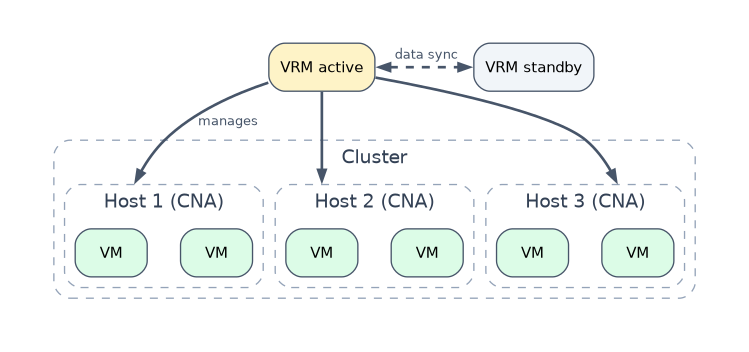 FusionCompute has two main software components. Learn their jobs as a pair.
| Component | Full name | Where it runs | Main job |
|---|---|---|---|
| CNA | Computing Node Agent | Installed on every physical server, which then becomes a host | Provides the virtualization function on the host and manages the VMs and the compute, storage and network resources of that host |
| VRM | Virtualization Resource Management | A VM or a physical server, normally deployed as an active/standby pair | Centrally manages hosts, clusters, VMs, storage and network resources, and provides the management portal |
A physical server with CNA installed is called a host. Hosts are grouped into clusters, and clusters belong to a site managed by VRM.
What VRM manages
VRM is the management brain. Through its web portal an administrator manages hosts, clusters, datastores, virtual switches, the VM lifecycle and templates, plus monitoring, alarms, logs, users and rights. VRM also offers APIs for upper layer management software.
CNA does the actual work on each host when VRM sends an instruction. If VRM is temporarily unavailable, the VMs already running on the hosts keep running; you only lose central management until VRM returns.
Key features of the platform
| Area | Examples of features |
|---|---|
| Compute | VM live migration, HA, DRS, DPM, memory overcommitment, CPU and memory QoS |
| Storage | Datastores on SAN, NAS or local disks, thin provisioning, snapshots, storage migration |
| Network | Distributed virtual switch, port groups, VLAN isolation, traffic shaping |
| Management | Unified web portal, VM templates, alarms and monitoring |
The next chapter explains these features; here, know which area each belongs to.
Planning before installation
Plan first, because hardware, network and storage choices are hard to change later.
| Planning item | What is decided |
|---|---|
| Hardware | Servers that are compatible with FusionCompute, CPU, memory and NIC count per host |
| Network planes | Which traffic uses which NICs and VLANs |
| Storage | Local disks or shared SAN or NAS storage, and the storage network addresses |
| VRM deployment | VM or physical server, active/standby pair, and its management IP addresses |
| Addresses | Management IP addresses of hosts and VRM, plus a floating IP address for the VRM pair |
Network plane planning
FusionCompute traffic is split into planes so that one type of traffic cannot starve another. Planes are separated by different physical NICs, by VLANs, or both.
| Plane | Carries |
|---|---|
| Management plane | Communication between VRM and CNA hosts, and administrator access to the portal |
| Storage plane | Traffic between hosts and IP storage such as an IP SAN |
| Service plane | The VMs' own traffic to users and other systems |
| BMC plane | Remote hardware management of the servers through their BMC ports |
Host NICs are usually bonded in pairs, so the failure of one NIC or cable does not cut a plane off.
Installation order
Install the hosts first, then VRM, then configure the system.
- Install CNA: mount the FusionCompute installation image on the server, for example through the BMC remote console, or install many hosts over the network with PXE.
- Install VRM: use the Huawei FusionCompute installation tool to deploy VRM, either as VMs on hosts or on physical servers. Two VRM nodes form an active/standby pair that shares a floating IP address.
- Configure: log in to the web portal through the floating IP address, add the hosts to clusters, add storage resources and datastores, and create distributed virtual switches and port groups.
A worked example
A small company buys three rack servers and an IP SAN to replace old physical servers. The engineer plans a management plane, a storage plane and a service plane on separate VLANs, with two bonded NICs per plane.
CNA is installed on all three servers, then VRM is deployed as two VMs in active/standby mode with a floating IP address. In the portal the engineer creates a cluster, adds the hosts and the IP SAN, and creates a datastore for the first VMs.
How the exam asks about this
- "Which FusionCompute component is installed on each physical server to provide virtualization?" -> CNA.
- "Which FusionCompute component centrally manages resources and provides the management portal?" -> VRM.
- "In which mode is VRM normally deployed to improve reliability?" -> Active/standby, with a floating IP address.
What to remember for the exam
- FusionCompute virtualizes compute, storage and network resources and manages them centrally.
- CNA runs on every host and does the virtualization work; VRM manages the whole system and provides the portal.
- VRM can be deployed on VMs or on physical servers, and normally as an active/standby pair with a floating IP address.
- Plan management, storage, service and BMC planes, separated by NICs or VLANs, with bonded NICs for redundancy.
- Install CNA on the hosts first, then VRM, then configure clusters, storage and networks in the portal.
Do not swap the two names. CNA is never the central manager and VRM is never installed on every host; questions often reverse the roles to test this.
Common mistakes
Thinking running VMs stop when VRM fails. VRM manages the system, but the VMs run on the CNA hosts. A VRM outage removes central management, not the services already running.
Putting all traffic on one network. Management, storage and service traffic share links badly. Planning separate planes keeps storage I/O and VM traffic from interfering with management.
Installing VRM before any host exists. When VRM is deployed as a VM, it needs a CNA host to run on, so the hosts are installed first.
Check yourself
What is the role of CNA in FusionCompute?
CNA runs on each physical server, provides the virtualization function and manages the VMs and resources of that host.
Why is VRM deployed as an active/standby pair?
So that if the active VRM node fails, the standby takes over the floating IP address and central management continues.
Which network plane carries traffic between hosts and an IP SAN?
The storage plane, which is kept separate from the management and service planes.
Topic 1 of 1 in Huawei Virtualization Platform
Test yourself on Huawei Virtualization Platform
The full Huawei H13-511 question bank has 600 questions, with timed practice exams and an explanation for every answer.
This study guide is independent and is not affiliated with, endorsed by, or sponsored by Huawei. Vendor names, certification names and exam codes are trademarks of their respective owners and are used for identification only.