Vault Leases · Topic 2 of 2
Revoking Leases
Vault Associate (003): revoke a lease by ID, revoke all leases under a prefix, use force and sync, and see how revoking a token ends the leases it created.
- 4 min
- Includes a diagram
- Revoking a lease invalidates the secret immediately and blocks renewal.
vault lease revoke <lease-id>revokes one lease;-prefixrevokes all leases that start with the given path.-forceneeds-prefixand skips engine errors, so use it for recovery only.
What it is
Revoking a lease invalidates the secret immediately and stops any further renewal. It is how you cut off a credential before its TTL ends, for example when it leaks or an application is decommissioned.
Revocation also happens on its own. When a lease expires, Vault can revoke the secret automatically, and revoking a token revokes every lease that token created.
How it works
Revoke one lease
Pass the exact lease ID to vault lease revoke.
vault lease revoke database/creds/readonly/27e1b9a1-27b8-83d9-9fe0-d99d786bdc83Vault confirms with a message that it revoked the lease. The API is POST /sys/leases/revoke with lease_id.
Revoke by prefix
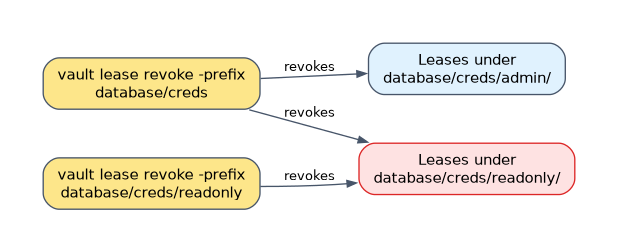 Lease IDs begin with the path of the secret, so one command can revoke many leases by giving the beginning of the ID.
vault lease revoke -prefix database/creds
vault lease revoke -prefix aws/
The first revokes every lease whose ID starts with database/creds. The second revokes all AWS access keys that Vault issued under aws/. This is the quick response to an intrusion on one backend.
Walking through it: a database engine has issued leases under database/creds/readonly/ and database/creds/admin/. Running -prefix database/creds ends both groups at once. Running -prefix database/creds/readonly ends only the readonly credentials and leaves admin untouched.
The API form is POST /sys/leases/revoke-prefix/:prefix, and it requires the sudo capability.
The options
| Option | Effect |
|---|---|
-prefix | Treats the ID as a prefix and revokes every matching lease |
-force (or -f) | Deletes the lease from Vault even if the engine fails to revoke the secret; needs -prefix |
-sync | Waits for the revocation to finish; by default it is queued and done in the background |
Use -force for recovery only, such as when someone removed the secret from the target system by hand and the engine keeps erroring. Vault does not ensure the credentials are cleaned up, so treat it as an emergency tool. The API path is POST /sys/leases/revoke-force/:prefix, which also needs sudo.
vault lease revoke -sync <lease-id>
vault lease revoke -prefix -force database/creds
Revoking a token revokes its leases
Vault tracks leases against the token that created them. Revoke the token and the leases go with it. Vault applies the same rule to child tokens, so revoking a parent token ends the leases of its children too.
Token leases are renewed with vault token renew, not with vault lease renew.
vault token revoke <token>The UI
You can also revoke from the Vault UI, under the Access tab. The CLI, the API and expiry cover the rest.
How the exam asks about this
- "A credential for one application leaked. Cut it off without touching others." Run
vault lease revokewith that credential's exact lease ID. - "An intrusion is suspected on the AWS engine. How do you revoke every credential it issued?"
vault lease revoke -prefix aws/. - "A token is revoked. What happens to the dynamic secrets it requested?" Their leases are revoked too.
What to remember for the exam
- Revoking a lease invalidates the secret immediately and blocks renewal.
vault lease revoke <lease-id>revokes one lease;-prefixrevokes all leases that start with the given path.-forceneeds-prefixand skips engine errors, so use it for recovery only.- By default revocation is queued;
-syncmakes the command wait. - Revoking a token revokes all leases created with that token.
- The API paths are under
sys/leases; revoke prefix and revoke force needsudo.
A prefix revoke is broad. vault lease revoke -prefix aws/ ends every credential under that mount, so applications that hold them will start failing until they read new ones.
Common mistakes
Using renew when the goal is to stop access. Renewal extends a lease. To end access now, revoke the lease or the token that owns it.
Forgetting that expiry also revokes. Waiting out the TTL revokes the secret by itself, so revoking early is only for cases where you cannot wait.
Running a prefix revoke with a path that is too short. The prefix matches the start of lease IDs, so a short one such as database/ ends every credential from every role under it.
Check yourself
How do you revoke every lease under the path aws/?
Run
vault lease revoke -prefix aws/. It treats the argument as a prefix and ends all matching leases.What does revoking a token do to the leases it created?
Vault revokes them too, so the dynamic secrets that token obtained stop working.
When would you add -force to a revoke?
When the engine fails to remove the secret, for example because it was deleted manually. It removes the lease from Vault anyway and requires
-prefix.
Topic 2 of 2 in Vault Leases
Test yourself on Vault Leases
The full HashiCorp Vault Associate 003 question bank has 600 questions, with timed practice exams and an explanation for every answer.
This study guide is independent and is not affiliated with, endorsed by, or sponsored by HashiCorp. Vendor names, certification names and exam codes are trademarks of their respective owners and are used for identification only.