Secrets Engines · Topic 4 of 4
Response Wrapping
Vault Associate (003): how response wrapping delivers a secret in a single-use cubbyhole token, how to request and unwrap it, and why it helps.
- 5 min
- Includes a diagram
- Wrapping puts the response in the cubbyhole of a single-use token and returns that token.
- Request it with the
X-Vault-Wrap-TTLheader, the-wrap-ttlCLI flag orVAULT_WRAP_TTL. - Unwrap with
vault unwraporsys/wrapping/unwrap; the token works once.
What it is
Response wrapping lets a client ask Vault to put a response inside a protected package instead of returning it directly. Vault stores the real response in the cubbyhole of a new single-use token and returns that token, called the wrapping token.
Only someone who holds the wrapping token can unwrap the secret, and only once. That makes it a safe way to pass a secret from one party to another.
How it works
Requesting a wrapped response
Set the X-Vault-Wrap-TTL header on an API request. The value is an integer number of seconds or a duration string such as 15s, 20m or 25h. With the CLI use the -wrap-ttl flag, or set the VAULT_WRAP_TTL environment variable.
vault read -wrap-ttl=5m aws/creds/my-roleVault serializes the original response, creates a single-use token with the requested TTL, stores the response in that token's cubbyhole and returns wrap information instead of the secret. Policies can enforce minimum and maximum wrapping TTLs.
What the wrap information contains
- The TTL of the wrapping token
- The wrapping token itself
- The creation time
- The creation path, which is the API path that was called
- The wrapped accessor, if the response held an authentication token
Wrapping operations
| Operation | Path | Purpose |
|---|---|---|
| Lookup | sys/wrapping/lookup | Shows creation time, creation path and TTL; needs no authentication |
| Unwrap | sys/wrapping/unwrap | Returns the original response |
| Rewrap | sys/wrapping/rewrap | Moves the wrapped data into a new wrapping token |
| Wrap | sys/wrapping/wrap | Wraps data you supply |
On the CLI, vault unwrap TOKEN returns the same result as a normal vault read of the secret. With no argument, it unwraps the data held by the currently authenticated token.
vault unwrap 3de9ece1-b347-e143-29b0-dc2dc31caafdOver the API, send a POST to /v1/sys/wrapping/unwrap. If the wrapping token is your client token, put it in X-Vault-Token and omit the token parameter. If you authenticate with another token, pass the wrapping token in the token parameter.
Do not use the wrapping token in both places.
Why it helps
- Cover. What travels is a token reference, not the secret itself.
- Malfeasance detection. Only one party can unwrap the token. If your unwrap fails, someone may have used it first, and you should treat it as a security alert.
- Limited lifetime. The wrapping token can expire long before the secret it protects, which shortens the window for exposure.
Validating a wrapping token
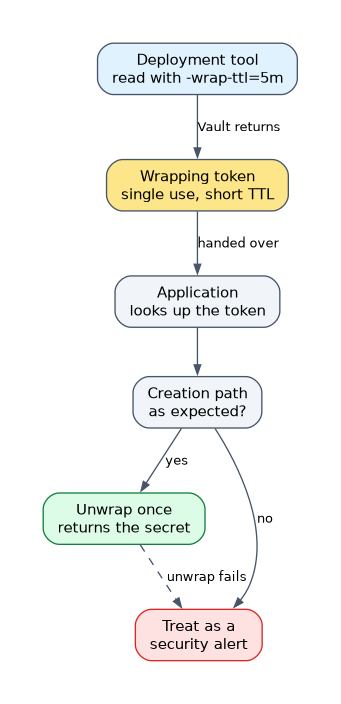 The recipient should check three things before trusting it: first, if the expected token never arrives, treat it as possible interception. Second, look it up to confirm the creation path matches what was expected. Third, unwrap it, and treat a failure as a security alert.
Typical use
A trusted system, such as a deployment tool, requests a secret with -wrap-ttl and hands only the wrapping token to the application. The application unwraps it once. The tool never needs to show the real secret to anything else.
How the exam asks about this
- "Why deliver a secret through a wrapping token?" Only a reference crosses the network, and single use plus a short TTL narrow the risk.
- "Where does Vault put a wrapped response?" In the cubbyhole of a single-use token.
- "A recipient finds the wrapping token was already used." Treat it as a possible compromise.
What to remember for the exam
- Wrapping puts the response in the cubbyhole of a single-use token and returns that token.
- Request it with the
X-Vault-Wrap-TTLheader, the-wrap-ttlCLI flag orVAULT_WRAP_TTL. - Unwrap with
vault unwraporsys/wrapping/unwrap; the token works once. - Lookup returns creation time, creation path and TTL without authentication.
- Benefits are cover, malfeasance detection and a limited lifetime.
- Rewrap moves wrapped data into a new wrapping token.
A wrapping token is single-use. If the unwrap fails because the token was already used or has expired, do not retry; treat it as a possible interception.
Common mistakes
Thinking wrapping encrypts the secret in transit. The secret sits in a cubbyhole, and the token is a reference to it. Protection comes from single use and a short TTL, not from a new cipher.
Wrapping without a short TTL. A long TTL leaves the token usable for longer. The point of wrapping is a short exposure window.
Using the wrapping token twice in an API call. Putting it in both the header and the token parameter uses it twice and revokes it, so it cannot be looked up afterward.
Check yourself
Where is a wrapped response stored?
In the cubbyhole of a new single-use wrapping token, which Vault returns in place of the secret.
How do you ask for a wrapped response from the CLI and from the API?
Use the
-wrap-ttlflag on the CLI, or theX-Vault-Wrap-TTLheader in an API request.What should a recipient do if the unwrap fails?
Treat it as a security alert, because the token may have been used or intercepted by someone else.
Topic 4 of 4 in Secrets Engines
Test yourself on Secrets Engines
The full HashiCorp Vault Associate 003 question bank has 600 questions, with timed practice exams and an explanation for every answer.
This study guide is independent and is not affiliated with, endorsed by, or sponsored by HashiCorp. Vendor names, certification names and exam codes are trademarks of their respective owners and are used for identification only.