Authentication Methods · Topic 2 of 3
Identities, Entities, Aliases and Groups
Vault Associate (003): how entities, aliases and groups tie logins from different auth methods together, and how policies on them add to a token's access.
- 5 min
- Includes a diagram
- An entity is a consolidated identity; an alias links an auth method account to it.
- An entity can have many aliases but only one per auth mount.
- Policies on entities and groups add to the token's policies; they never replace them.
What it is
Vault's identity system lets you recognize one person or machine even when it logs in through several auth methods. It also lets you attach policies to many clients at once.
An entity is a consolidated identity for one client. An alias is the account that client has with one auth method, mapped to the entity. A group holds entities, and policies on the group apply to all its members.
How it works
Entities and aliases
An entity can have zero or more aliases. Each alias is an account with an auth provider, such as an LDAP username or a GitHub login name.
An entity cannot have more than one alias for the same auth backend. Two aliases of the same type are allowed only when they come from different auth mounts.
An alias is identified by its name combined with the accessor of the auth mount it belongs to. Each method reports a different name: LDAP uses the username and GitHub uses the login name.
If no entity exists when a client logs in successfully through any method except token, Vault creates one and attaches a new alias. These are called implicit entities.
Vault is a cache of identities, not a source of them. It does not pull entities from your identity provider; operators manage them.
What identities are used for
- Attribution: if a token has an entity ID, that ID appears in the audit log, so actions can be traced to a specific client.
- Policies: policies can be attached to an entity, adding access beyond the token's own.
- Grouping: entities can be collected into groups to share policies.
Entity policies are additional
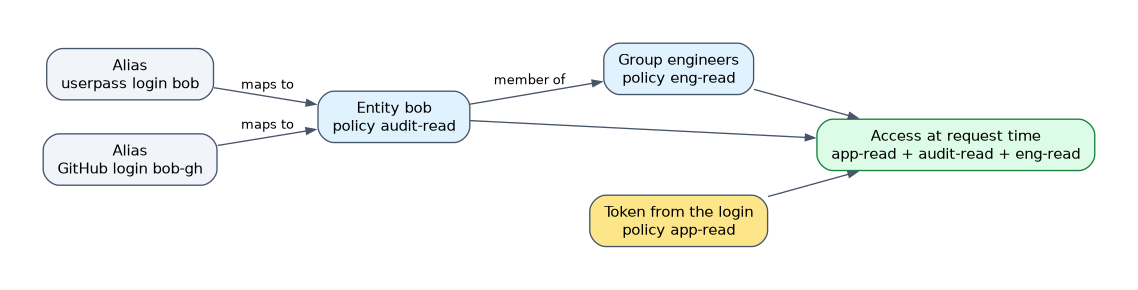 Policies on an entity grant additional permissions on top of the policies on the token. They do not replace them. They are evaluated at request time, so they can change the capabilities of tokens that already exist.
For example, a userpass token carries app-read, and the entity behind it carries audit-read. The client can use both policies at once.
Groups
A group contains entities and can also contain subgroups. Members of a subgroup get the parent group's policies as well as their own group's.
| Group type | Membership | Typical use |
|---|---|---|
| Internal (default) | Managed manually by operators | Teams defined inside Vault |
| External | Managed semi automatically through one alias that maps to a group outside Vault | An LDAP group or GitHub team |
External group membership updates when a member logs in or renews a token. Removing someone from the outside group does not remove them from the Vault group until their next login or renewal.
Commands
vault auth list
vault write identity/entity name=bob-smith policies=audit-read
vault write identity/entity-alias name=bob mount_accessor=auth_userpass_1a2b3c canonical_id=ENTITY_ID
vault write identity/group name=engineers policies=eng-read member_entity_ids=ENTITY_ID
vault write identity/group name=ldap-eng type=external policies=eng-read
vault write identity/group-alias name=ldap-engineers mount_accessor=auth_ldap_1a2b3c canonical_id=GROUP_ID
vault auth list shows each mount's accessor. The alias needs the entity ID as canonical_id, the alias name, and the accessor of the mount. An external group is created with type=external, and its group alias uses the group ID as canonical_id and the outside group's name as name.
The same operations are available over the API at identity/entity, identity/entity-alias, identity/group and identity/group-alias.
How the exam asks about this
- "One engineer logs in with LDAP and GitHub and the audit log should show one person." Create an entity with an alias for each auth method.
- "Every member of a team should get the same extra policy." Put the entities in a group and attach the policy to the group.
- "An LDAP group should map to a Vault group automatically." Use an external group.
What to remember for the exam
- An entity is a consolidated identity; an alias links an auth method account to it.
- An entity can have many aliases but only one per auth mount.
- Policies on entities and groups add to the token's policies; they never replace them.
- Policies on a group apply to every member, including members of subgroups.
- Internal groups are managed by hand; external groups map to a group in an outside system.
- An entity ID in the audit log lets you attribute actions to a client.
Anyone who can modify an entity, alias or group membership can gain higher privileges. Treat write access to the identity endpoints as sensitive.
Common mistakes
Believing Vault imports users from LDAP or GitHub. It does not. Entities are created implicitly at login or managed by operators, and Vault only caches identities.
Thinking entity policies override token policies. They are added to them. A token keeps its own policies, and the entity and group policies are extra.
Expecting an external group to drop members immediately. Membership refreshes at login or renewal, so a removed user can keep group policies until then.
Check yourself
What is the difference between an entity and an alias?
An entity is the consolidated identity of one client, while an alias is that client's account with one particular auth method, mapped to the entity.
A token has policy
aand its entity has policyb. Which policies apply?Both, because entity policies grant additional permissions on top of the token's policies.
How does an external group differ from an internal group?
Internal group membership is managed manually, while an external group maps through an alias to a group in an outside system such as LDAP and is updated at login or renewal.
Topic 2 of 3 in Authentication Methods
Test yourself on Authentication Methods
The full HashiCorp Vault Associate 003 question bank has 600 questions, with timed practice exams and an explanation for every answer.
This study guide is independent and is not affiliated with, endorsed by, or sponsored by HashiCorp. Vendor names, certification names and exam codes are trademarks of their respective owners and are used for identification only.