Access Management Architecture · Topic 1 of 2
Vault Agent
Vault Associate 003: what Vault Agent solves, with auto-auth for the token lifecycle, client side caching and templates so apps need no Vault code.
- 4 min
- Includes a diagram
- Vault Agent is a client-side daemon, started with
vault agent -config=.... - Auto-auth authenticates and manages the token lifecycle, so the application does not have to.
- A sink is where auto-auth writes the token, and a file sink is the common one.
What it is
Vault Agent is a client daemon that runs next to your application. It lowers the barrier to adopting Vault, because the application does not need code to log in, renew tokens or fetch secrets.
Without it, every application must implement authentication, token renewal and secret retrieval. With it, the Agent does that work and hands the application a file it can read.
How it works
The main features
| Feature | What it does |
|---|---|
| Auto-auth | Authenticates to Vault and manages the token lifecycle, including renewal |
| Caching | Caches tokens and the leased secrets derived from them on the client side |
| Templating | Renders secrets into files for the application, using Consul Template markup |
| Process supervisor mode | Runs a child process with secrets injected as environment variables |
| Windows service | Runs the Agent as a Windows service |
| API proxy | Deprecated in Agent; use Vault Proxy as the API proxy instead |
You start the Agent with a configuration file.
vault agent -config=/etc/vault/agent-config.hclAuto-auth
The auto_auth block names an auth method and, optionally, one or more sinks. A sink is where the Agent writes the token it obtained, such as a file.
auto_auth {
  method "approle" {
    config = {
      role_id_file_path   = "/etc/vault/roleid"
      secret_id_file_path = "/etc/vault/secretid"
    }
  }
  sink "file" {
    config = { path = "/tmp/file-foo" }
  }
}
The Agent renews the token until Vault refuses the renewal, for example because it was revoked, and then authenticates again. The application never handles that logic.
Where it runs
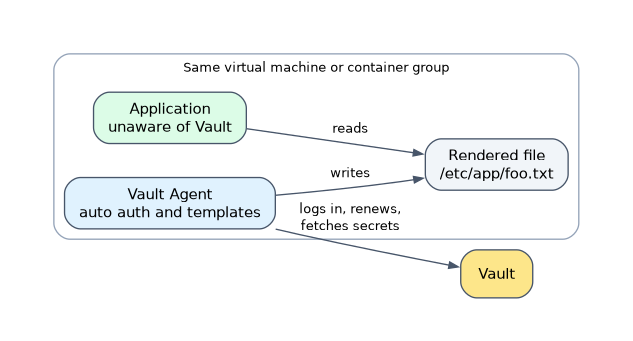 The Agent runs close to the application, for example on the same virtual machine or alongside it in a container. Machine-oriented auth methods such as AppRole, AWS and Kubernetes suit it, because no person is present to log in.
The Agent does the login, so the Vault-specific logic lives in one place that operators can change without touching application code. The application only sees the files the Agent writes, such as a rendered template.
Caching
The cache block turns on caching of responses that contain new tokens and the leased secrets from them. The Agent also manages their renewal. The benefit is lower latency when secrets are requested again.
When the cache block is set, the configuration must also define a template or listener, otherwise nothing can use the cache.
Templates
A template block says where the template comes from, with source for a file or contents for inline text, and where the result goes. The secret function from Consul Template fetches data from Vault.
template {
  contents    = "{{ with secret \"secret/my-secret\" }}{{ .Data.data.foo }}{{ end }}"
  destination = "/etc/app/foo.txt"
}
Renewable secrets are renewed after two-thirds of the lease has passed. Non-leased secrets such as KV v2 are fetched again every five minutes by default. This is why an existing application can stay Vault-unaware: it only reads the rendered file.
How the exam asks about this
- "An application cannot be modified, but it needs database credentials from Vault. What should be used?" Vault Agent with templates, which renders the secret to a file.
- "Which Agent feature handles logging in and renewing the token?" Auto-auth.
- "Which Agent feature reduces latency when reading secrets repeatedly?" Caching.
What to remember for the exam
- Vault Agent is a client-side daemon, started with
vault agent -config=.... - Auto-auth authenticates and manages the token lifecycle, so the application does not have to.
- A sink is where auto-auth writes the token, and a file sink is the common one.
- Caching stores tokens and leased secrets on the client side to reduce latency.
- Templates use Consul Template markup and let the application stay unaware of Vault.
- Process supervisor mode injects secrets into a child process as environment variables.
The Agent holds a token on behalf of the application. Anything allowed to read the sink file can use that token, so protect the sink path.
Common mistakes
Thinking the Agent is a Vault server. It is a client process. It connects to a Vault server and cannot store secrets on its own.
Mixing up auto-auth and caching. Auto-auth gets and renews the token. Caching keeps copies of tokens and leased secrets to answer repeat requests faster.
Assuming the application must call Vault. With templates, the application reads a rendered file. That is the point of the Agent for existing applications.
Check yourself
What problem does Vault Agent solve?
It removes the need for applications to implement Vault authentication, token renewal and secret retrieval themselves.
Which feature lets an unmodified application consume Vault secrets?
Templating, which renders secrets into a file using Consul Template markup.
What does the caching feature store?
Tokens and the leased secrets obtained with them, on the client side, to reduce latency.
Topic 1 of 2 in Access Management Architecture
Test yourself on Access Management Architecture
The full HashiCorp Vault Associate 003 question bank has 600 questions, with timed practice exams and an explanation for every answer.
This study guide is independent and is not affiliated with, endorsed by, or sponsored by HashiCorp. Vendor names, certification names and exam codes are trademarks of their respective owners and are used for identification only.