Terraform Security and Governance · Topic 1 of 3
Secrets, Ephemeral Values and Rotation
Terraform Professional (002): keep secrets out of state with ephemeral values and write-only arguments, protect state, and rotate secrets safely.
- 5 min
- Includes a diagram
- Sensitive values are still stored in state and plan files.
- Ephemeral values and write-only arguments are never stored in state or plan files.
- A root module output cannot be ephemeral; a child module output can.
What it is
A secret can leak from four places: configuration in version control, CLI output, the plan file and the state file. Good practice is to never hardcode a secret, fetch it at run time from a secrets manager, keep it out of state where the provider allows, and protect state where it does not.
Rotation is the other half of the job. When a secret changes, you must know how the new value reaches the resource, and what Terraform will do on the next plan.
How it works
Where a value ends up
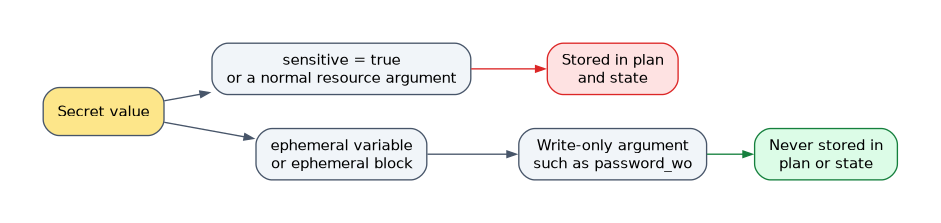
| Technique | Hidden in output | In plan and state | Since |
|---|---|---|---|
sensitive = true | Yes | Yes | 0.14 |
ephemeral = true on a variable or child module output | Only if also sensitive | No | 1.10 |
ephemeral block | Only if marked sensitive | No | 1.10 |
Write-only argument such as password_wo | Not applicable | No | 1.11 |
sensitive only redacts display, and anything derived from a sensitive value is also redacted. terraform output -json and -raw still print sensitive values in plain text.
Ephemeral values can only flow into certain places: locals, ephemeral variables, child module ephemeral outputs, write-only arguments, other ephemeral blocks, provider configuration, and provisioner and connection blocks. Anywhere else, such as a normal resource argument or a root module output, is an error.
Reading from a secrets manager
A data source returns the current secret, but its result is written to state. An ephemeral block reads the same secret without storing it, if the provider offers one.
ephemeral "vault_kv_secret_v2" "db" {
  mount = "kv"
  name  = "prod/db"
}

resource "aws_db_instance" "main" {
  # other arguments omitted
  password_wo         = tostring(ephemeral.vault_kv_secret_v2.db.data.password)
  password_wo_version = 2
}Rotation patterns
| Situation | What happens | What to do |
|---|---|---|
| Write-only argument | Terraform stores nothing to compare | Increase password_wo_version so the new value is sent |
Value read by a data source | Read again on each plan, so dependents show an update | Run plan and apply; the value stays in state |
| Another system rotates a normal argument | The plan proposes setting it back | Use ignore_changes |
| Replace an object when something changes | Needs a managed resource reference | Use replace_triggered_by, with terraform_data wrapping a plain value |
Trace the ignore_changes case with this configuration.
resource "aws_db_instance" "main" {
  # other arguments omitted
  password = var.initial_password

  lifecycle {
    ignore_changes = [password]
  }
}
On create, Terraform uses var.initial_password, because ignore_changes applies to updates only. After a manager rotates the password, the next plan proposes no password change. The initial value is still in state, so this suits a throwaway bootstrap value only.
To record an out-of-band change in state without touching the object, run terraform apply -refresh-only, which replaces terraform refresh.
Protecting state and plan files
- Store state in a remote backend, restrict access and track access with audit logs.
- Encrypt at rest: set
encrypton the S3 backend; HCP Terraform encrypts state at rest and uses TLS in transit. - For control of the key, HCP Terraform Premium offers hold your own key, which encrypts state and plan files with your own key management system.
- Never commit state, and treat saved plan files as secrets.
How the exam asks about this
- "A scan finds the database password in state although the variable is marked sensitive." Use an ephemeral value with a write-only argument;
sensitiveonly hides output. - "The password changed in Vault, and the write-only argument did not update." Increase the version argument, such as
password_wo_version. - "A rotation tool changes a password, and every plan tries to change it back." Add
ignore_changesfor that argument.
What to remember for the exam
- Sensitive values are still stored in state and plan files.
- Ephemeral values and write-only arguments are never stored in state or plan files.
- A root module output cannot be ephemeral; a child module output can.
- A
datasource that reads a secret writes it to state; anephemeralblock does not. ignore_changesaffects updates only, never the initial create.- Provider support varies, so check the registry for ephemeral blocks and write-only arguments.
Changing only the value passed to a write-only argument does nothing on its own. Terraform keeps no copy to compare, so the provider sees a new value only when the matching version argument changes.
Common mistakes
Treating sensitive as encryption. The argument changes what is displayed, not what is stored. Anyone who can read the state file can read the value.
Assuming a secrets manager keeps the value out of state. Vault protects the source, but a data source copies the result into state. Use an ephemeral block to avoid the copy.
Passing an ephemeral value to a normal argument. Terraform raises an error, because that argument would be saved in state. Use the write-only argument, such as password_wo rather than password.
Check yourself
Does marking a variable as sensitive keep it out of the state file?
No. It only redacts the value from CLI and UI output, and the value is still stored in state and plan files.
How do you send a rotated password through a write-only argument?
Pass the new value and change the companion version argument, such as
password_wo_version, so the provider receives it during apply.Which block reads a Vault secret without saving it in state?
An
ephemeralblock, such asephemeral "vault_kv_secret_v2", whose result can flow into a write-only argument.
Topic 1 of 3 in Terraform Security and Governance
Test yourself on Terraform Security and Governance
The full HashiCorp Terraform Infrastructure Engineer Professional question bank has 600 questions, with timed practice exams and an explanation for every answer.
This study guide is independent and is not affiliated with, endorsed by, or sponsored by HashiCorp. Vendor names, certification names and exam codes are trademarks of their respective owners and are used for identification only.