CI/CD and Automation Workflows · Topic 1 of 2
Pipelines and Deployment Strategies
Terraform Professional 002: run Terraform in CI, use detailed exit codes and saved plans, handle locks and plugin caches, and shift traffic in stages.
- 5 min
- Includes a diagram
- Exit codes with
-detailed-exitcode: 0 no changes, 1 error, 2 changes. - Save a plan with
-outonly when it will be applied. TF_CLI_ARGS_planarguments go after the subcommand and before command-line flags.
What it is
A Terraform pipeline runs init, plan and apply without prompts, with a review gate between plan and apply. The aim is that what was reviewed is exactly what gets applied.
A deployment strategy decides how those runs behave safely at scale: how they share state and providers, and how a change reaches users.
How it works
The core commands
terraform init -input=false
terraform plan -input=false -out=tfplan
terraform apply -input=false tfplan
-input=false makes Terraform fail rather than wait for a prompt nobody will answer. Supply values with -var or -var-file on the plan step, since a saved plan takes no new options at apply.
If plan and apply run on different machines, archive the whole working directory after plan, including .terraform, and restore it at the same absolute path. Use the same operating system, CPU architecture and provider versions. Plan files contain sensitive values, so restrict who can read those artifacts.
Branching on the plan result
terraform plan -input=false -detailed-exitcode -out=tfplan
case $? in
  0) echo "no changes" ;;
  2) echo "changes: wait for approval" ;;
  *) exit 1 ;;
esac| Exit code | Meaning |
|---|---|
| 0 | Success, no changes |
| 1 | Error |
| 2 | Success, changes present |
A pipeline that treats every non-zero code as an error fails whenever there is real work to do, so handle 2 explicitly.
Environment variables and options
| Setting | Effect |
|---|---|
TF_IN_AUTOMATION | Any non-empty value trims next-step hints; output only |
TF_INPUT=false | Acts like -input=false |
TF_CLI_ARGS | Adds arguments to every command |
TF_CLI_ARGS_plan | Adds arguments to plan only |
TF_WORKSPACE | Selects a workspace without a command |
TF_TOKEN_app_terraform_io | Token for HCP Terraform |
-chdir=DIR | Global option, placed before the subcommand |
Trace a combined run:
export TF_CLI_ARGS_plan="-refresh=false"
terraform -chdir=envs/prod plan -var-file=prod.tfvars-chdirswitches toenvs/prodfirst, so it comes beforeplan.- The variable's arguments go right after the subcommand and before your flags.
- Terraform effectively runs
plan -refresh=false -var-file=prod.tfvars.
Pull request plans
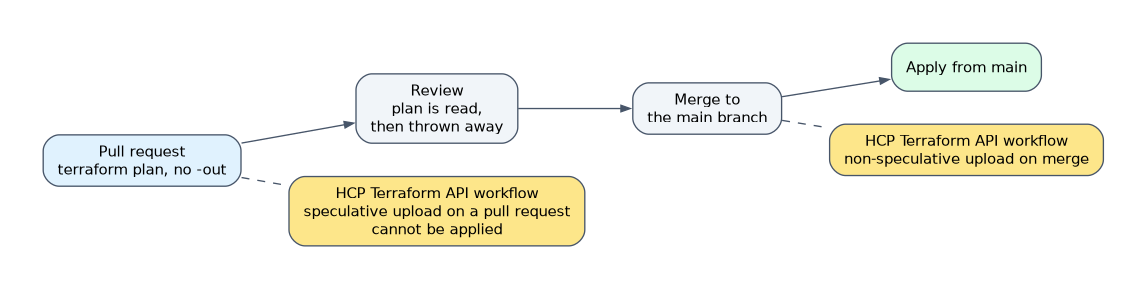 Run a plan on every pull request, without
-out, because those plans are for reading and are thrown away. Apply from the main branch after merge.
With HCP Terraform, an API-driven workflow uploads the configuration as speculative on a pull request and non-speculative on merge. Speculative plans cannot be applied. Anyone able to submit a pull request can discover secrets exposed to its build.
Safe runs: approvals and locks
Keep one outstanding plan at a time, because applying a plan invalidates others made against the same state. Approve in sequence using staged pipeline steps. Reserve -auto-approve for non-critical environments.
Concurrent jobs on one state are stopped by the lock, and the second fails with Error acquiring the state lock. Add -lock-timeout=10m so it retries rather than failing at once.
If a killed runner leaves a lock behind, confirm nothing is running and use terraform force-unlock LOCK_ID. Never set -lock=false to get a pipeline past this error.
CLI configuration and plugin caching
Runners read .terraformrc on Unix or terraform.rc in %APPDATA% on Windows. TF_CLI_CONFIG_FILE points to another file, which should match *.tfrc.
| Setting | Purpose |
|---|---|
plugin_cache_dir or TF_PLUGIN_CACHE_DIR | Downloads each provider once; the directory must already exist |
provider_installation | Uses mirrors instead of direct registry access |
credentials | User or team token for a host, not an organization token |
The cache is not guaranteed to be concurrency safe, so parallel terraform init jobs sharing one directory have undefined behavior. Cached providers are used only when they match the lock file's checksums.
Rollout patterns
| Pattern | How it works with Terraform | Trade-off |
|---|---|---|
create_before_destroy | New object before the old one goes | Needs names that can coexist |
| Blue-green | Two environments behind a load balancer; shift traffic, then remove the old one | Instant switch, double capacity for a while |
| Canary | Send a small weight to the new version, then raise it | Limits impact; needs monitoring |
locals {
  weights = {
    blue   = { blue = 100, green = 0 }
    canary = { blue = 90, green = 10 }
    green  = { blue = 0, green = 100 }
  }
  active = lookup(local.weights, var.traffic, local.weights.blue)
}
With var.traffic = "canary", local.active.green is 10. Each stage is a normal apply that only updates listener weights, and an unrecognized value falls back to all traffic on blue.
How the exam asks about this
- "The pipeline must comment only when a plan has changes." Use -detailed-exitcode and check for exit code 2.
- "Parallel jobs on one state fail immediately with a lock error, and they should wait." Add -lock-timeout.
- "Output keeps suggesting commands that make no sense in CI logs." Set TF_IN_AUTOMATION.
What to remember for the exam
- Exit codes with
-detailed-exitcode: 0 no changes, 1 error, 2 changes. - Save a plan with
-outonly when it will be applied. TF_CLI_ARGS_planarguments go after the subcommand and before command-line flags.-chdirgoes before the subcommand.TF_IN_AUTOMATIONis cosmetic and does not disable prompts; use-input=false.- The plugin cache is not concurrency safe.
Never commit plan files or leave them as broadly readable build artifacts. A saved plan contains the configuration, state data and variable values, including sensitive values in cleartext.
Common mistakes
Assuming TF_IN_AUTOMATION makes runs non-interactive. It only changes output text. Prompts are controlled by -input=false or TF_INPUT.
Re-planning at the apply stage. Running terraform apply -auto-approve without the file builds a new plan that nobody reviewed. Pass the saved plan instead.
Putting -chdir after the subcommand. It is a global option, so terraform plan -chdir=dir is wrong. Write terraform -chdir=dir plan.
Check yourself
What does exit code 2 mean with -detailed-exitcode?
The plan succeeded and changes are present. Exit code 0 means no changes, and 1 means an error.
What happens when a second pipeline job applies against a locked state?
It fails with
Error acquiring the state lock, unless-lock-timeoutis set, which makes it retry for that duration.Why should a pull request plan skip -out?
It is only for review and will not be applied. Plan files are for plans you intend to apply, and they contain sensitive values.
Topic 1 of 2 in CI/CD and Automation Workflows
Test yourself on CI/CD and Automation Workflows
The full HashiCorp Terraform Infrastructure Engineer Professional question bank has 600 questions, with timed practice exams and an explanation for every answer.
This study guide is independent and is not affiliated with, endorsed by, or sponsored by HashiCorp. Vendor names, certification names and exam codes are trademarks of their respective owners and are used for identification only.