Terraform State Management · Topic 1 of 2
Local Backend and State Locking
Terraform Associate 004: the local backend, terraform.tfstate and its backup, CLI workspaces on disk, automatic state locking and terraform force-unlock.
- 5 min
- Includes a diagram
- No backend block and no cloud block means the local backend and
terraform.tfstate. - The local backend arguments are
pathandworkspace_dir; the previous state is kept asterraform.tfstate.backup. - Extra CLI workspaces on the local backend store state under
terraform.tfstate.d.
What it is
A backend decides where Terraform stores its state. If a configuration has no backend block and no cloud block, Terraform uses the local backend, which writes state as a file on the disk of the machine running Terraform.
State locking protects that file. While an operation that could write state is running, Terraform holds a lock so a second run cannot change the same state at the same time and corrupt it.
How it works
The local backend
With no backend configured, the state file is terraform.tfstate in the root module directory. You can also declare the local backend explicitly to change the path.
terraform {
  backend "local" {
    path = "state/network.tfstate"
  }
}| Argument | What it does |
|---|---|
path | Path to the state file, default terraform.tfstate relative to the root module |
workspace_dir | Path where state for non default workspaces is kept |
When Terraform writes a new state, it keeps the previous version as terraform.tfstate.backup. The backup is a single earlier snapshot, not a full history.
CLI workspaces on the local backend
The local backend supports multiple CLI workspaces. The default workspace uses terraform.tfstate, and each extra workspace gets its own state file under terraform.tfstate.d/<workspace name>/ unless workspace_dir says otherwise.
terraform workspace new dev
terraform workspace list
terraform workspace select default
Each workspace is a separate state for the same configuration. The code is shared; the recorded resources are not.
Limits of the local backend
The local backend is simple and fine for one person learning or testing. It has clear limits for team work:
| Concern | Local backend |
|---|---|
| Sharing state | Only by copying the file, which is error prone |
| Locking | Uses system APIs on the one machine, so it cannot stop a teammate on another machine |
| Secrets | State holds attribute values, including sensitive ones, in plain text on disk |
| Loss | Deleting the folder or the disk loses the state |
Because state can contain secrets, do not commit terraform.tfstate or its backup to version control. A remote backend with access control and encryption is the usual fix.
State locking
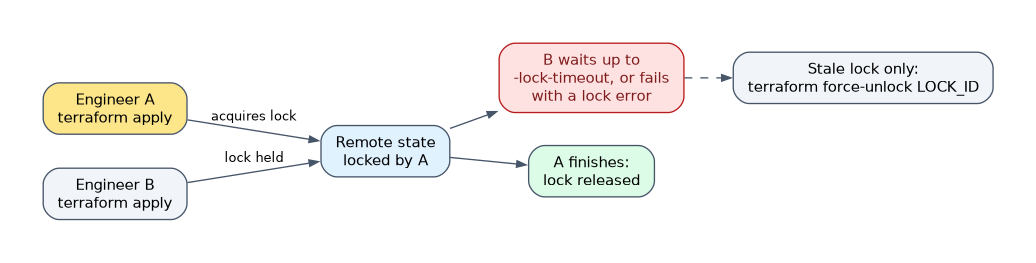 Locking happens automatically on all operations that could write state, such as
terraform plan, terraform apply and terraform destroy. Terraform does not print a message when it takes the lock; it only reports status if acquiring the lock takes longer than expected.
| Option or command | What it does |
|---|---|
-lock=false | Disables locking for most commands; not recommended |
-lock-timeout=DURATION | Waits up to that time for a lock instead of failing at once, for example -lock-timeout=60s |
terraform force-unlock LOCK_ID | Removes a lock that automatic unlocking failed to release |
Not every backend supports locking; each backend's documentation says whether it does. The local backend locks the file, the S3 backend locks with a lock file when use_lockfile = true, and HCP Terraform locks workspace state for you.
Force unlock
If Terraform crashes or loses its connection mid run, the lock can be left behind. The next run fails and shows the lock ID.
terraform force-unlock 6638c5b7-7d63-4ea5-8b2c-0f1e1d5b1a2eUse it only to clear your own stuck lock. If you remove a lock that another person's run still holds, two writers can overwrite each other and corrupt the state.
How the exam asks about this
- "No backend block exists. Where does Terraform save state?" In terraform.tfstate in the root module directory, using the local backend.
- "A teammate's apply is running and you run terraform apply." Your run cannot acquire the lock and stops, or waits if you set a lock timeout.
- "A crashed run left the state locked." Run terraform force-unlock with the lock ID, after confirming no run is still active.
What to remember for the exam
- No backend block and no cloud block means the local backend and
terraform.tfstate. - The local backend arguments are
pathandworkspace_dir; the previous state is kept asterraform.tfstate.backup. - Extra CLI workspaces on the local backend store state under
terraform.tfstate.d. - Locking is automatic for every operation that could write state.
-lock=falsedisables locking,-lock-timeoutwaits for it, andterraform force-unlock LOCK_IDclears a stuck lock.- Not all backends support locking, so check the backend before relying on it for a team.
State stores resource attributes in plain text, including values marked sensitive. Never commit the local state file or its backup to a Git repository.
Common mistakes
Thinking locking needs to be turned on per command. Locking is automatic whenever a backend supports it. You only touch it to disable it, wait longer for it or force it open.
Using force unlock as a routine fix. It exists for a lock that failed to release. Running it while another apply is in progress invites two runs writing the same state.
Treating the backup as version history. terraform.tfstate.backup holds only the snapshot before the last write. Real history needs a backend that versions state, such as an S3 bucket with versioning or HCP Terraform.
Check yourself
What is the default state file name and location?
terraform.tfstatein the root module directory, written by the local backend when no backend or cloud block is configured.Which command removes a lock left behind by a crashed run?
terraform force-unlockwith the lock ID that Terraform printed; use it only when no other run still holds the lock.Does every backend support state locking?
No. Locking happens automatically where a backend supports it, and each backend's documentation states whether it does.
Topic 1 of 2 in Terraform State Management
Test yourself on Terraform State Management
The full HashiCorp Terraform Associate 004 question bank has 600 questions, with timed practice exams and an explanation for every answer.
This study guide is independent and is not affiliated with, endorsed by, or sponsored by HashiCorp. Vendor names, certification names and exam codes are trademarks of their respective owners and are used for identification only.