Maintain Infrastructure with Terraform · Topic 1 of 2
Importing Existing Infrastructure
Terraform Associate 004: import existing resources with import blocks, generate configuration with -generate-config-out, or use terraform import.
- 5 min
- Includes a diagram
- An import block has
to(address) andid(provider ID);identityis an alternative toid. - Plan shows the import; apply performs it.
terraform plan -generate-config-out=FILEwrites resource blocks for import blocks without one, into a new file.
What it is
Importing brings a resource that already exists, created by hand or by another tool, under Terraform management. After the import, the object is recorded in state at a resource address and Terraform plans changes to it like any other resource.
Terraform offers two ways to do it: the import block, which is part of configuration and goes through plan and apply, and the older terraform import command, which writes straight to state.
How it works
The import block
An import block names the resource address to import into (to) and the provider's ID for the real object (id).
import {
  to = aws_s3_bucket.logs
  id = "acme-app-logs"
}

resource "aws_s3_bucket" "logs" {
  bucket = "acme-app-logs"
}| Argument | Meaning |
|---|---|
to | Resource address in your configuration that will own the object |
id | The provider's identifier for the existing object; must be known at plan time |
identity | Alternative to id for providers that support resource identity; cannot be combined with id |
for_each | Imports several similar objects from a map or set of strings |
provider | Uses a specific provider configuration, such as an aliased one |
The ID format depends on the resource type. A bucket name, an instance ID or a full Azure resource ID are all common, and each resource's documentation in the registry describes its import ID.
What plan and apply do
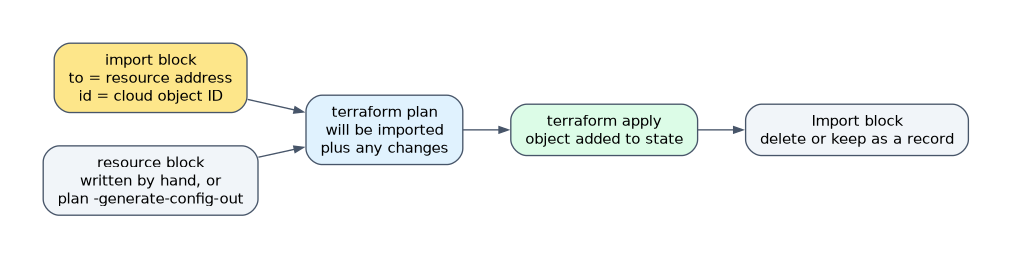
terraform plan shows the resource as "will be imported" along with any changes needed to match the configuration. Nothing is imported until you run terraform apply. If the configuration differs from the real object, the same apply also makes those changes, so read the plan carefully.
After a successful import you can delete the import block or keep it as a record. Keeping it is harmless because the object is already in state.
Generating configuration
Writing the resource block by hand is slow for resources with many arguments. Terraform can write it for you from the import block.
import {
  to = aws_instance.web
  id = "i-0abc123def4567890"
}
terraform plan -generate-config-out=generated.tfTerraform reads the real object and writes a resource block for every import block that has no matching resource block. The docs still label configuration generation as experimental.
| Rule | Detail |
|---|---|
| New file only | The path must not already exist, or Terraform throws an error |
| Review the output | Generated code can include conflicting or unneeded arguments to remove |
| Provider setup | If no other resource uses that provider, add a provider block and run terraform init |
Once the generated file plans cleanly, run terraform apply to finish the import and treat the file as normal configuration.
The terraform import command
terraform import aws_instance.web i-0abc123def4567890The command takes a resource address and an ID and writes the object into state immediately. Compare it with the import block:
| import block | terraform import command | |
|---|---|---|
| Reviewed in a plan | Yes | No, state changes at once |
| Many resources at once | Yes, with several blocks or for_each | One resource per run |
| Can generate configuration | Yes, with -generate-config-out | No |
| Resource block needed first | Yes, unless generating config | Yes |
| Leaves a record in code | Yes, if you keep the block | No |
Apart from generated configuration, neither method writes resource blocks. Every imported object needs one that matches it.
Import safety
Import each real object to only one resource address. If two addresses, or two configurations, manage the same object, each run fights the other. Importing also does not change the real resource by itself; only differences you approve in the plan do.
How the exam asks about this
- "You must bring 20 existing buckets under management and review the result first." Use import blocks (with
for_eachor several blocks) and review the plan. - "You have an import block but no resource block and want Terraform to write it." Run terraform plan -generate-config-out=FILE.
- "Does terraform import create the resource block for you?" False; it only writes state, so the block must exist.
What to remember for the exam
- An import block has
to(address) andid(provider ID);identityis an alternative toid. - Plan shows the import; apply performs it.
terraform plan -generate-config-out=FILEwrites resource blocks for import blocks without one, into a new file.terraform import ADDRESS IDwrites to state immediately, one resource at a time, with no plan to review.- Every imported object needs a matching resource block, or Terraform will plan to destroy it.
- Import an object to one address only.
After an import, run a plan before anything else. If the configuration does not match the real object, the next apply will change the resource to match the configuration.
Common mistakes
Expecting terraform import to write configuration. The command only records the object in state. You write the resource block yourself, or use an import block with -generate-config-out.
Pointing -generate-config-out at an existing file. Terraform refuses and throws an error. Give a new file name, then move the code where you want it.
Deleting the resource block after import. The object is in state, so removing its block makes Terraform plan a destroy. Keep the block, or use a removed block to stop managing the object.
Check yourself
Which two arguments does a basic import block need?
to, the resource address in your configuration, andid, the provider's identifier for the existing object.When is the resource actually imported when you use an import block?
During
terraform apply.terraform planonly shows that the resource will be imported.What is a key drawback of the terraform import command compared with import blocks?
It changes state at once without a plan to review and imports only one resource per run.
Topic 1 of 2 in Maintain Infrastructure with Terraform
Test yourself on Maintain Infrastructure with Terraform
The full HashiCorp Terraform Associate 004 question bank has 600 questions, with timed practice exams and an explanation for every answer.
This study guide is independent and is not affiliated with, endorsed by, or sponsored by HashiCorp. Vendor names, certification names and exam codes are trademarks of their respective owners and are used for identification only.