HCP Terraform · Topic 1 of 2
HCP Terraform Workflows and CLI Integration
Terraform Associate 004: create infrastructure with HCP Terraform VCS, CLI and API workflows, terraform login, the cloud block and execution modes.
- 5 min
- Includes a diagram
- The three workflows are VCS driven, CLI driven and API driven.
- Pull requests in a VCS driven workspace produce speculative plans that cannot be applied.
terraform loginstores an API token in the CLI credentials file.
What it is
HCP Terraform (formerly Terraform Cloud) runs Terraform for you as a hosted service. It stores each workspace's state, keeps variables and credentials secure, runs plans and applies on disposable machines it manages, and records every run.
You create infrastructure in HCP Terraform through one of three workflows, and you connect a local configuration to it with terraform login and the cloud block.
How it works
The three run workflows
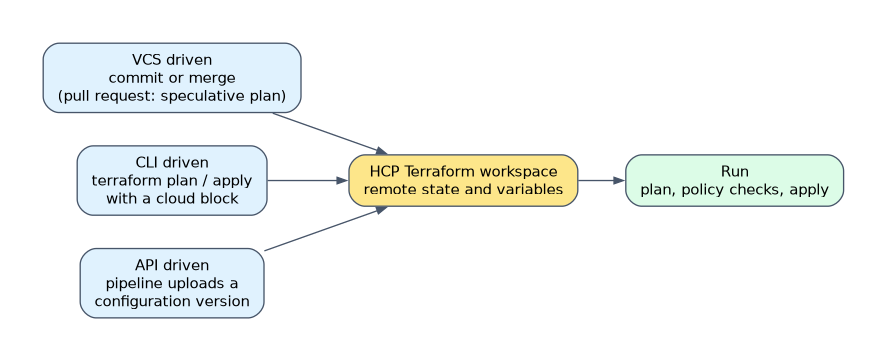
| Workflow | What starts a run | Typical use |
|---|---|---|
| VCS driven | A commit or merge to the connected repository branch | Teams that review changes as pull requests |
| CLI driven | terraform plan or terraform apply on your machine | Engineers who want the CLI with remote state and runs |
| API driven | Your pipeline uploads a configuration version through the API | Custom CI/CD tooling |
In the VCS driven workflow, a pull request triggers a speculative plan: a plan only run that shows the effect of the change and cannot be applied. Merging to the tracked branch queues a real run. A workspace connected to VCS does not accept terraform apply from the CLI; changes must come through the repository.
A run in HCP Terraform
A run moves through stages: plan, then optional cost estimation and policy checks, then apply. Run tasks can call outside tools at set points, such as before or after the plan. If auto apply is off, someone with apply permission must confirm the plan before it is applied.
Every run, its logs and the state it produced stay in the workspace history. Each workspace also selects the Terraform version its runs use, and you upgrade it in the workspace settings.
Logging in from the CLI
terraform loginterraform login opens a browser so you can create an API token, then saves it in the CLI credentials file (credentials.tfrc.json). For Terraform Enterprise, pass the hostname, as in terraform login tfe.example.com. Avoid putting tokens in configuration.
The cloud block
terraform {
  cloud {
    organization = "acme"
    workspaces {
      project = "networking"
      name    = "network-prod"
    }
  }
}| Argument | Meaning |
|---|---|
organization | The HCP Terraform organization |
workspaces.name | One workspace for this configuration |
workspaces.tags | Match all workspaces with these tags; cannot be combined with name |
workspaces.project | The project the workspaces belong to |
hostname | Defaults to app.terraform.io; set it for Terraform Enterprise |
A configuration uses the cloud block or a backend block, never both. Environment variables can fill missing values: TF_CLOUD_ORGANIZATION, TF_CLOUD_HOSTNAME, TF_CLOUD_PROJECT and TF_WORKSPACE. If you rely only on these, you still need an empty cloud {} block, and values in the block take precedence.
Migrating local state to HCP Terraform
Add the cloud block to a configuration that already has local state, then run terraform init. Terraform detects the change and offers to migrate the existing state into the HCP Terraform workspace. After migration, the workspace holds the state and you can remove the local terraform.tfstate file.
Execution modes
| Mode | Where runs happen | State |
|---|---|---|
| Remote | On HCP Terraform's disposable virtual machines | In HCP Terraform |
| Local | On your own machine through the CLI | Still in HCP Terraform |
| Agent | On HCP Terraform agents you run in your own network | In HCP Terraform |
In remote mode, terraform plan and terraform apply from the CLI stream output from the remote run, and workspace variables are used. In local mode, HCP Terraform only stores state, and workspace variables and variable sets are not evaluated. Agent mode suits private or on premises infrastructure that HCP Terraform cannot reach directly.
Sharing values between workspaces
A workspace can read another workspace's root outputs with the terraform_remote_state data source, given access. Run triggers connect workspaces so that a successful apply in a source workspace queues a run in the dependent one.
How the exam asks about this
- "Developers must review infrastructure changes as pull requests before anything is applied." Use the VCS driven workflow; pull requests get speculative plans.
- "You want CLI plan and apply but with state and runs in HCP Terraform." Add a cloud block, run terraform login and terraform init.
- "Runs must reach servers in a private data center." Use agent execution mode.
What to remember for the exam
- The three workflows are VCS driven, CLI driven and API driven.
- Pull requests in a VCS driven workspace produce speculative plans that cannot be applied.
terraform loginstores an API token in the CLI credentials file.- The cloud block takes
organizationand aworkspacesblock withnameortags, plus optionalproject. - Add the cloud block and run
terraform initto migrate existing state to HCP Terraform. - Execution modes are remote, local and agent; state stays in HCP Terraform in all three.
In local execution mode, workspace variables and variable sets are not used. Runs use only what your own machine provides, so credentials stored in the workspace do not apply.
Common mistakes
Using a backend block and a cloud block together. Both store state, so a configuration can contain only one of them. Pick the cloud block for HCP Terraform.
Running terraform apply against a VCS connected workspace. HCP Terraform rejects it. Commit and merge the change, or use a workspace with the CLI driven workflow.
Thinking local execution means local state. Local mode changes where the run happens. The workspace still stores the state in HCP Terraform.
Check yourself
What does
terraform logindo?It obtains an HCP Terraform API token through the browser and saves it in the CLI credentials file for later commands.
Can a speculative plan be applied?
No. A speculative plan is a plan only run, for example on a pull request, that shows the effect of a change but cannot be applied.
Which execution mode runs Terraform inside your private network?
Agent mode, which sends runs to HCP Terraform agents you install where they can reach private or on premises resources.
Topic 1 of 2 in HCP Terraform
Test yourself on HCP Terraform
The full HashiCorp Terraform Associate 004 question bank has 600 questions, with timed practice exams and an explanation for every answer.
This study guide is independent and is not affiliated with, endorsed by, or sponsored by HashiCorp. Vendor names, certification names and exam codes are trademarks of their respective owners and are used for identification only.