Serving and scaling models · Topic 2 of 3
Model Registry Versions and Rollout Strategies
Organize and version models in Gemini Enterprise Agent Platform Model Registry and compare versions with A/B tests, canary releases and traffic splits.
- 5 min
- Includes a diagram
- Model Registry holds models, versions, aliases, labels and evaluations from any training source.
- Upload with
parent_modelto add a version; use aliases such aschampionin pipelines. - One endpoint can host several deployed models with a traffic split.
What it is
Gemini Enterprise Agent Platform Model Registry is the central list of your models and their versions. Every trained model, whether from AutoML, BigQuery ML or custom training, can be registered, evaluated, labeled and deployed from one place.
A rollout strategy decides how a new version replaces the old one. Instead of switching all traffic at once, you send a small share first (canary) or split traffic to compare versions (A/B test), and you keep a quick way back.
How it works
Organizing models in Model Registry
| Concept | Meaning |
|---|---|
| Model | A named entry, for example churn-classifier |
| Version | One trained instance of that model; each has its own artifacts and evaluation |
| Default version | The version used when you refer to the model without a version; carries the default alias |
| Alias | A movable name on one version, such as champion or challenger |
| Labels | Key-value tags such as team, use case or data version, for filtering |
| Evaluation | Metrics attached to the version, so versions can be compared in the console |
Models trained with AutoML or pipelines can be registered automatically, and BigQuery ML models can be registered from BigQuery. Uploading with parent_model adds a new version instead of a new model.
from google.cloud import aiplatform

PREBUILT_XGBOOST_SERVING_IMAGE = "..."   # a prebuilt XGBoost serving container URI

challenger = aiplatform.Model.upload(
    parent_model="projects/my-project/locations/us-central1/models/1234567890",
    display_name="churn-classifier",
    artifact_uri="gs://my-models/churn/v4/",
    serving_container_image_uri=PREBUILT_XGBOOST_SERVING_IMAGE,
    is_default_version=False,
    version_aliases=["challenger"],
)
Pipelines and apps should refer to an alias rather than a version number. Promoting a model then means moving the alias, with no code change.
How endpoints support rollouts
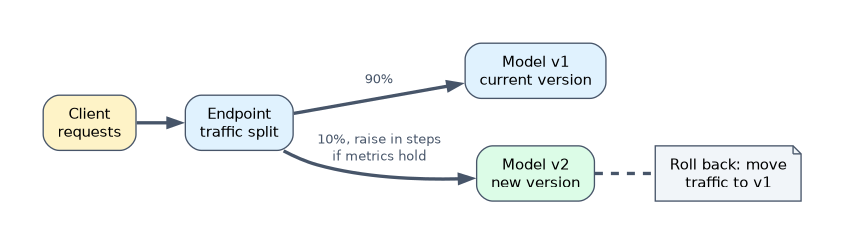
One endpoint can host several deployed models at once, with a traffic split that sends a percentage of requests to each. Each deployed model has its own machines and autoscaling.
endpoint = aiplatform.Endpoint("ENDPOINT_ID")   # the production endpoint
endpoint.deploy(
    model=challenger,
    traffic_percentage=10,          # 10% to the new version, 90% stays on the old one
    machine_type="n1-standard-4",
    min_replica_count=1,
)
Rollout strategies
| Strategy | How | Use when |
|---|---|---|
| Canary | Send a small share (for example 5 to 10%) to the new version, watch errors, latency and business metrics, then raise in steps | Lower the risk of a bad release |
| A/B test | Split traffic between versions for a set period and compare an outcome metric with enough data for a valid result | Decide which model performs better for the business |
| Blue/green | Deploy the new version alongside the old, then switch all traffic at once | Clean cut-over with instant rollback |
| Shadow testing | Send copies of live requests to the new model without using its answers | Test on real traffic with no user impact (the application sends the copies) |
| Rollback | Move traffic back to the previous deployed model | The new version misbehaves |
Keep the old version deployed until the new one is proven, so rollback is a traffic change, not a redeploy.
"Compare two model versions on live traffic and measure conversion" is an A/B test with a traffic split. "Release with minimal risk and roll back quickly" is a canary on the same endpoint.
What to compare
| Signal | Source |
|---|---|
| Errors and latency | Endpoint metrics in Cloud Monitoring |
| Prediction distribution | Request-response logging to BigQuery, Model Monitoring |
| Model quality | Ground-truth labels joined to logged predictions when they arrive |
| Business outcome | Clicks, conversions or losses tied to each version |
A worked example
A retailer retrains its recommendation model weekly. Last month a bad version went straight to 100% of traffic and cut sales for a day.
The engineer registers each new model as a version with the challenger alias. The pipeline deploys it to the production endpoint with 10% of traffic. After two days with stable latency and equal or better click-through, traffic moves to 100%, the alias champion moves to the new version, and the old deployment is removed.
How the exam asks about this
- "Release a new fraud model while limiting the impact if it is worse." Deploy it to the same endpoint with a small traffic percentage (canary) and increase gradually.
- "Teams cannot tell which model artifact is in production." Register models as versions in Model Registry with aliases and labels.
- "A new version raises error rates after release." Shift the traffic split back to the previous deployed model.
What to remember for the exam
- Model Registry holds models, versions, aliases, labels and evaluations from any training source.
- Upload with
parent_modelto add a version; use aliases such aschampionin pipelines. - One endpoint can host several deployed models with a traffic split.
- Canary lowers release risk; A/B tests compare outcomes; keep the old version for rollback.
- Compare errors, latency, prediction distributions and business metrics.
An A/B test that stops after a few hours, or with too little traffic, can pick the wrong winner by chance. Run it long enough for a meaningful comparison.
Common mistakes
Creating a new endpoint for every version. Clients must then change URLs; deploy versions to the same endpoint and split traffic.
Removing the old model at release. Rollback becomes a slow redeploy instead of a traffic change.
Hard-coding version numbers. Use aliases so promotion needs no code change.
Check yourself
How do you add a new version to an existing model in Model Registry?
Upload the model with parent_model set to the existing model, optionally with aliases and is_default_version.
How does a canary deployment work on an endpoint?
The new version is deployed to the same endpoint with a small traffic percentage, monitored, and given more traffic in steps if it behaves well.
Why use aliases instead of version IDs?
Pipelines and apps refer to a stable name like champion, so promoting a model is just moving the alias.
Topic 2 of 3 in Serving and scaling models
Test yourself on Serving and scaling models
The full Google Cloud Professional Machine Learning Engineer question bank has 749 questions, with timed practice exams and an explanation for every answer.
This study guide is independent and is not affiliated with, endorsed by, or sponsored by Google Cloud. Vendor names, certification names and exam codes are trademarks of their respective owners and are used for identification only.