Monitoring AI solutions · Topic 2 of 2
Model Monitoring, Drift and Evaluating Gen AI
Configure Model Monitoring for skew, data drift and attribution drift, set up continuous evaluation, and monitor, test and evaluate gen AI apps.
- 6 min
- Includes a diagram
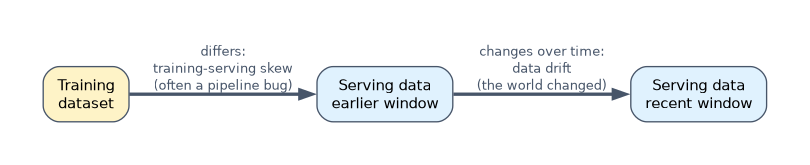
- Skew compares serving with training data; drift compares serving data over time.
- Concept drift shows up in accuracy against labels, not always in input distributions.
- Model Monitoring settings: target, baseline, features, thresholds, sampling, schedule, alerts.
What it is
A model that was accurate at launch can quietly get worse. Model Monitoring on Gemini Enterprise Agent Platform watches production inputs, outputs and attributions and alerts when they move away from a baseline. Continuous evaluation compares predictions with real outcomes as labels arrive.
Gen AI applications need their own checks: quality, safety and groundedness of free-text answers, plus cost and latency.
How it works
Common issues to monitor
| Issue | What changed | Detect it by |
|---|---|---|
| Training-serving skew | Serving data differs from the training data | Compare serving feature distributions with the training dataset |
| Data drift | Serving data changes over time | Compare recent serving data with an earlier serving window |
| Prediction drift | The distribution of outputs changes | Track predicted classes or values over time |
| Concept drift | The relationship between inputs and the label changes | Falling accuracy once labels arrive; input monitoring alone may not show it |
| Feature attribution drift | Which features drive predictions changes | Compare feature attributions over time or with training |
Skew often comes from a pipeline bug, such as different units or preprocessing in serving. Drift comes from the world changing: new customers, seasons, products or fraud patterns.
Configuring Model Monitoring
| Setting | Meaning |
|---|---|
| Target | The model version or endpoint to watch |
| Baseline | The training dataset (for skew) or a previous serving period (for drift) |
| Features and outputs | Which inputs, predictions and attributions to track |
| Thresholds | How far a distribution may move before alerting, per feature |
| Sampling rate | Share of requests analysed, trading cost against sensitivity |
| Schedule | How often monitoring jobs run, or on demand |
| Alerts | Email or Cloud Monitoring notification channels, for example Pub/Sub to trigger retraining |
Distribution distance is measured with statistics such as Jensen-Shannon divergence for numeric features and L-infinity distance for categorical ones. Attribution monitoring needs explanations enabled on the model.
Skew detection needs the training data as baseline. If a stem says the training dataset is not available to the monitoring job, only drift between serving windows can be measured.
Continuous evaluation
Distributions show change; only labels show whether the model is wrong.
- Log requests and predictions, for example with endpoint request-response logging to BigQuery.
- Join ground-truth labels when they arrive (a purchase, a chargeback, a human review).
- Compute the production metrics on a schedule and on slices.
- Alert or trigger retraining when a metric falls below its threshold.
Troubleshooting by symptom
| Symptom | Likely cause | Action |
|---|---|---|
| Accuracy fell right after launch | Training-serving skew | Compare preprocessing and feature values between training and serving |
| Accuracy declines slowly over months | Data or concept drift | Retrain on recent data; review features |
| Drift alert but accuracy unchanged | Harmless shift | Adjust the threshold or baseline; confirm before retraining |
| Attributions shift to a new feature | Leakage or a changed upstream field | Inspect that feature's source |
| Latency or errors rise | Capacity, cold starts, bad requests | Check endpoint metrics and logs; scale or fix inputs |
Monitoring, testing and evaluating gen AI solutions
| Stage | What to do |
|---|---|
| Before release | Build an evaluation dataset of real prompts with expected answers or rubrics; score with computation-based metrics and LLM-as-a-judge |
| Regression tests | Re-run the evaluation set for every change of prompt, model version, retrieval settings or tuning |
| Red teaming | Test with adversarial prompts: injection, jailbreaks, requests for sensitive data |
| In production | Track latency, token usage and cost, error rates (including 429), safety filter blocks, and Model Armor findings |
| Quality in production | Sample live responses and score groundedness, relevance and safety with a judge model; collect user feedback such as thumbs up or down |
| RAG apps | Check retrieval quality (are the right passages returned?) separately from answer quality |
Gen AI quality can change without your code changing, for example when a model version is updated or source documents change. Pin model versions and rerun evaluations before moving to a new one.
A worked example
A demand model's error doubled one week after a release. Monitoring shows skew on price: serving sends prices in cents, training used dollars. The serving code is fixed and the feature is added to skew monitoring with a tight threshold.
Months later, accuracy falls slowly as buying habits change. Drift alerts on several features confirm data drift, and the scheduled retraining pipeline with fresh data restores accuracy.
How the exam asks about this
- "A model performs worse in production than in testing from day one." Investigate training-serving skew: enable skew detection against the training data and compare preprocessing.
- "Labels arrive weeks later; detect problems sooner." Monitor input feature and prediction drift with Model Monitoring.
- "Measure a support chatbot's answer quality after each prompt change." Run the same evaluation dataset with model-based metrics (LLM-as-a-judge) as a regression test before release.
What to remember for the exam
- Skew compares serving with training data; drift compares serving data over time.
- Concept drift shows up in accuracy against labels, not always in input distributions.
- Model Monitoring settings: target, baseline, features, thresholds, sampling, schedule, alerts.
- Continuous evaluation joins logged predictions with labels to track real accuracy.
- Gen AI: evaluation sets, regression tests on every change, red teaming, and live quality, safety, cost and latency tracking.
A drift alert is not automatically a reason to retrain. Confirm with labels or evaluation; retraining on a temporary blip can make the model worse.
Common mistakes
Confusing skew and drift. Skew is training versus serving; drift is serving now versus serving before.
Monitoring inputs only. Concept drift can leave inputs unchanged while accuracy falls; evaluate against labels.
Changing prompts without re-testing. A small prompt edit can break formats or safety; rerun the evaluation set first.
Check yourself
What baseline does skew detection need?
The training dataset, so serving feature distributions can be compared with what the model was trained on.
Why can concept drift go undetected by input monitoring?
The inputs can look the same while their relationship to the label changes, so only accuracy measured against ground truth reveals it.
How should a gen AI app be tested before changing its prompt or model version?
Rerun a fixed evaluation dataset with computation-based and model-based metrics and compare results with the current version.
Topic 2 of 2 in Monitoring AI solutions
Test yourself on Monitoring AI solutions
The full Google Cloud Professional Machine Learning Engineer question bank has 749 questions, with timed practice exams and an explanation for every answer.
This study guide is independent and is not affiliated with, endorsed by, or sponsored by Google Cloud. Vendor names, certification names and exam codes are trademarks of their respective owners and are used for identification only.