Architecting low-code AI solutions · Topic 2 of 4
AutoML Training and Tuning Gemini from BigQuery
Train AutoML models on Gemini Enterprise Agent Platform, choose between AutoML and BigQuery ML, and fine-tune Gemini models from BigQuery using SQL.
- 6 min
- Includes a diagram
- AutoML covers tabular and image data; you set target, split, objective and node-hour budget.
- The optimization objective should match the business cost of errors, not default accuracy.
- Use a chronological split for time-dependent data.
What it is
AutoML on Gemini Enterprise Agent Platform trains a high quality model from your labeled data without you writing model code. You supply a dataset, a target and a training budget; the service searches model architectures and hyperparameters for you.
BigQuery can also fine-tune Gemini models with SQL: you point a remote model at a Gemini version, give it prompt and label columns, and BigQuery runs supervised tuning.
How it works
What AutoML trains
| Data | Tasks |
|---|---|
| Tabular | Classification, regression, forecasting |
| Image | Single-label and multi-label classification, object detection |
AutoML text and AutoML video training have been retired. For text tasks such as classification, entity extraction or sentiment, Google points users to prompting or tuning Gemini instead; for video, use Gemini, the Video Intelligence API or custom training.
The AutoML training flow
- Create a dataset from a BigQuery table or files in Cloud Storage (images are listed in a manifest with their labels).
- Choose the target column and the problem type.
- Split the data. The default is a random split of about 80% training, 10% validation and 10% test. Use a manual split column or a chronological split when time order matters.
- Pick an optimization objective, for example ROC AUC, log loss, or precision at a fixed recall for classification, and RMSE or MAE for regression.
- Set the budget in node hours. More budget can improve quality; early stopping ends training when it stops improving.
- Review evaluation: confusion matrix, precision and recall curves, and feature importance for tabular models.
- Deploy to an endpoint for online predictions, or run batch inference without an endpoint.
Forecasting models need more inputs: a time column, a time series identifier, the target, the forecast horizon (how far ahead to predict) and the context window (how much history each prediction looks at).
An unbalanced fraud dataset where missing fraud is costly points to an objective such as maximizing recall at a set precision, or AUC PR, rather than plain accuracy.
Choosing BigQuery ML or AutoML
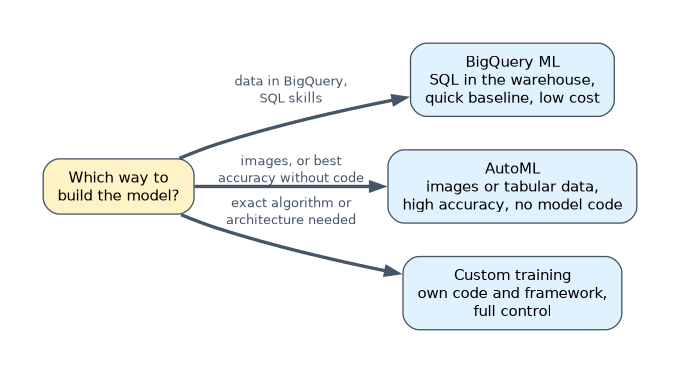
| Situation | Better choice |
|---|---|
| Data in BigQuery, SQL skills, want quick baseline | BigQuery ML |
| Images to classify or detect objects in | AutoML |
| Tabular data, highest accuracy with no model code | AutoML (also callable from SQL with AUTOML_CLASSIFIER or AUTOML_REGRESSOR model types) |
| Need to explain and tune the exact algorithm | BigQuery ML or custom training |
| Simple model, lowest cost, scheduled batch scoring | BigQuery ML |
Fine-tuning Gemini from BigQuery
BigQuery reaches Gemini through a Cloud resource connection. Its service account needs permission to call the platform. Supervised tuning uses a table of example prompts and the answers you want.
CREATE OR REPLACE MODEL `support.ticket_router`
REMOTE WITH CONNECTION `my-project.us.ai_conn`
OPTIONS (
  endpoint = 'GEMINI_VERSION',   -- a Gemini version that supports tuning
  prompt_col = 'prompt',
  input_label_cols = ['label']
) AS
SELECT CONCAT('Route this support ticket to a team: ', ticket_text) AS prompt,
       team AS label
FROM support.labeled_tickets;
The tuned model is then used like any remote model. ML.GENERATE_TEXT still works; for new queries Google recommends the newer AI.GENERATE_TEXT, which returns the text in a result column:
SELECT ticket_id, ml_generate_text_llm_result AS team
FROM ML.GENERATE_TEXT(
  MODEL `support.ticket_router`,
  (SELECT ticket_id,
          CONCAT('Route this support ticket to a team: ', ticket_text) AS prompt
   FROM support.new_tickets),
  STRUCT(0.0 AS temperature, TRUE AS flatten_json_output));
Use ML.EVALUATE on held-out examples to compare the tuned model with the base model before switching. The prompt format used for prediction should match the format used in tuning.
| Choose | When |
|---|---|
| Prompting the base Gemini model | A clear instruction and a few examples already give good results |
| Tuning in BigQuery | Hundreds of labeled examples are in BigQuery, a consistent output format or domain label set is needed, and the team works in SQL |
| AutoML or BigQuery ML classifier | Structured features rather than free text, or the cheapest per-prediction cost at very high volume |
A worked example
An insurer has 60,000 labeled photos of car damage in Cloud Storage and wants to detect damaged parts. The team has no deep learning experience. The engineer writes a manifest listing each image with its bounding boxes, creates an image dataset, and trains an AutoML object detection model with a node-hour budget.
After reviewing precision and recall per label, the model is deployed to an endpoint that the claims app calls.
How the exam asks about this
- "Classify product images into 20 categories; the team has labeled images but no ML expertise." AutoML image classification.
- "Data analysts want to adapt Gemini to route tickets using labeled examples stored in BigQuery, without leaving SQL." Create a remote model with prompt and label columns to tune Gemini in BigQuery, then call
ML.GENERATE_TEXT. - "An AutoML forecasting model must predict 14 days ahead using the last 60 days." Set the forecast horizon to 14 and the context window to 60 days.
What to remember for the exam
- AutoML covers tabular and image data; you set target, split, objective and node-hour budget.
- The optimization objective should match the business cost of errors, not default accuracy.
- Use a chronological split for time-dependent data.
- BigQuery ML is the quick, cheap SQL baseline; AutoML is the low-code path to higher accuracy and unstructured data.
- Gemini tuning in BigQuery uses a remote model over a Cloud resource connection with prompt and label columns.
Tuning is not the first step for a gen AI task. Try a clear prompt with examples first; tune only when prompting cannot meet the quality or format requirement.
Common mistakes
Choosing custom training for a standard image task. If AutoML meets the requirement, it is cheaper to build and maintain than a hand-written network.
Ignoring class imbalance. Accuracy can look high while the rare class is never predicted; choose an objective and metrics for the minority class.
Changing the prompt format after tuning. A tuned model learns the template it was trained on; predictions should use the same template.
Check yourself
What does the forecast horizon mean in AutoML forecasting?
How far into the future the model predicts, for example 14 days ahead; the context window is how much history it looks at.
How does BigQuery call Gemini for tuning and generation?
Through a remote model created over a Cloud resource connection whose service account is allowed to call the platform.
When is AutoML a better choice than BigQuery ML?
When the data is images, or when the team wants higher accuracy on tabular data without choosing and tuning algorithms themselves.
Topic 2 of 4 in Architecting low-code AI solutions
Test yourself on Architecting low-code AI solutions
The full Google Cloud Professional Machine Learning Engineer question bank has 749 questions, with timed practice exams and an explanation for every answer.
This study guide is independent and is not affiliated with, endorsed by, or sponsored by Google Cloud. Vendor names, certification names and exam codes are trademarks of their respective owners and are used for identification only.