Storing the data · Topic 1 of 4
Selecting Storage Systems by Access Pattern
Pick BigQuery, BigLake, Bigtable, Spanner, Cloud SQL, AlloyDB, Cloud Storage, Firestore or Memorystore by access pattern; plan cost, speed and lifecycle.
- 5 min
- Includes a diagram
- BigQuery for analytics, Bigtable for high-volume key lookups, Spanner for global ACID.
- Cloud SQL and AlloyDB for relational apps; Firestore for documents; Memorystore for caching.
- Avoid sequential keys in Bigtable and Spanner to prevent hotspots.
What it is
Selecting storage means matching each dataset to the managed service whose access pattern, consistency, latency and cost fit it. A good design often uses several stores: an operational database for transactions, a warehouse for analytics and object storage for raw files.
How it works
Analyzing data access patterns
Ask four questions about each dataset:
- Read shape: full scans and aggregations, single-key lookups, or relational queries with joins?
- Write rate: a few transactions, or millions of events per second?
- Latency: seconds are fine, or single-digit milliseconds?
- Consistency and scope: strong transactions, in one region or across the world?
Choosing managed services
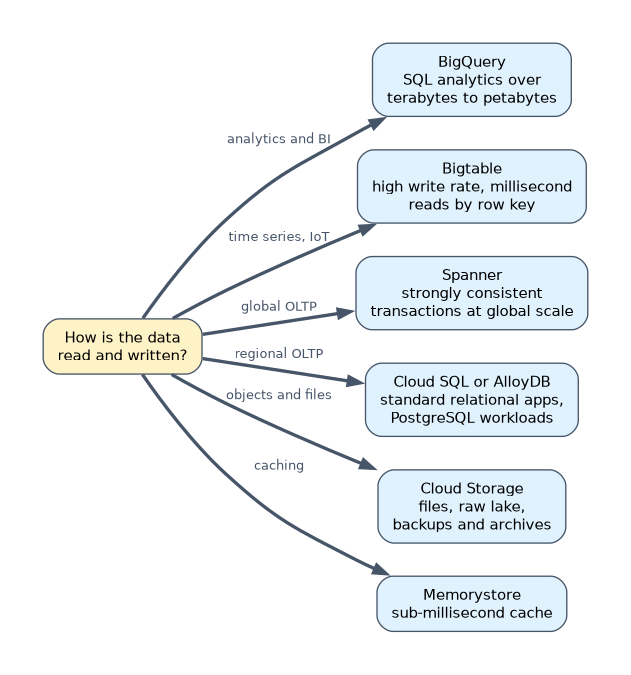
| Service | Model | Choose it for |
|---|---|---|
| BigQuery | Serverless analytics warehouse | SQL analytics over terabytes to petabytes, BI, BigQuery ML |
| BigLake | Tables over open files in object storage | Analytics on Parquet or Iceberg files with BigQuery security, shared with Spark |
| Bigtable | Wide-column NoSQL | Very high write throughput, millisecond reads by row key: time series, IoT, ad tech |
| Spanner | Relational, horizontally scalable | Strongly consistent transactions at large or global scale, up to 99.999% availability |
| Cloud SQL | Managed MySQL, PostgreSQL, SQL Server | Standard relational apps and lift-and-shift with minimal change |
| AlloyDB | PostgreSQL compatible | Demanding PostgreSQL workloads, with a columnar engine for fast analytics on operational data |
| Cloud Storage | Object storage | Files, raw data lake, backups, media, archives |
| Firestore | Serverless document database | Mobile and web app data with flexible documents |
| Memorystore | Managed Redis, Valkey or Memcached | Sub-millisecond caching, sessions, leaderboards |
BigQuery is not a serving database for per-request lookups. When an application needs a value per user in milliseconds, choose Bigtable, Firestore, a database or Memorystore.
Bigtable and Spanner key design
Both spread data by key, so sequential keys create hotspots. In Bigtable, start the row key with an identifier such as a device ID, then a timestamp, for example device#4711#20261016T1015. In Spanner, avoid monotonically increasing primary keys; use a UUID version 4 or a bit-reversed sequence.
Planning for storage costs and performance
| Service | Cost and performance levers |
|---|---|
| Cloud Storage | Storage classes: Standard, Nearline (30-day minimum), Coldline (90-day), Archive (365-day); retrieval fees for colder classes |
| BigQuery | Active versus long-term storage (half price after 90 days unmodified); logical or physical (compressed) storage billing per dataset |
| Bigtable | Node count sets throughput; SSD for low latency, HDD only for large, rarely read data |
| Spanner | Compute capacity in nodes or processing units; scales without downtime |
| Cloud SQL | Machine size, high availability and read replicas for read scaling |
Lifecycle management of data
| Service | Mechanism |
|---|---|
| Cloud Storage | Object Lifecycle Management rules, Autoclass, retention policies, object versioning |
| BigQuery | Dataset default table expiration, table expiration, partition expiration |
| Bigtable | Garbage collection policies per column family (max versions or max age) |
{
  "lifecycle": {
    "rule": [
      {"action": {"type": "SetStorageClass", "storageClass": "COLDLINE"},
       "condition": {"age": 90}},
      {"action": {"type": "Delete"}, "condition": {"age": 2555}}
    ]
  }
}
gcloud storage buckets update gs://raw-logs --lifecycle-file=lifecycle.jsonAutoclass moves each object between classes based on its own access, which suits data with unpredictable access. Fixed lifecycle rules suit predictable aging, such as logs read for 30 days and then kept for audit.
A worked example
An online retailer needs storage for five workloads.
| Workload | Store | Why |
|---|---|---|
| Orders and payments | Cloud SQL for PostgreSQL | Regional relational transactions, existing app |
| Shopping session data | Memorystore | Sub-millisecond reads, data can be rebuilt |
| Click events for analysis | BigQuery, partitioned by day | SQL analytics |
| Per-user recommendations served to the site | Bigtable | Millisecond lookups by user ID |
| Raw logs kept seven years | Cloud Storage with lifecycle rules to Coldline then Archive | Cheap, durable files |
How the exam asks about this
- "Store sensor readings at millions of writes per second and read the last hour per sensor in milliseconds." Bigtable with a row key that starts with the sensor ID.
- "A global inventory database needs strongly consistent transactions across continents." Spanner in a multi-region configuration.
- "Logs are read often for 30 days, rarely for a year, then deleted." Cloud Storage lifecycle rules: change class after 30 days, delete after 365.
What to remember for the exam
- BigQuery for analytics, Bigtable for high-volume key lookups, Spanner for global ACID.
- Cloud SQL and AlloyDB for relational apps; Firestore for documents; Memorystore for caching.
- Avoid sequential keys in Bigtable and Spanner to prevent hotspots.
- Colder Cloud Storage classes have minimum durations and retrieval fees.
- Lifecycle rules, Autoclass, table and partition expiration, and Bigtable garbage collection control data age.
Moving frequently read data to Coldline or Archive to save money backfires. Retrieval fees and minimum storage durations can cost more than Standard.
Common mistakes
Picking Bigtable for SQL joins and transactions. It offers single-row atomicity and key-based access, not relational queries.
Timestamp-first row keys. All new writes hit the same tablet and throughput collapses.
Using Spanner for a small regional app. Cloud SQL meets the need at lower cost unless scale or global consistency is required.
Check yourself
Which service suits millisecond reads by key at very high write rates?
Bigtable, with a row key designed to spread writes, such as an entity ID before the timestamp.
When does BigQuery storage become long-term storage?
When a table or partition has not been modified for 90 consecutive days; the price drops by about half with no change in performance.
Which Cloud Storage feature moves objects between classes based on each object's access?
Autoclass.
Topic 1 of 4 in Storing the data
Test yourself on Storing the data
The full Google Cloud Professional Data Engineer question bank has 733 questions, with timed practice exams and an explanation for every answer.
This study guide is independent and is not affiliated with, endorsed by, or sponsored by Google Cloud. Vendor names, certification names and exam codes are trademarks of their respective owners and are used for identification only.