Designing data processing systems · Topic 5 of 5
Planning and Validating Data Migrations
Plan a Google Cloud migration: assess needs, choose BigQuery Data Transfer Service, Database Migration Service, Transfer Appliance or Datastream, validate.
- 5 min
- Includes a diagram
- Assess users, processes and technologies first; migrate in waves with parallel runs.
- BigQuery Data Transfer Service: Teradata, Redshift, S3, Azure Blob and SaaS into BigQuery.
- Database Migration Service: database to Cloud SQL or AlloyDB with minimal downtime.
What it is
A data migration moves data, pipelines, queries and users from an existing platform to Google Cloud. It starts with understanding stakeholders, users, processes and technologies, then picks the right transfer tool for each source, the network to carry it, and a validation method that proves nothing was lost.
How it works
Analyzing the current state
Before choosing tools, list what exists and who depends on it.
| Ask about | Why it matters |
|---|---|
| Stakeholders and users | Who signs off, which reports and SLAs must keep working |
| Processes | Job schedules, dependencies, data freshness, month-end peaks |
| Technologies | Source databases, warehouse dialect, Hadoop or Spark jobs, BI tools |
| Constraints | Downtime allowed, network bandwidth, residency, budget, deadline |
Migrate in waves, usually one use case or data domain at a time. Run old and new systems in parallel, compare results, then switch consumers. For warehouse migrations, the BigQuery Migration Service assesses the source and translates SQL from dialects such as Teradata to GoogleSQL.
Choosing the transfer tool
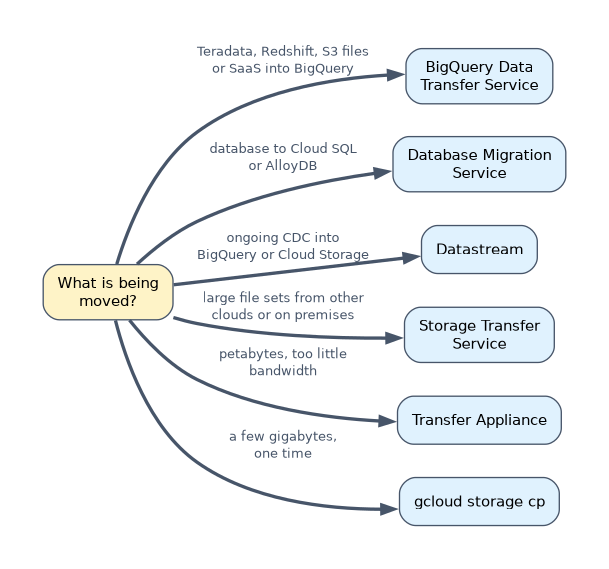
| Source and need | Tool |
|---|---|
| Teradata or Amazon Redshift warehouse into BigQuery | BigQuery Data Transfer Service (migration connectors) |
| Files in Amazon S3 or Azure Blob Storage into BigQuery on a schedule | BigQuery Data Transfer Service |
| SaaS sources such as Google Ads into BigQuery | BigQuery Data Transfer Service |
| MySQL, PostgreSQL, SQL Server or Oracle database to Cloud SQL or AlloyDB | Database Migration Service, with continuous replication for minimal downtime |
| Ongoing change data capture from operational databases into BigQuery or Cloud Storage | Datastream |
| Large file sets from other clouds, HTTP or on-premises file systems | Storage Transfer Service |
| Petabytes with too little bandwidth or time | Transfer Appliance (offline shipping) |
| A few gigabytes, one time | gcloud storage cp |
Database Migration Service moves an operational database to another operational database. Datastream streams changes into analytics destinations. "Migrate Oracle to Cloud SQL for PostgreSQL" is Database Migration Service; "replicate Oracle changes into BigQuery for reporting" is Datastream.
Google Cloud networking for migrations
| Option | Use it for |
|---|---|
| Cloud VPN (HA VPN) | Encrypted tunnels over the internet; quick to set up, modest bandwidth |
| Cloud Interconnect (Dedicated or Partner) | High bandwidth private connection for large or ongoing transfers |
| Private Google Access for on-premises hosts | Reaching Google APIs over VPN or Interconnect instead of the public internet |
Estimate transfer time before choosing: bits to move divided by usable bandwidth. If the result is weeks, choose Transfer Appliance or more bandwidth.
Migration and validation
Validation proves the target matches the source. Compare row counts, column aggregates (sums, min, max) and row hashes for each table. Google's open source Data Validation Tool automates these comparisons between sources such as Teradata, Oracle or PostgreSQL and BigQuery.
-- quick reconciliation on the BigQuery side
SELECT COUNT(*) AS row_count,
       SUM(amount) AS total_amount,
       MIN(order_date) AS first_day,
       MAX(order_date) AS last_day
FROM `prod-analytics.sales.orders`;
Run the same query on the source and compare. Then validate reports and dashboards, not only tables, because users judge the migration by the numbers they see.
A worked example
A manufacturer has 300 TB in an on-premises Hadoop cluster, a 1 Gbps link and three weeks. It also runs an Oracle order system that must stay live, with reporting moving to BigQuery.
At full speed, 300 TB over 1 Gbps takes about 28 days, longer than the deadline and before any overhead.
The engineer ships the bulk data with Transfer Appliance, then uses Storage Transfer Service for files that changed since. Spark jobs move to Dataproc reading from Cloud Storage. Datastream captures Oracle changes continuously into BigQuery.
How the exam asks about this
- "Migrate a 50 TB Teradata warehouse to BigQuery, including schema and data, with minimal custom code." BigQuery Data Transfer Service for Teradata, with the BigQuery Migration Service to translate SQL.
- "Move a production PostgreSQL database to Cloud SQL with only minutes of downtime." Database Migration Service with continuous migration, then promote.
- "Transfer 2 PB from a data center with a slow link within a month." Transfer Appliance.
What to remember for the exam
- Assess users, processes and technologies first; migrate in waves with parallel runs.
- BigQuery Data Transfer Service: Teradata, Redshift, S3, Azure Blob and SaaS into BigQuery.
- Database Migration Service: database to Cloud SQL or AlloyDB with minimal downtime.
- Datastream: continuous change data capture into BigQuery or Cloud Storage.
- Validate with counts, aggregates and hashes; the Data Validation Tool automates it.
Do the bandwidth arithmetic. A link that looks fast can still need weeks for hundreds of terabytes, which makes Transfer Appliance the right answer.
Common mistakes
Choosing Datastream to migrate a database to Cloud SQL. That is Database Migration Service; Datastream feeds analytics destinations.
Moving everything at once. A big-bang cutover with no parallel run hides errors until users find them.
Validating only row counts. Counts can match while values are wrong; compare sums and hashes too.
Check yourself
Which service streams ongoing changes from an Oracle database into BigQuery?
Datastream, using change data capture after an initial backfill.
When is Transfer Appliance the right choice?
When the data volume is so large compared with available bandwidth that a network transfer would miss the deadline, typically hundreds of terabytes or more.
Which tool translates Teradata SQL to GoogleSQL during a migration?
The BigQuery Migration Service SQL translation, in batch or interactive mode.
Topic 5 of 5 in Designing data processing systems
Test yourself on Designing data processing systems
The full Google Cloud Professional Data Engineer question bank has 733 questions, with timed practice exams and an explanation for every answer.
This study guide is independent and is not affiliated with, endorsed by, or sponsored by Google Cloud. Vendor names, certification names and exam codes are trademarks of their respective owners and are used for identification only.