Building and implementing CI/CD pipelines · Topic 4 of 4
Artifact Analysis, Binary Authorization, SLSA and Pipeline IAM
Secure the deployment pipeline with Artifact Analysis scanning, Binary Authorization, SLSA build provenance and IAM policies for each environment.
- 6 min
- Includes a diagram
- Artifact Analysis scans; On-Demand Scanning gates the build.
- SLSA is about provenance: who built what, from which source, how.
- Cloud Build provenance needs the image in the
imagesfield.
What it is
The pipeline is a target. If an attacker can push an image, change a build step or deploy directly, every control on the running service is bypassed. Software supply chain security makes sure only code that went through the trusted pipeline, and passed its checks, can run.
The pieces are scanning artifacts, proving how they were built, enforcing that proof at deploy time, and limiting who can act in each environment.
How it works
Artifact Analysis and vulnerability scanning
Artifact Analysis scans container images for known vulnerabilities in their operating system and language packages, and stores the results as metadata on the artifact.
| Mode | When | Use |
|---|---|---|
| Automatic scanning | On push to Artifact Registry, and continuously as new vulnerabilities are published | See the risk of stored images over time |
| On-Demand Scanning | When the pipeline asks, before push | Fail a build on critical findings |
- name: gcr.io/google.com/cloudsdktool/cloud-sdk
  entrypoint: bash
  args:
  - -c
  - |
    gcloud artifacts docker images scan "$_IMAGE:$SHORT_SHA" \
      --format='value(response.scan)' > /workspace/scan_id.txt
    gcloud artifacts docker images list-vulnerabilities "$(cat /workspace/scan_id.txt)" \
      --format='value(vulnerability.effectiveSeverity)' | grep -q CRITICAL && exit 1 || exit 0
Scanning reports problems; it does not block anything unless a pipeline step or a policy acts on the result.
SLSA and build provenance
Supply-chain Levels for Software Artifacts (SLSA) is a framework of increasing levels of assurance about how an artifact was produced. Its core idea is provenance: signed metadata saying which source, which builder and which steps produced an artifact.
| SLSA idea | On Google Cloud |
|---|---|
| Builds run on a hosted, isolated build service | Cloud Build |
| The builder generates signed provenance | Cloud Build generates build provenance for images listed in the build's images field |
| Provenance is stored with the artifact | Provenance is stored as Artifact Analysis metadata in Artifact Registry |
| Consumers verify provenance before use | Binary Authorization policies and checks |
images:
- '$_IMAGE:$SHORT_SHA'
Higher SLSA levels also need reviewed source changes and hardened build configuration that users cannot tamper with.
Binary Authorization
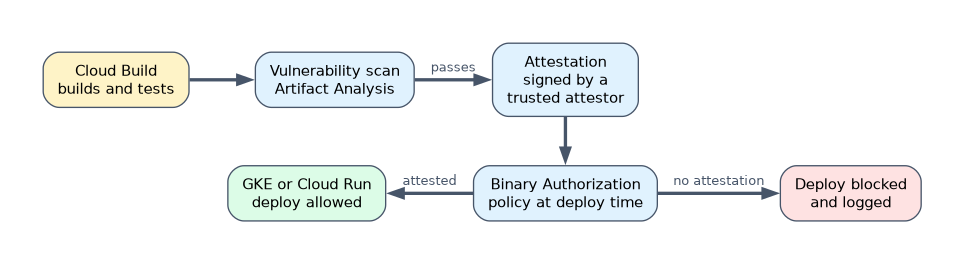 Binary Authorization is a deploy-time gate for GKE and Cloud Run. A policy says which images may run; images need attestations from trusted attestors, usually signed with Cloud KMS keys.
| Element | Meaning |
|---|---|
| Default rule | ALWAYS_ALLOW, ALWAYS_DENY or REQUIRE_ATTESTATION |
| Specific rules | Different rules per GKE cluster, for example stricter for production |
| Enforcement mode | Block and audit log, or dry run to only log |
| Exempt images | Patterns allowed without attestation, such as system images |
| Breakglass | Emergency deploy that is always logged |
| Continuous validation | For GKE, checks running pods against policy and logs violations |
A pipeline usually creates an attestation only after tests and the vulnerability check pass. Cloud Build can also attest images it builds with the built-by-cloud-build attestor, so a policy can require that an image came from Cloud Build. This works only for images pushed through the images field (not a docker push step), with Binary Authorization in the same project; private pool builds also need requestedVerifyOption: VERIFIED.
gcloud run deploy web --image="$IMAGE" --region=europe-west1 \
  --binary-authorization=default
Roll out policies in dry run first, read the audit log entries, add exemptions, then enforce.
IAM policies based on environment
| Practice | Why |
|---|---|
| Separate projects and service accounts per environment | A staging credential cannot deploy to production |
| Cloud Deploy execution service account per target | Only the production execution account has rights in production |
| Developers can create releases; only approvers promote to production | Two people for a production change |
| Only the build service account writes to Artifact Registry | Nothing enters the registry outside the pipeline |
No direct kubectl or console deploy rights in production | All change goes through the gated pipeline |
| Stricter Binary Authorization rule on production clusters | Dev can move fast while prod requires attestations |
apiVersion: deploy.cloud.google.com/v1
kind: Target
metadata:
  name: prod
requireApproval: true
gke:
  cluster: projects/shop-prod/locations/europe-west1/clusters/prod
executionConfigs:
- usages: [RENDER, DEPLOY]
  serviceAccount: deploy-prod@shop-prod.iam.gserviceaccount.com
A worked example
A company must prove that every production image came from its pipeline and has no critical vulnerabilities. The build runs On-Demand Scanning and fails on critical findings; images are listed under images so Cloud Build records provenance.
After tests, a step signs an attestation with a Cloud KMS key. The production GKE cluster rule requires that attestation, first in dry run for two weeks, then enforced, and only the production execution service account can deploy there.
How the exam asks about this
- "Only images built by the company's pipeline may run on the production GKE cluster." Require an attestation with Binary Authorization on that cluster.
- "Stop images with critical vulnerabilities before they are pushed." Use On-Demand Scanning in the build and fail the step.
- "A developer with staging access must not be able to deploy to production." Use separate projects and execution service accounts per target, and grant production promote and approve rights only to release managers.
What to remember for the exam
- Artifact Analysis scans; On-Demand Scanning gates the build.
- SLSA is about provenance: who built what, from which source, how.
- Cloud Build provenance needs the image in the
imagesfield. - Binary Authorization enforces attestations at deploy time on GKE and Cloud Run; start in dry run.
- Separate identities per environment; only the pipeline writes to the registry and deploys to production.
Binary Authorization checks images when they are deployed. Without continuous validation, a pod admitted before a policy change keeps running, so pair it with regular rebuilds and monitoring.
Common mistakes
Treating scan results as a gate. A finding in Artifact Analysis does not stop a deploy by itself. Add a build step or an attestation that depends on it.
Enforcing a new policy immediately. System images and sidecars get blocked. Use dry run and exemptions first.
One deployer service account for all environments. A leak in staging then reaches production. Use one per target.
Check yourself
What is build provenance?
Signed metadata that records the source, builder and build steps used to produce an artifact, so consumers can verify where it came from.
How does Binary Authorization decide whether an image may run?
It evaluates the policy rule for that cluster or service, which can require attestations from trusted attestors, and blocks or logs images that lack them.
Why give each Cloud Deploy target its own execution service account?
So credentials used for one environment cannot change another, and only the production account has rights in production.
Topic 4 of 4 in Building and implementing CI/CD pipelines
Test yourself on Building and implementing CI/CD pipelines
The full Google Cloud Professional Cloud DevOps Engineer question bank has 751 questions, with timed practice exams and an explanation for every answer.
This study guide is independent and is not affiliated with, endorsed by, or sponsored by Google Cloud. Vendor names, certification names and exam codes are trademarks of their respective owners and are used for identification only.