Building and implementing CI/CD pipelines · Topic 2 of 4
Deployment Strategies, Auditing Deployments and Troubleshooting
Canary, blue/green, rolling, traffic splitting and feature flags on Google Cloud, success metrics, deployment auditing and fixing failed rollouts.
- 6 min
- Includes a diagram
- Rolling is cheap; blue/green gives instant switch back; canary limits blast radius.
- Feature flags separate deploying code from releasing a feature.
- Success metrics are defined in advance and tied to SLOs; ML adds model quality and drift.
What it is
Once a pipeline exists, the work is running releases safely: choosing how new versions replace old ones, deciding what metrics prove a release is healthy, keeping a record of who deployed what, and fixing rollouts that fail.
Every strategy trades speed, cost and blast radius. The exam asks you to match the strategy to the risk described.
How it works
Deployment strategies
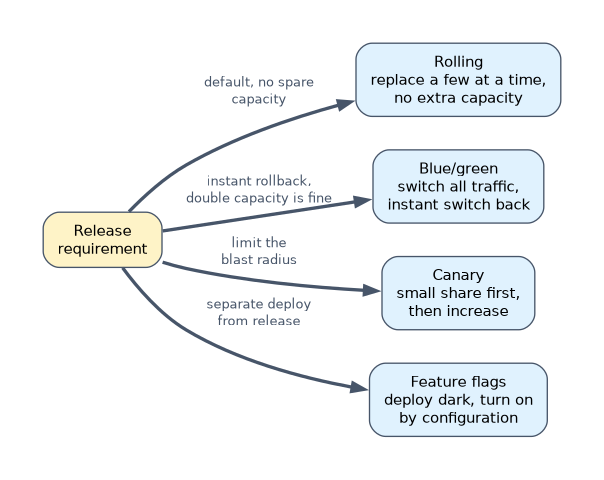
| Strategy | How it works | Strength | Cost or risk |
|---|---|---|---|
| Rolling | Replace instances a few at a time | Little or no extra capacity; the GKE Deployment default | Old and new run together; rollback is another rollout |
| Blue/green | Stand up the full new version, switch all traffic at once | Instant switch back | Double capacity during the switch |
| Canary | Send a small percentage to the new version, then increase | Limits blast radius, real traffic as test | Needs good metrics to judge |
| Traffic splitting | Weighted routing between versions | Fine control, A/B tests | Must handle sessions and state |
| Feature flags | Deploy code dark, turn features on by config | Separates deploy from release; instant off | Flag debt in code |
| Platform | Mechanism |
|---|---|
| Cloud Run | Revisions with traffic percentages and tags |
| GKE | Deployment rolling updates; Cloud Deploy canary; Gateway API weighted routes |
| Managed instance groups | Rolling update to a new template; canary with two templates by size |
| Vertex AI endpoints | Traffic split across deployed models |
gcloud run deploy web --image="$IMAGE" --region=europe-west1 --no-traffic --tag=green
gcloud run services update-traffic web --region=europe-west1 --to-tags=green=10
gcloud run services update-traffic web --region=europe-west1 --to-latest
Cloud Deploy runs canaries in phases on GKE and Cloud Run:
strategy:
  canary:
    runtimeConfig:
      kubernetes:
        serviceNetworking:
          service: web
          deployment: web
    canaryDeployment:
      percentages: [10, 50]
      verify: true
Defining success metrics
A rollout should advance only if telemetry says it is healthy. Define the metrics before the release, with thresholds tied to your SLOs.
| Workload | Typical success metrics |
|---|---|
| Web or API | Error rate, latency percentiles, saturation, compared with the old version |
| Batch | Job completion, duration, records processed |
| ML model | Prediction latency and errors, plus model quality: accuracy against labels, and skew or drift from Vertex AI Model Monitoring |
In Cloud Deploy, verify: true runs a verification container after each phase, which can query metrics and fail the rollout. Deploy hooks run jobs before or after deployment, and a repair rollout automation can retry or roll back a failed rollout.
Auditing and tracking deployments
| Source | What it records |
|---|---|
| Cloud Audit Logs | Admin Activity entries for who created builds, releases, approvals and rollouts, always on |
| Cloud Build | Build history, logs, the commit, the image digests produced, build provenance |
| Artifact Registry | Every version and digest, tags, vulnerability results and provenance metadata |
| Cloud Deploy | Release and rollout history per target, approvals, what is running where |
| Pub/Sub notifications | Build and deployment events for chat, tickets or a deployment dashboard |
logName:"cloudaudit.googleapis.com%2Factivity"
protoPayload.serviceName="clouddeploy.googleapis.com"
protoPayload.methodName:"ApproveRollout"
Route these audit logs with an aggregated sink to a central bucket so deployment history survives project deletion.
Troubleshooting and mitigating deployment issues
| Symptom | Likely cause | Fix |
|---|---|---|
| Build fails with permission denied | Build service account lacks a role | Grant the specific role to that account |
ImagePullBackOff on GKE | Wrong image path, or node service account cannot read the repository | Fix the reference; grant Artifact Registry Reader |
CrashLoopBackOff | The app exits on start: bad config, missing secret | Read container logs; fix config or secret access |
| Cloud Run revision not ready | Container not listening on the PORT variable, or slow start | Listen on PORT; adjust startup probe |
| Rollout stuck | Readiness probes failing, quota or not enough nodes | Check pod events and quotas; scale nodes |
| Deploy denied by Binary Authorization | Image lacks the required attestation | Rebuild through the pipeline that attests |
| Cloud Deploy render fails | Skaffold or Kustomize configuration error | Read the render logs for the release |
Mitigate first, diagnose second. Roll back the target in Cloud Deploy, move Cloud Run traffic to the previous revision, or run kubectl rollout undo, then find the cause.
A worked example
A payment API on GKE had an outage after a full rolling update. The engineer switches the production target to a Cloud Deploy canary with phases at 10% and 50%, and verify: true running a container that checks error rate and p99 latency in Cloud Monitoring.
A later release raises errors at 10%; verification fails, and a repair rollout rule rolls the target back. Audit logs show who approved the release.
How the exam asks about this
- "Expose a new version to 5% of users and increase only if errors stay low." Use a canary, with Cloud Run traffic splitting or a Cloud Deploy canary strategy.
- "Switch back to the previous version within seconds if the release fails, cost is not a concern." Use blue/green.
- "Find out who approved last night's production rollout." Query Cloud Audit Logs for Cloud Deploy approval entries, or the rollout history.
What to remember for the exam
- Rolling is cheap; blue/green gives instant switch back; canary limits blast radius.
- Feature flags separate deploying code from releasing a feature.
- Success metrics are defined in advance and tied to SLOs; ML adds model quality and drift.
- Cloud Audit Logs, Cloud Build history, Artifact Registry and Cloud Deploy together track deployments.
- Mitigate with rollback or traffic shift first, then troubleshoot.
A canary is only as good as its metrics. Without automated comparison of error rate and latency, a canary just delays a bad release reaching everyone.
Common mistakes
Debugging in production while users suffer. Roll back or shift traffic first. Investigate with the old version serving.
Choosing blue/green when capacity is tight. It needs a full second copy. A canary or rolling update needs far less.
Granting the Artifact Registry role to a user, not to the node service account. Image pulls use the runtime identity, so grant reader to that account.
Check yourself
What does verify true do in a Cloud Deploy canary?
It runs a verification container after each phase, and the rollout fails if verification fails, so the next phase does not start.
Which strategy separates deploying code from enabling a feature?
Feature flags, which let code ship turned off and be switched on or off by configuration.
What is the first action when a new release causes errors?
Mitigate by rolling back or shifting traffic to the previous version, then investigate the cause.
Topic 2 of 4 in Building and implementing CI/CD pipelines
Test yourself on Building and implementing CI/CD pipelines
The full Google Cloud Professional Cloud DevOps Engineer question bank has 751 questions, with timed practice exams and an explanation for every answer.
This study guide is independent and is not affiliated with, endorsed by, or sponsored by Google Cloud. Vendor names, certification names and exam codes are trademarks of their respective owners and are used for identification only.