Bootstrapping and maintaining a Google Cloud organization · Topic 4 of 6
CI/CD Architecture with Cloud Build, Cloud Deploy and Artifact Registry
Design a CI/CD stack on Google Cloud: Cloud Build, Cloud Deploy with Skaffold and Kustomize, Artifact Registry, third-party tools and security.
- 6 min
- Includes a diagram
- Cloud Build is CI; Cloud Deploy is CD; Artifact Registry stores artifacts.
- Cloud Deploy: pipeline, targets, release, rollout, promote, approve, rollback.
- Skaffold renders and deploys; profiles plus Kustomize overlays give per-target config.
What it is
A CI/CD stack turns a commit into a running release. On Google Cloud the managed pieces are Cloud Build for continuous integration, Artifact Registry for storing what was built, and Cloud Deploy for continuous delivery to GKE and Cloud Run.
Many organizations also keep third-party tools. The exam asks which piece does which job, how they fit together, and how to secure the tooling itself.
How it works
Continuous integration with Cloud Build
Cloud Build runs a series of steps, each a container, defined in cloudbuild.yaml. Triggers start builds from repository events in GitHub, GitLab or Bitbucket, from Pub/Sub messages, webhooks or manual runs.
steps:
- name: gcr.io/cloud-builders/docker
  args: ['build', '-t', '${_IMAGE}:$SHORT_SHA', '.']
- name: gcr.io/cloud-builders/docker
  args: ['push', '${_IMAGE}:$SHORT_SHA']
- name: gcr.io/google.com/cloudsdktool/cloud-sdk
  entrypoint: gcloud
  args: ['deploy', 'releases', 'create', 'rel-$SHORT_SHA',
         '--delivery-pipeline=web-app', '--region=europe-west1',
         '--images=web=${_IMAGE}:$SHORT_SHA']
substitutions:
  _IMAGE: europe-west1-docker.pkg.dev/acme-ci/apps/web
serviceAccount: projects/acme-ci/serviceAccounts/build-sa@acme-ci.iam.gserviceaccount.com
options:
  logging: CLOUD_LOGGING_ONLY
Private pools run builds on workers in a Google-managed network peered to your VPC. Use them when builds must reach private resources, such as an on-premises artifact server over VPN, or must run without public IP addresses.
Continuous delivery with Cloud Deploy
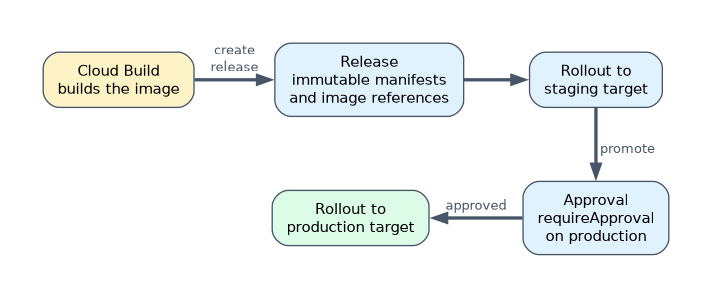 Cloud Deploy models delivery as a delivery pipeline with an ordered list of targets (for example staging, then production). Each build creates a release; deploying it to a target creates a rollout, and promotion moves the same release to the next target.
| Concept | Meaning |
|---|---|
| Target | Where to deploy: a GKE cluster, a Cloud Run location, a GKE attached cluster or a custom target |
| Release | An immutable snapshot of rendered manifests and image references |
| Rollout | One release deployed to one target |
| Approval | requireApproval: true on a target holds rollouts until an approver acts |
| Rollback | Redeploy the previous successful release to a target |
Cloud Deploy uses Skaffold to render and deploy manifests. Skaffold profiles select per-target config, and Skaffold can render with Kustomize overlays or Helm charts, so one base manifest becomes staging and prod variants.
apiVersion: skaffold/v4beta7
kind: Config
manifests:
  kustomize:
    paths: [k8s/overlays/staging]
profiles:
- name: prod
  manifests:
    kustomize:
      paths: [k8s/overlays/prod]
Artifact Registry configuration
| Setting | Choice |
|---|---|
| Format | Docker, Maven, npm, Python, Go, Apt, Yum and others |
| Location | Regional or multi-regional, close to builds and runtimes |
| Mode | Standard (your artifacts), remote (cache of an upstream such as Docker Hub), virtual (one endpoint over several repositories) |
| Access | IAM per repository: roles/artifactregistry.reader for runtimes, roles/artifactregistry.writer for the build |
| Hygiene | Cleanup policies to delete old versions, immutable tags to stop overwrites |
Keep a repository per environment stage or per team, and deploy by digest so the image that was tested is exactly the image that runs.
Hybrid, multi-cloud and third-party tools
| Tool | Role in the stack |
|---|---|
| Git | Source of truth for code, config and infrastructure |
| Jenkins | Existing CI server; can run on GKE and push to Artifact Registry |
| Argo CD | GitOps delivery to Kubernetes clusters anywhere |
| Packer | Builds VM images, often as a Cloud Build step |
| kpt | Packages and transforms Kubernetes configuration as data |
Cloud Deploy reaches clusters outside Google Cloud as GKE attached clusters, and a fleet's Connect gateway gives a single control path into registered clusters.
Security of CI/CD tooling
- Run each build with a dedicated, user-specified service account holding only the roles it needs, not a broad default.
- Keep credentials in Secret Manager and read them in the build; never put them in the repository.
- Use private pools and VPC Service Controls where builds handle sensitive projects.
- Restrict who can edit triggers and pipeline definitions, and require approval for builds from untrusted branches or forks.
- Let only the build service account write to the registry, so nothing reaches it except through the pipeline.
A worked example
A team uses Jenkins on VMs and deploys to GKE with kubectl from the build server. The engineer moves CI to Cloud Build triggered on merges to main, pushing images to a regional Artifact Registry repository.
Cloud Build then creates a Cloud Deploy release. The pipeline deploys to staging, and production requires approval, with Skaffold profiles selecting Kustomize overlays per target.
How the exam asks about this
- "Builds must reach a package server in the on-premises data centre over Cloud Interconnect." Use a Cloud Build private pool peered to the VPC.
- "The same release must move from staging to production with a manual sign-off." Use a Cloud Deploy pipeline with
requireApprovalon the production target. - "Builds pull base images from Docker Hub and hit rate limits." Create an Artifact Registry remote repository as a cache.
What to remember for the exam
- Cloud Build is CI; Cloud Deploy is CD; Artifact Registry stores artifacts.
- Cloud Deploy: pipeline, targets, release, rollout, promote, approve, rollback.
- Skaffold renders and deploys; profiles plus Kustomize overlays give per-target config.
- Artifact Registry modes: standard, remote cache, virtual aggregate.
- Secure the pipeline: own service account, secrets in Secret Manager, private pools.
If you set a custom service account on a build, you must also set a logs option such as CLOUD_LOGGING_ONLY or a logs bucket, or the build is rejected.
Common mistakes
Rebuilding the image for each environment. The image in production is then not the one that was tested. Build once and promote the same digest.
Using a default service account with broad roles for builds. A compromised build can then change anything. Use a dedicated account with least privilege.
Deploying with kubectl from CI scripts. There is no release history, approval or one-step rollback. Use Cloud Deploy or GitOps.
Check yourself
What is the difference between a release and a rollout in Cloud Deploy?
A release is an immutable snapshot of manifests and images, while a rollout is that release deployed to one specific target.
When do you need a Cloud Build private pool?
When builds must reach resources on a private network, such as on premises or in a VPC, or must run without public IP addresses.
What does an Artifact Registry remote repository do?
It acts as a caching proxy for an upstream registry such as Docker Hub, so builds pull through your own repository.
Topic 4 of 6 in Bootstrapping and maintaining a Google Cloud organization
Test yourself on Bootstrapping and maintaining a Google Cloud organization
The full Google Cloud Professional Cloud DevOps Engineer question bank has 751 questions, with timed practice exams and an explanation for every answer.
This study guide is independent and is not affiliated with, endorsed by, or sponsored by Google Cloud. Vendor names, certification names and exam codes are trademarks of their respective owners and are used for identification only.