Applying site reliability engineering practices · Topic 1 of 3
SLIs, SLOs, SLAs, Error Budgets and the Cost of Nines
Define SLIs, SLOs and SLAs, compute error budgets, set burn rate alerts in Cloud Monitoring and weigh the opportunity cost of each extra nine.
- 5 min
- Includes a diagram
- SLI = good events / valid events, measured near the user.
- SLO = target over a window; SLA = looser contractual promise with penalties.
- Error budget = 1 minus SLO; 99.9% over 30 days is 43.2 minutes.
What it is
SRE replaces "as reliable as possible" with a measured target. A service level indicator (SLI) measures something users feel, a service level objective (SLO) sets the target for it, and a service level agreement (SLA) is the contract with consequences if a lower promise is missed.
The gap between perfect and the SLO is the error budget: the amount of unreliability the team may spend on releases, experiments and maintenance.
How it works
SLIs
An SLI is best expressed as a ratio: good events divided by valid events, measured as close to the user as practical, such as at the load balancer.
| SLI type | Good event | Example |
|---|---|---|
| Availability | Request served without a server error | Non 5xx responses / all responses |
| Latency | Request faster than a threshold | Requests under 300 ms / all requests |
| Quality | Full rather than degraded response | Responses with all components / all |
| Freshness | Data updated recently enough | Reads of data under 1 minute old / all reads |
| Correctness and throughput | Pipelines producing right output in time | Records processed correctly / all records |
Choose a few SLIs per user journey, not every metric. CPU usage is not an SLI: users do not feel it directly.
SLOs and SLAs
An SLO is the SLI target over a window, for example 99.9% of requests successful over a rolling 28 days. Rolling windows reflect recent user experience; calendar windows match business reporting.
| SLO | SLA | |
|---|---|---|
| Audience | The engineering team | Customers |
| Consequence | Change in priorities, release freeze | Refunds, credits, penalties |
| Strictness | Tighter | Looser than the SLO, so the team reacts before the SLA is breached |
Error budgets
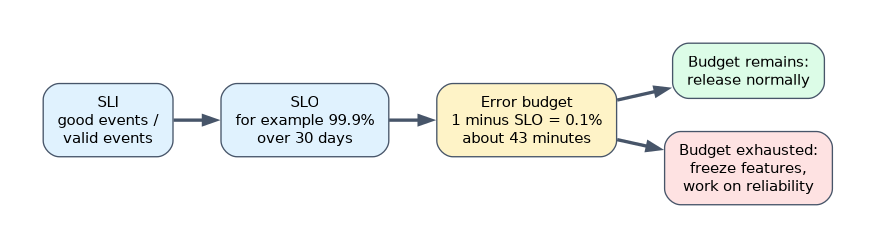 The error budget is 1 minus the SLO. Over a 30 day window:
| SLO | Error budget | Allowed full downtime in 30 days |
|---|---|---|
| 99% | 1% | 7.2 hours |
| 99.9% | 0.1% | 43.2 minutes |
| 99.95% | 0.05% | 21.6 minutes |
| 99.99% | 0.01% | 4.32 minutes |
An error budget policy agreed with product owners says what happens: while budget remains, release normally; when it is exhausted, freeze feature releases and spend effort on reliability until it recovers.
SLOs in Cloud Monitoring and Cloud Service Mesh
Cloud Monitoring lets you define services and attach SLOs to them. Services on Cloud Service Mesh, Istio on GKE and App Engine are detected automatically, and Cloud Service Mesh services come with ready availability and latency SLIs from mesh telemetry. GKE and Cloud Run services are offered as candidates that you define, and other services are custom services with SLIs built from your own metrics.
| SLI style | How it counts |
|---|---|
| Request based | Good requests divided by total requests |
| Windows based | Share of time windows, such as minutes, that met a goodness condition |
Alert on the burn rate: how fast the budget is being consumed compared with an even spend. A burn rate of 1 uses the budget exactly over the window.
select_slo_burn_rate("projects/shop-prod/services/checkout/serviceLevelObjectives/avail-999", "60m")The SRE workbook pattern uses several windows: page when about 2% of a 30 day budget burns in 1 hour (burn rate 14.4) or 5% in 6 hours (burn rate 6), and open a ticket for slower burns such as 10% in 3 days (burn rate 1). A short confirmation window on each alert stops it firing long after the problem ends.
Opportunity cost of reliability
Each extra nine cuts allowed downtime by ten times and usually costs much more: multi-region designs, more redundancy, slower releases and more on-call effort.
- Users cannot tell the difference beyond the reliability of their own network and device.
- A service cannot be more reliable than its critical dependencies in series; the availabilities multiply.
- Money and engineering time spent on an unneeded nine are not spent on features.
Set the SLO where users are happy, not at 100%.
A worked example
A checkout API has an SLO of 99.9% availability over 30 days, a budget of 43.2 minutes. A bad release causes 30 minutes of errors, leaving about 13 minutes.
The burn rate alert paged during the incident. Under the error budget policy, the team pauses feature releases until the budget recovers and puts the fix and a better canary check first.
How the exam asks about this
- "Developers want to ship faster; operations want fewer releases." Agree an SLO and error budget policy, and release while budget remains.
- "Alert on SLO violations without paging for every brief spike." Use burn rate alerts on the SLO, with multiple windows.
- "What should the SLA be relative to the internal SLO?" Looser than the SLO, so the SLO is missed and acted on first.
What to remember for the exam
- SLI = good events / valid events, measured near the user.
- SLO = target over a window; SLA = looser contractual promise with penalties.
- Error budget = 1 minus SLO; 99.9% over 30 days is 43.2 minutes.
- Burn rate alerting with multiple windows: fast burns page, slow burns ticket.
- Each nine costs far more; aim for what users need, never 100%.
An SLO of 100% leaves no error budget, so every release, maintenance and dependency blip is a violation. It stops change without making users happier.
Common mistakes
Using resource metrics as SLIs. High CPU does not mean users suffer. Measure availability and latency of requests.
Setting the SLA equal to the SLO. The first warning then costs money. Keep the SLA looser.
Alerting on a simple error threshold. It is noisy and ignores the budget. Alert on burn rate.
Check yourself
How much downtime does a 99.95% monthly SLO allow over 30 days?
About 21.6 minutes, because the error budget is 0.05% of 43,200 minutes.
What does a burn rate of 1 mean?
The error budget is being consumed at exactly the rate that would use it up by the end of the SLO window.
What should happen when the error budget is exhausted?
Follow the error budget policy, which usually freezes feature releases and moves effort to reliability until the budget recovers.
Topic 1 of 3 in Applying site reliability engineering practices
Test yourself on Applying site reliability engineering practices
The full Google Cloud Professional Cloud DevOps Engineer question bank has 751 questions, with timed practice exams and an explanation for every answer.
This study guide is independent and is not affiliated with, endorsed by, or sponsored by Google Cloud. Vendor names, certification names and exam codes are trademarks of their respective owners and are used for identification only.