Applying site reliability engineering practices · Topic 3 of 3
Mitigating Incidents: Draining Traffic, Adding Capacity and Rollbacks
Reduce incident impact on Google Cloud by draining or redirecting traffic, adding capacity and rolling back, with incident roles and blameless postmortems.
- 5 min
- Includes a diagram
- Mitigate first, find root cause later.
- Drain or redirect traffic with load balancer capacity, health checks and connection draining.
- Add capacity by raising autoscaler limits, but protect downstream systems.
What it is
During an incident the goal is to stop the harm to users as fast as possible, even before anyone understands the cause. The three main levers are moving traffic away from the broken part, giving the service more capacity, and returning to the last known good version.
Root cause analysis comes afterwards, in a blameless postmortem.
How it works
Incident roles
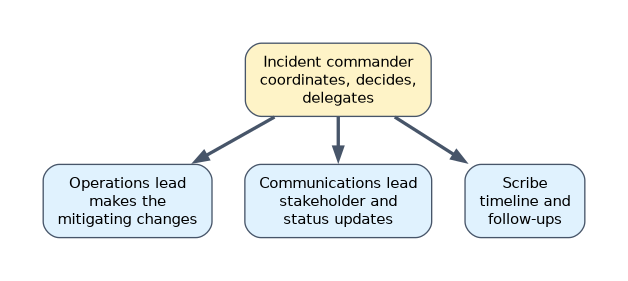
| Role | Job |
|---|---|
| Incident commander | Coordinates, decides, delegates; does not fix things personally |
| Operations lead | Makes the changes to mitigate |
| Communications lead | Updates stakeholders and status pages on a schedule |
| Scribe or planner | Keeps the timeline and tracks follow-ups |
Keep a written log of actions with times. It makes handoffs and the postmortem much easier.
Draining and redirecting traffic
| Situation | Action |
|---|---|
| One zone or region is unhealthy | Remove its backend from the load balancer, or set its capacity to zero, so the global load balancer sends users elsewhere |
| One VM or pod is bad | Health checks remove it; or take it out manually and recreate it |
| A node must be serviced | kubectl drain evicts pods respecting PodDisruptionBudgets |
| Planned removal of VMs | Connection draining lets in-flight requests finish |
| A new Cloud Run revision is bad | Send traffic back to the previous revision |
| A dependency is down | Serve a degraded response or cached data instead of failing |
gcloud compute backend-services update-backend web-backend --global \
  --instance-group=web-mig-us --instance-group-region=us-central1 \
  --capacity-scaler=0

gcloud compute backend-services update web-backend --global \
  --connection-draining-timeout=300
Cloud DNS routing policies with health checks, such as failover policies, can also move users to a standby endpoint.
Adding capacity
When the cause is overload, more capacity is the fastest fix.
- Raise the managed instance group maximum or set a higher minimum so new VMs start immediately.
- Raise Cloud Run max instances if the cap is the bottleneck, or min instances to avoid cold starts.
- Increase GKE node pool size or HPA maximum; check that cluster autoscaler limits are not blocking.
- Consume reservations if you hold them; request quota increases early if quota is the limit.
- Shed load or rate limit at the edge (for example with Cloud Armor rate limiting) to protect the core while capacity arrives.
Watch the downstream effect: more front-end instances can overload a database connection pool.
Rollback strategies
| Platform | Rollback |
|---|---|
| Cloud Deploy | gcloud deploy targets rollback prod --delivery-pipeline=web-app --region=europe-west1 |
| Cloud Run | gcloud run services update-traffic web --region=europe-west1 --to-revisions=web-00041-xyz=100 |
| GKE Deployment | kubectl rollout undo deployment/web |
| Managed instance group | Rolling update back to the previous instance template |
| Feature flag | Turn the feature off; no deployment needed |
| Infrastructure | Revert the commit and let the pipeline apply it |
Design releases so rollback is always possible. Database schema changes are the usual blocker: make changes backward compatible (expand first, contract in a later release) so old code still works.
When rollback is not possible, roll forward with a small fix through the same pipeline, with its tests and canary.
After the incident
A blameless postmortem records impact, timeline, root cause and contributing factors, what went well, and action items with owners. It focuses on systems and processes, not on who made the mistake, so people report problems honestly.
Track action items to completion. A postmortem without done actions does not prevent the next incident.
A worked example
At 09:10 the checkout SLO burn rate alert pages. Error rates rose in us-central1 right after a release reached that region.
The incident commander assigns roles. The operations lead sets the us-central1 backend capacity scaler to 0, so traffic moves to us-east1, and the autoscaler maximum there is raised. Cloud Deploy rolls the production target back to the previous release, and the region is restored once errors clear; the postmortem adds a regional canary step.
How the exam asks about this
- "Errors started immediately after a deployment and users are affected. What should you do first?" Roll back to the previous version, then investigate.
- "One region is failing behind a global external Application Load Balancer." Drain that region's backends so traffic goes to healthy regions.
- "After the incident, how should the team learn from it without blame?" Write a blameless postmortem with tracked action items.
What to remember for the exam
- Mitigate first, find root cause later.
- Drain or redirect traffic with load balancer capacity, health checks and connection draining.
- Add capacity by raising autoscaler limits, but protect downstream systems.
- Every platform has a one-step rollback; keep schema changes backward compatible.
- Assign incident roles; finish with a blameless postmortem and owned actions.
Restarting or deleting the failing instances during an incident can destroy evidence such as logs on local disk and memory state. Drain them from traffic first, then capture what you need.
Common mistakes
Debugging live while users are impacted. If a recent change is the likely cause, roll it back first.
Everyone fixing at once. Uncoordinated changes make the incident worse. One incident commander, one operations lead.
Postmortems that name a culprit. Blame hides future problems. Focus on the system that let the mistake through.
Check yourself
How do you move traffic away from one region behind a global load balancer?
Remove that region's backends or set their capacity scaler to zero, so the load balancer sends requests to healthy regions.
Why are backward compatible schema changes important for rollback?
They let the previous version of the code keep working with the new schema, so the application can be rolled back safely.
What is the role of the incident commander?
To coordinate the response, make decisions and delegate work, rather than making the technical changes personally.
Topic 3 of 3 in Applying site reliability engineering practices
Test yourself on Applying site reliability engineering practices
The full Google Cloud Professional Cloud DevOps Engineer question bank has 751 questions, with timed practice exams and an explanation for every answer.
This study guide is independent and is not affiliated with, endorsed by, or sponsored by Google Cloud. Vendor names, certification names and exam codes are trademarks of their respective owners and are used for identification only.