Managing and provisioning a solution infrastructure · Topic 3 of 6
Configuring Storage Systems
Configuring Cloud Storage classes, Autoclass, lifecycle and retention, database replicas and backups, data transfer options and growth planning for the PCA exam.
- 4 min
- Includes a diagram
- Standard, Nearline (30), Coldline (90), Archive (365): minimum days and retrieval fees.
- Autoclass for unpredictable access; lifecycle rules for predictable ageing.
- Dual-region plus turbo replication for region loss with a 15-minute target.
What it is
Once a store is chosen, it must be configured: where data lives, who can reach it, how it moves in, how long it stays, how it grows and how it is protected. Exam questions often turn on one setting such as a storage class, a lifecycle rule or a replica type.
How it works
Cloud Storage classes
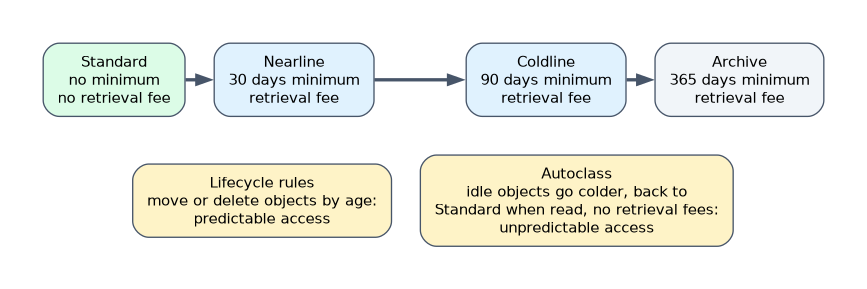
| Class | Minimum storage duration | Retrieval fee | Fits |
|---|---|---|---|
| Standard | None | None | Hot data, frequently read |
| Nearline | 30 days | Yes | Read about once a month |
| Coldline | 90 days | Yes | Read about once a quarter |
| Archive | 365 days | Yes | Long-term retention, rarely read |
Lifecycle rules move or delete objects by age, version count or other conditions. Autoclass moves each object to colder classes as it goes unread and back to Standard when read, without retrieval fees. Use Autoclass when access patterns are unpredictable and nobody can maintain per-object rules.
"Old content surges unpredictably and must not incur retrieval charges" is the Autoclass pattern. Fixed lifecycle rules put surging objects in a class that charges for reads.
Location and availability
| Location type | Survives | Note |
|---|---|---|
| Region | Zone loss | Lowest latency for one region's compute |
| Dual-region | Region loss | One bucket name across two regions; optional turbo replication with a 15-minute replication target |
| Multi-region | Region loss | Large geography such as US or EU, default asynchronous replication |
Security and access
- Uniform bucket-level access so IAM alone controls access.
- Signed URLs for time-limited uploads or downloads without Google accounts.
- CMEK where the business must control keys.
- Retention policies and Bucket Lock for records that must not be deleted before a date; object holds for legal holds.
- Object Versioning or soft delete to recover from accidental deletes and overwrites.
Databases: availability and protection
| Product | Zone resilience | Region resilience | Backup |
|---|---|---|---|
| Cloud SQL | High availability (standby in another zone) | Cross-region read replica, promoted on failover | Automated backups, point-in-time recovery |
| Spanner | Built into regional configurations | Multi-region configurations | Backups and point-in-time recovery |
| Bigtable | Replication across zones | Replication across regions with multi-cluster routing | Backups |
| Memorystore for Redis | Standard tier with a replica in another zone | Cross-region options depend on the offering | Export and persistence options |
Configure maintenance windows and deny maintenance periods on Cloud SQL to keep maintenance out of busy seasons.
Moving data in
| Situation | Tool |
|---|---|
| Online transfer from other clouds, URLs or on-premises file systems | Storage Transfer Service (agents for on-premises sources) |
| Huge datasets over slow links | Transfer Appliance |
| SaaS and cloud sources into BigQuery | BigQuery Data Transfer Service |
| Large files from an application | Resumable uploads with the client libraries |
| Low-latency streaming into BigQuery | Storage Write API or Pub/Sub BigQuery subscriptions |
Growth planning
Estimate data growth per month and its effect on cost and performance. Prefer storage that scales without re-sharding (Cloud Storage, BigQuery, Spanner, Bigtable). Partition and cluster BigQuery tables so queries scan only what they need, and set table or partition expiration for transient data.
How the exam asks about this
- "Single bucket name, survive a region loss, at most 15 minutes of new uploads lost." Dual-region with turbo replication.
- "Six weeks with no Cloud SQL maintenance." A deny maintenance period plus a maintenance window.
- "Suppliers upload files without Google accounts." Signed URLs.
What to remember for the exam
- Standard, Nearline (30), Coldline (90), Archive (365): minimum days and retrieval fees.
- Autoclass for unpredictable access; lifecycle rules for predictable ageing.
- Dual-region plus turbo replication for region loss with a 15-minute target.
- Cloud SQL high availability for zones, cross-region replicas for regions.
- Storage Transfer Service online, Transfer Appliance offline.
Deleting or moving objects before the minimum duration still bills the remaining days of that class.
Common mistakes
Archive for data that is read in bursts. Retrieval fees pile up.
Relying on a multi-region bucket for a hard 15-minute replication target. Turbo replication is a dual-region feature.
Treating read replicas as backups. A deleted table replicates too.
Check yourself
Which Cloud Storage feature moves objects between classes based on access, with no retrieval fees?
Autoclass.
What is the minimum storage duration of Coldline?
90 days.
How do you keep Cloud SQL maintenance out of a six-week busy period?
Set a deny maintenance period covering it, with a maintenance window for normal times.
Topic 3 of 6 in Managing and provisioning a solution infrastructure
Test yourself on Managing and provisioning a solution infrastructure
The full Google Cloud Professional Cloud Architect question bank has 877 questions, with timed practice exams and an explanation for every answer.
This study guide is independent and is not affiliated with, endorsed by, or sponsored by Google Cloud. Vendor names, certification names and exam codes are trademarks of their respective owners and are used for identification only.