Designing and planning a cloud solution architecture · Topic 6 of 8
Migration Planning
Planning a move to Google Cloud: assess, plan, deploy and optimize, Migration Center, migration strategies and tools, network plans and licences.
- 4 min
- Includes a diagram
- Phases: assess, plan, deploy, optimize.
- Migration Center for discovery, utilization and cost comparison.
- Rehost for speed, replatform for managed services, refactor for long-term gains.
What it is
A migration plan says what moves, in what order, how, and what it costs. On the exam it shows up as deadlines (a lease ends), constraints (a system must stay) and evidence the business wants before funding (measured utilization and cost).
How it works
The four phases
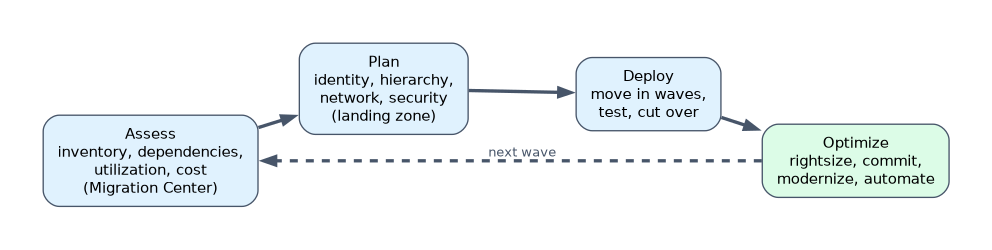
| Phase | Main activities |
|---|---|
| Assess | Inventory applications, databases and dependencies; measure utilization; classify workloads by complexity and business criticality; estimate cost |
| Plan | Build the foundation: identity, resource hierarchy, networking, security, billing |
| Deploy | Move workloads in waves, test, cut over |
| Optimize | Rightsize, buy commitments, modernize, automate |
A question that says "before any landing zone is built" is asking about the assess phase: inventory, dependencies and classification.
Migration Center
Migration Center is Google Cloud's hub for assessment. It discovers on-premises assets (for example from vCenter through its discovery client), collects performance history, and produces reports that compare current cost with Google Cloud target sizing. It works without copying any workload data to Google Cloud.
Migration strategies
| Strategy | Also called | Fits when |
|---|---|---|
| Rehost | Lift and shift | Deadline pressure, no code change allowed |
| Replatform | Improve and move | Small changes unlock managed services (Cloud SQL, GKE) |
| Refactor | Rip and replace, rebuild | The app blocks scale or agility and the business will invest |
| Repurchase | Move to SaaS | A commodity capability |
| Retain | Keep on premises | Not ready, vendor support limits, being replaced later |
| Retire | Turn off | Not needed |
Migration tools
| Moving | Tool |
|---|---|
| VMs to Compute Engine | Migrate to Virtual Machines |
| VMs to containers | Migrate to Containers |
| MySQL, PostgreSQL, SQL Server, Oracle databases | Database Migration Service (continuous replication, short cutover) |
| Ongoing change capture into BigQuery | Datastream |
| Files and object storage | Storage Transfer Service; Transfer Appliance when the network is too slow |
| VMware estates as they are | Google Cloud VMware Engine |
Testing, network and dependency planning
- Dependencies: move tightly coupled systems in the same wave, or keep a fast link between them during transition.
- Network: size hybrid connectivity for both migration traffic and production traffic; order circuits early, since Interconnect lead times can be weeks or months.
- Testing: run the migrated workload against real traffic patterns before cutover, and keep a rollback path.
Licences and financial impact
- Some licences allow bring your own licence only on dedicated hardware: use sole-tenant nodes.
- Otherwise use pay-as-you-go premium images (for example Windows Server or SQL Server) billed through Google Cloud.
- Compare total cost of ownership: hardware refresh, data center space, staff time and licences, not just VM prices.
- Moving from capital expense to operating expense changes how the business budgets.
A worked scenario
A healthcare SaaS company must leave one colocation facility within ten weeks. Its insurer integrations stay on premises. The plan: assess dependencies first, connect the remaining facility with a link that can be ordered in time, rehost or replatform the containerized apps to GKE, migrate MySQL with Database Migration Service, and leave the insurer integrations where they are.
How the exam asks about this
- "Board funds the move only after measured CPU and memory and a cost comparison, nothing copied yet." Migration Center discovery and reports.
- "2 TB MySQL, 15-minute cutover, no code change." Database Migration Service to Cloud SQL.
- "Licences tied to physical cores." Sole-tenant nodes.
What to remember for the exam
- Phases: assess, plan, deploy, optimize.
- Migration Center for discovery, utilization and cost comparison.
- Rehost for speed, replatform for managed services, refactor for long-term gains.
- Database Migration Service keeps cutover short with continuous replication.
- Order network links early; respect licence rules with sole-tenant nodes or premium images.
Sizing from provisioned vCPU and RAM instead of measured use overprovisions the target and inflates the cost case.
Common mistakes
Building the landing zone before assessing. You will not know what it must hold.
Moving everything at once. Waves reduce risk and allow learning.
Dump and restore for large live databases. The outage is too long; replicate continuously instead.
Check yourself
Which tool collects on-premises VM inventory and performance history and compares cost with Google Cloud?
Migration Center.
What are the four migration phases?
Assess, plan, deploy and optimize.
How do you keep a database cutover to minutes?
Replicate continuously with Database Migration Service and promote the target once it has caught up.
Topic 6 of 8 in Designing and planning a cloud solution architecture
Test yourself on Designing and planning a cloud solution architecture
The full Google Cloud Professional Cloud Architect question bank has 877 questions, with timed practice exams and an explanation for every answer.
This study guide is independent and is not affiliated with, endorsed by, or sponsored by Google Cloud. Vendor names, certification names and exam codes are trademarks of their respective owners and are used for identification only.