Scaling with Google Cloud Operations · Topic 2 of 4
The Google Cloud Resource Hierarchy
The Google Cloud resource hierarchy of organization, folders, projects and resources, and its benefits for access control, inheritance, security and auditing.
- 4 min
- Includes a diagram
- Organization (root) > folders (grouping) > projects (basic unit) > resources.
- Every resource belongs to one project; projects link to a billing account.
- Policies and permissions set higher are inherited lower down.
What it is
Google Cloud organizes everything an organization owns into a resource hierarchy: the organization node at the top, folders to group work, projects to hold resources, and the resources themselves. Policies and permissions set at a higher level flow down to everything beneath. The exam expects you to know the levels and why the structure helps with access, security, compliance, visibility and cost.
How it works
The levels
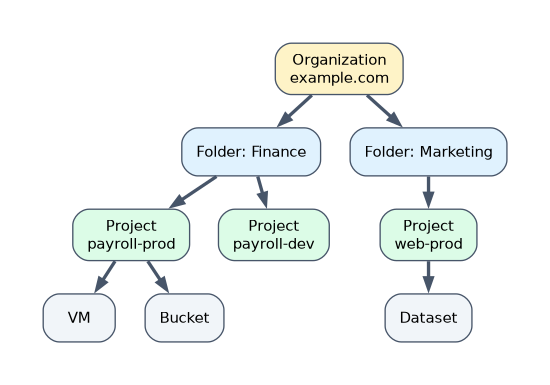
| Level | What it is | Example |
|---|---|---|
| Organization node | The root, representing the whole company, usually tied to its domain | example.com |
| Folders | Optional groups of projects (and other folders), often by department, team or environment | Finance, Marketing, Production |
| Projects | The basic unit for creating and using resources, enabling APIs, and tracking billing | payroll-app-prod |
| Resources | The actual services | A Compute Engine VM, a Cloud Storage bucket, a BigQuery dataset |
Every resource belongs to exactly one project. Projects are linked to a billing account, which pays for their use.
Inheritance and propagation
Policies set at a level are inherited by everything below it.
| Set at | Applies to |
|---|---|
| Organization | Every folder, project and resource in the company |
| Folder | Every project and resource in that folder |
| Project | Every resource in that project |
For IAM, access granted at a higher level adds to access granted lower down. A role given on a folder applies to every project in it. Organization policies (rules such as "resources may only be created in EU locations") also flow down.
Grant access as high as needed but no higher. A role granted at the organization level reaches everything, which can break least privilege.
Benefits
| Benefit | How the hierarchy helps |
|---|---|
| Access control | Grant a team access to its folder once instead of to each project |
| Inheritance and propagation | Set a rule once and it applies everywhere below |
| Security and compliance | Enforce company-wide guardrails, such as allowed regions or no public IP addresses |
| Visibility and auditing | See all projects in one structure; audit who has access where |
| Cost management | Projects map to billing, so costs can be tracked by team or application |
Designing a hierarchy
A common pattern: folders per department, and inside each, projects per application and environment (development, test, production). Keeping production in separate projects limits the blast radius of mistakes and lets different people have access to each.
A worked scenario
A university creates an organization for its domain, folders for Research, Teaching and Administration, and inside Research, a project per research group. It sets an organization policy that data may only be stored in its home country, which every project inherits. The Research IT team gets an admin role on the Research folder, so it manages all research projects without access to Administration. Billing reports show the cost of each research group's project.
How the exam asks about this
- "Order the levels from top to bottom." Organization, folders, projects, resources.
- "Apply one policy to all projects in a department." Set it on the department folder.
- "Which level is the basic unit for enabling APIs and tracking billing?" The project.
- "Benefit of inheritance." Set once, applied everywhere below, consistently.
What to remember for the exam
- Organization (root) > folders (grouping) > projects (basic unit) > resources.
- Every resource belongs to one project; projects link to a billing account.
- Policies and permissions set higher are inherited lower down.
- Benefits: access control, inheritance, security and compliance, visibility and auditing, cost tracking.
Folders are optional; projects are not. You cannot create resources without a project.
Common mistakes
Putting folders below projects. Folders contain projects, never the reverse.
Granting broad roles at the organization level. Everything below inherits them.
Thinking a billing account is part of the hierarchy. It pays for projects but is not a level in the hierarchy.
Check yourself
What is the order of the resource hierarchy from the top?
Organization node, folders, projects, resources.
Where do you set a policy so that it applies to every project in the Finance department?
On the Finance folder, so all its projects inherit it.
Which level is the basic unit for using resources and tracking billing?
The project.
Topic 2 of 4 in Scaling with Google Cloud Operations
Test yourself on Scaling with Google Cloud Operations
The full Google Cloud Digital Leader question bank has 512 questions, with timed practice exams and an explanation for every answer.
This study guide is independent and is not affiliated with, endorsed by, or sponsored by Google Cloud. Vendor names, certification names and exam codes are trademarks of their respective owners and are used for identification only.