Modernizing Infrastructure and Applications with Google Cloud · Topic 1 of 5
Cloud Migration Terms
Cloud migration terms for Cloud Digital Leader: workloads, discovery and assessment, and the retire, retain, rehost, replatform, refactor and reimagine paths.
- 4 min
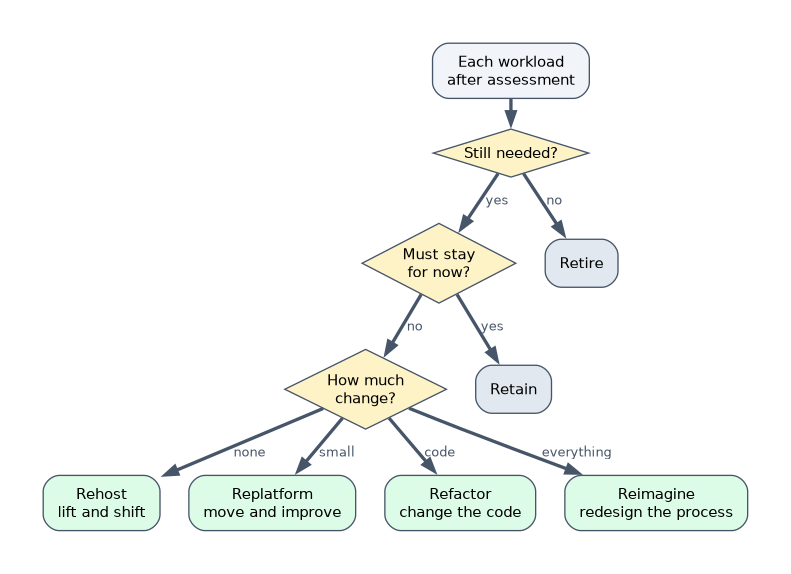
- Includes a diagram
- A workload is an application plus the resources it needs.
- Discovery lists what exists; assessment judges readiness, cost and risk.
- Retire switches off; retain keeps in place; rehost moves unchanged; replatform moves with small improvements; refactor changes code; reimagine redesigns the process.
What it is
Cloud migration is moving applications, data and infrastructure from on premises (or another cloud) into the cloud. Every migration starts by understanding what you have, then choosing a path for each workload. The exam expects you to define the terms and pick the right path for a scenario.
How it works
Core terms
| Term | Meaning |
|---|---|
| Workload | An application or service and the resources it needs, such as a web app with its database and storage |
| Discovery | Finding and listing every workload, server and dependency in the current environment |
| Assessment | Evaluating each workload: dependencies, performance, cost, risk and how ready it is to move |
Discovery and assessment matter because hidden dependencies (an app that quietly reads another app's database) break migrations. Google Cloud provides Migration Center to help discover the estate, assess it and estimate cloud costs.
The migration paths
| Path | What it means | Effort | Benefit | Example |
|---|---|---|---|---|
| Retire | Switch the workload off; it is no longer needed | None | Saves cost immediately | An old reporting tool nobody uses |
| Retain | Keep it where it is for now | None | Avoids risk where moving does not pay | A system tied to on-premises hardware or about to be replaced |
| Rehost (lift and shift) | Move as is to cloud VMs, with no code changes | Low | Fast exit from the data center | Copy VMs to Compute Engine |
| Replatform (move and improve) | Move with small changes to use managed services | Medium | Less operations work with modest effort | Move the database to Cloud SQL while the app stays similar |
| Refactor | Change the application's code and architecture to use cloud-native services | High | Scalability, resilience, speed of change | Split a monolith into microservices on GKE or Cloud Run |
| Reimagine | Rethink the business process and rebuild from the start, often with new technology such as AI | Highest | New capabilities and business models | Replace a manual claims process with an AI agent workflow |
Order the paths by effort: retire and retain (no move), rehost (no change), replatform (small change), refactor (code change), reimagine (start again).
Choosing a path
| Situation | Likely path |
|---|---|
| Data center contract ends soon; move fast | Rehost |
| Team wants less database administration without rewriting the app | Replatform |
| App cannot scale and changes are slow | Refactor |
| A process could be transformed by new technology | Reimagine |
| A system will be decommissioned next year | Retire, or retain until then |
| Strict reasons to stay on premises | Retain |
Most organizations use several paths at once: rehost many workloads quickly, then refactor the most important ones later.
A worked scenario
A manufacturer must leave its data center within six months. Discovery finds 300 servers. Assessment shows 40 unused servers (retire), a plant-floor system tied to local machines (retain), most business apps can move unchanged (rehost), the main database should go to Cloud SQL (replatform), and the customer portal, which struggles at peak, is rebuilt as microservices (refactor). The order-entry process is later reimagined with an AI agent.
How the exam asks about this
- A situation is described and you pick the migration path.
- "Which step identifies all applications and their dependencies?" Discovery.
- "Move to the cloud with no code changes." Rehost (lift and shift).
- "Move to a managed database while keeping the app mostly the same." Replatform (move and improve).
What to remember for the exam
- A workload is an application plus the resources it needs.
- Discovery lists what exists; assessment judges readiness, cost and risk.
- Retire switches off; retain keeps in place; rehost moves unchanged; replatform moves with small improvements; refactor changes code; reimagine redesigns the process.
- Rehost is fastest; refactor and reimagine bring the most long-term benefit and need the most effort.
Rehosting moves the problems too. An app that does not scale on premises will not scale just because it now runs on a cloud VM.
Common mistakes
Confusing replatform and refactor. Replatform makes small changes such as a managed database; refactor changes the application's code and architecture.
Skipping discovery. Missed dependencies cause outages after the move.
Thinking every workload must move. Retire and retain are valid choices.
Check yourself
What is "lift and shift"?
Rehosting: moving a workload to cloud VMs without changing its code.
A team moves its app's database to Cloud SQL but leaves the app mostly unchanged. Which path is this?
Replatform (move and improve).
Why does discovery come first?
To find every workload and its dependencies so nothing breaks during migration.
Topic 1 of 5 in Modernizing Infrastructure and Applications with Google Cloud
Test yourself on Modernizing Infrastructure and Applications with Google Cloud
The full Google Cloud Digital Leader question bank has 512 questions, with timed practice exams and an explanation for every answer.
This study guide is independent and is not affiliated with, endorsed by, or sponsored by Google Cloud. Vendor names, certification names and exam codes are trademarks of their respective owners and are used for identification only.