Setting up a cloud solution environment · Topic 1 of 4
Resource Hierarchy and Organization Policies
ACE resource hierarchy: organization, folders and projects, standalone organizations, organization policy constraints, inheritance and the gcloud commands.
- 4 min
- Includes a diagram
- Hierarchy: organization > folders > projects > resources; the project ID is permanent and globally unique.
- IAM is inherited and additive downward.
- Organization policies restrict configurations with list or boolean constraints; they need
roles/orgpolicy.policyAdmin.
What it is
Google Cloud resources live in a resource hierarchy: an organization node at the top, optional folders, projects, and the resources inside projects. Organization policies are guardrails set on this hierarchy, for example "no external IP addresses on VMs" or "resources only in EU locations". IAM controls who can act; organization policies control what may be configured, whoever does it.
How it works
The levels
| Level | Purpose | Notes |
|---|---|---|
| Organization | Root node for a company, tied to a Cloud Identity or Google Workspace account | Central control of all projects; created automatically when a domain's Cloud Identity or Workspace account creates its first project |
| Folder | Groups projects and other folders, for departments, teams or environments | Can be nested; policies and IAM set here are inherited |
| Project | Container for resources; where APIs are enabled and billing is attached | Has a globally unique project ID (permanent), a project number, and a changeable display name |
| Resource | VMs, buckets, datasets, clusters | Belongs to exactly one project |
Creating the hierarchy
# create a folder under the organization
gcloud resource-manager folders create --display-name="Production" --organization=ORGANIZATION_ID

# create a project inside that folder
gcloud projects create shop-prod-1234 --folder=FOLDER_ID

# move an existing project into a folder
gcloud beta projects move shop-dev-1234 --folder=FOLDER_ID
Creating folders needs the Folder Creator role; creating projects in the organization needs Project Creator (roles/resourcemanager.projectCreator).
Inheritance
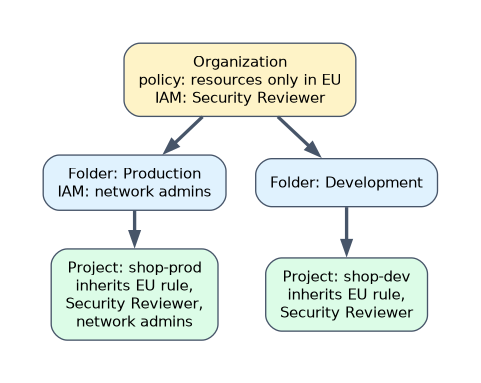 IAM allow policies are inherited downward and added together: a role granted on a folder applies to every project in it, and you cannot remove an inherited permission lower down by granting less. Organization policies are also inherited, but a lower level can be set to merge with, replace or inherit the parent's policy, where the constraint allows it.
Organization policies
An organization policy applies a constraint to a resource node. Two kinds:
| Constraint type | How it works | Examples |
|---|---|---|
| List constraint | Allows or denies a list of values | constraints/gcp.resourceLocations (allowed locations), constraints/iam.allowedPolicyMemberDomains (domain restricted sharing), constraints/compute.vmExternalIpAccess (which VMs may have external IPs) |
| Boolean constraint | Turns a behavior on or off | constraints/compute.skipDefaultNetworkCreation (no default network in new projects), constraints/iam.disableServiceAccountKeyCreation (no downloadable keys) |
Policies are written as YAML and applied with the gcloud org-policies commands:
gcloud org-policies set-policy policy.yaml
gcloud org-policies describe gcp.resourceLocations --project=shop-prod-1234
You need the Organization Policy Administrator role (roles/orgpolicy.policyAdmin), granted at the organization, to manage these policies. Organization policies are not retroactive: existing resources that break a new policy are not deleted.
"Prevent anyone, including project owners, from creating resources outside the EU" is an organization policy (resource locations), not IAM.
Standalone organizations
A company can have more than one organization, for example to keep a subsidiary separate. Each organization is tied to its own Cloud Identity or Workspace domain, and policies do not cross between organizations. Setting one up means verifying a domain in Cloud Identity, then creating projects so the organization node appears.
A worked scenario
A company wants separate production and development environments, development data only in the EU, and no external IPs on production VMs. The engineer creates Production and Development folders, puts projects under each, sets gcp.resourceLocations on the Development folder to EU locations, and sets compute.vmExternalIpAccess on the Production folder to deny all. A team's IAM role on its folder covers every project in it.
How the exam asks about this
- "Apply a rule to every project in a department." Set it on the department's folder.
- "Restrict the regions where resources can be created." The resource locations organization policy.
- "Only allow IAM members from our own domain." Domain restricted sharing (
iam.allowedPolicyMemberDomains). - "A role granted on the folder still applies even though it was removed in the project." An inherited allow policy grant cannot be removed lower down.
What to remember for the exam
- Hierarchy: organization > folders > projects > resources; the project ID is permanent and globally unique.
- IAM is inherited and additive downward.
- Organization policies restrict configurations with list or boolean constraints; they need
roles/orgpolicy.policyAdmin. - Organization policies are not retroactive.
- Common constraints: resource locations, domain restricted sharing, VM external IP access, disabling service account key creation.
A project's ID cannot be changed after creation. Only its display name can.
Common mistakes
Using IAM to stop resource creation in a region. That is an organization policy.
Trying to deny an inherited role in a child project. Allow policies are additive; restructure or grant lower instead.
Expecting a new policy to delete existing resources. It only blocks new violations.
Check yourself
Which organization policy limits where resources can be created?
The resource locations constraint,
constraints/gcp.resourceLocations.Can a project ID be changed after the project is created?
No. Only the display name can be changed.
Which role is needed to manage organization policies?
Organization Policy Administrator,
roles/orgpolicy.policyAdmin.
Topic 1 of 4 in Setting up a cloud solution environment
Test yourself on Setting up a cloud solution environment
The full Google Cloud Associate Cloud Engineer question bank has 661 questions, with timed practice exams and an explanation for every answer.
This study guide is independent and is not affiliated with, endorsed by, or sponsored by Google Cloud. Vendor names, certification names and exam codes are trademarks of their respective owners and are used for identification only.