Setting up a cloud solution environment · Topic 4 of 4
Billing Accounts, Budgets and Exports
Creating Cloud Billing accounts, linking projects, billing roles, budgets with threshold alerts and Pub/Sub, and exporting billing data to BigQuery for ACE.
- 4 min
- Includes a diagram
- One billing account pays for many projects; each project has one billing account.
- Billing roles: Creator, Administrator, User, Viewer, Project Billing Manager.
gcloud billing projects link PROJECT --billing-account=ID.
What it is
A Cloud Billing account pays for the resources used in the projects linked to it. Engineers create billing accounts, link projects to them, set budgets with alerts, and export billing data for analysis. The exam tests the right roles, commands and the behavior of budgets.
How it works
Billing accounts
| Type | How you pay |
|---|---|
| Self-serve (online) | Credit or debit card or bank account; charged automatically |
| Invoiced (offline) | Monthly invoices; requires eligibility |
One billing account can pay for many projects; a project is linked to one billing account at a time. Companies create several billing accounts to separate cost centers or subsidiaries. A subaccount setup is used by resellers.
Billing roles
| Role | Can do |
|---|---|
Billing Account Creator (roles/billing.creator) | Create billing accounts in the organization |
Billing Account Administrator (roles/billing.admin) | Manage a billing account, link and unlink projects, manage its users |
Billing Account User (roles/billing.user) | Link projects to the billing account (combined with project permissions) |
Billing Account Viewer (roles/billing.viewer) | View costs and transactions |
Project Billing Manager (roles/billing.projectManager) | Link or unlink a specific project to a billing account (granted on the project) |
To let a developer attach their new project to the company billing account without managing it, grant Billing Account User on the billing account (they already own their project).
Linking projects
gcloud billing accounts list
gcloud billing projects link shop-prod-1234 --billing-account=0X0X0X-0X0X0X-0X0X0X
gcloud billing projects describe shop-prod-1234
If a project's billing is disabled, its paid resources stop working; some resources may be deleted if billing is not restored.
Budgets and alerts
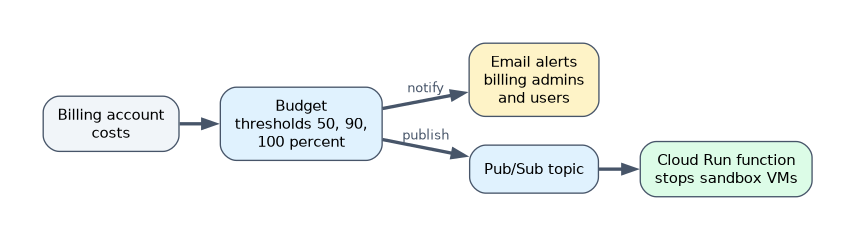 A budget tracks actual or forecasted spend against an amount for a billing account, optionally scoped to projects, services or labels. Threshold rules (for example 50, 90 and 100 percent) send alerts.
| Feature | Detail |
|---|---|
| Recipients | Billing Account Administrators and Users by default, plus Cloud Monitoring notification channels |
| Forecasted spend | Alert before the money is spent, based on the forecast |
| Pub/Sub notifications | Send budget updates to a Pub/Sub topic so code (for example a Cloud Run function) can act automatically, such as stopping resources or disabling billing on a test project |
gcloud billing budgets create --billing-account=0X0X0X-0X0X0X-0X0X0X \
  --display-name="dev-monthly" --budget-amount=1000USD \
--threshold-rule=percent=0.5 --threshold-rule=percent=0.9A budget does not stop spending by itself. To cap costs, automate a response through Pub/Sub, or limit usage with quotas.
Billing exports
Cloud Billing export to BigQuery sends detailed billing data to a BigQuery dataset automatically, for analysis and dashboards.
| Export type | Contents |
|---|---|
| Standard usage cost | Cost and usage data per service, SKU, project, label and location |
| Detailed usage cost | Adds resource-level detail, such as individual VM costs |
| Pricing | The list and contract prices of SKUs |
Export does not bring in your full history (a US or EU multi-region dataset gets data from the start of the previous month; other locations only from the day it is enabled), so enable it early. Labels on resources make costs easy to group by team or environment.
A worked scenario
A company wants each team's projects billed centrally, alerts at 90 percent of each team's monthly budget, automatic shutdown of a sandbox project when its budget is exceeded, and cost dashboards by team. The engineer links the projects to the central billing account, creates budgets scoped by project with threshold rules, connects the sandbox budget to Pub/Sub with a function that stops its VMs, enables detailed billing export to BigQuery, and requires a team label on resources for reporting.
How the exam asks about this
- "Let a developer link projects to the billing account without full billing control." Billing Account User.
- "Be warned before overspending." A budget with threshold rules on forecasted spend.
- "Automatically act when a budget is exceeded." Budget notifications to Pub/Sub with a function.
- "Analyze costs with SQL by label." Billing export to BigQuery.
What to remember for the exam
- One billing account pays for many projects; each project has one billing account.
- Billing roles: Creator, Administrator, User, Viewer, Project Billing Manager.
gcloud billing projects link PROJECT --billing-account=ID.- Budgets alert on actual or forecasted spend; they do not cap costs.
- Pub/Sub notifications enable automated responses.
- Export billing data to BigQuery early; use labels.
Common mistakes
Expecting a budget to stop resources. It only notifies unless you automate.
Enabling billing export after a cost spike. It backfills little or no earlier data.
Granting Billing Account Administrator just to link projects. Billing Account User is enough.
Check yourself
Which role lets a user link projects to a billing account without administering it?
Billing Account User,
roles/billing.user.How can a budget trigger an automatic action?
Send budget notifications to a Pub/Sub topic and process them with code, such as a Cloud Run function.
Where should billing data go for SQL analysis by label?
A Cloud Billing export to BigQuery.
Topic 4 of 4 in Setting up a cloud solution environment
Test yourself on Setting up a cloud solution environment
The full Google Cloud Associate Cloud Engineer question bank has 661 questions, with timed practice exams and an explanation for every answer.
This study guide is independent and is not affiliated with, endorsed by, or sponsored by Google Cloud. Vendor names, certification names and exam codes are trademarks of their respective owners and are used for identification only.