Planning and implementing a cloud solution · Topic 7 of 9
VPCs, Subnets and Firewalls
Custom mode VPCs and subnets, Shared VPC, VPC Network Peering, VPC firewall rules and Cloud NGFW policies with tags, secure tags and service accounts.
- 5 min
- Includes a diagram
- Custom mode VPC for production; VPC global, subnets regional.
- Shared VPC: host and service projects;
roles/compute.xpnAdminandroles/compute.networkUser. - Peering: no overlap, not transitive.
What it is
A Virtual Private Cloud (VPC) network is a global private network for your resources, divided into regional subnets. Shared VPC lets several projects use one central network. VPC Network Peering connects two VPCs privately. Firewall rules and Cloud Next Generation Firewall (Cloud NGFW) policies decide which traffic is allowed.
How it works
VPC networks and subnets
| Mode | Behavior | Use |
|---|---|---|
| Auto mode | One subnet created automatically in every region with predefined ranges | Quick tests |
| Custom mode | You create subnets with your own ranges in the regions you choose | Production; avoids overlapping ranges |
gcloud compute networks create prod-vpc --subnet-mode=custom
gcloud compute networks subnets create web-subnet --network=prod-vpc \
  --region=us-central1 --range=10.10.0.0/24 --enable-private-ip-google-access
A VPC is global; subnets are regional. Private Google Access lets VMs without external IPs reach Google APIs.
Shared VPC
| Role | What it is |
|---|---|
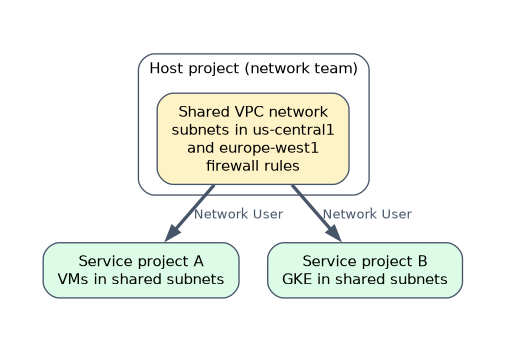
| Host project | Owns the Shared VPC network, subnets and firewall rules |
| Service projects | Attached to the host; their resources use the host's subnets |
Shared VPC Admin (roles/compute.xpnAdmin) | Enables the host project and attaches service projects, granted at the organization or folder |
Network User (roles/compute.networkUser) | Lets service project users create resources in shared subnets |
Shared VPC centralizes network control with a network team while application teams keep their own projects and billing.
VPC Network Peering
Peering connects two VPCs (same or different projects or organizations) with internal IP connectivity. Key rules: subnet ranges must not overlap, peering is not transitive (A peered with B and B with C does not connect A and C), and each side manages its own firewall rules.
"One central team manages the network for many projects in the same organization" is Shared VPC. "Connect two separate VPCs privately, possibly across organizations" is VPC Network Peering.
VPC firewall rules
Every rule has these attributes:
| Attribute | Values |
|---|---|
| Direction | Ingress or egress |
| Action | Allow or deny |
| Priority | 0 to 65535; lower numbers win |
| Targets | All instances, instances with a network tag, or instances using a service account |
| Source or destination | IP ranges, tags or service accounts (source), IP ranges (destination) |
| Protocols and ports | Such as tcp:22 or tcp:80,443 |
Every VPC has implied rules: deny all ingress and allow all egress, at the lowest priority.
gcloud compute firewall-rules create allow-ssh-iap --network=prod-vpc \
  --direction=INGRESS --action=ALLOW --rules=tcp:22 \
  --source-ranges=35.235.240.0/20 --target-tags=ssh
The range 35.235.240.0/20 is used by Identity-Aware Proxy TCP forwarding, so this rule allows SSH only through IAP.
Cloud NGFW policies
Cloud Next Generation Firewall adds firewall policies that group rules and can be applied more widely:
| Policy type | Scope |
|---|---|
| Hierarchical firewall policy | Attached to the organization or a folder; applies to all VPCs below |
| Global network firewall policy | Attached to a VPC network, applies across all regions |
| Regional network firewall policy | Attached to a VPC network for one region |
Policy rules can target secure Tags (IAM-governed tags from Resource Manager, unlike plain network tags that anyone who can edit the VM can set) and service accounts. Cloud NGFW tiers add features such as FQDN and geolocation objects, threat intelligence and intrusion prevention.
A worked scenario
A company sets up a Shared VPC host project with custom subnets in two regions; application teams build in service projects with roles/compute.networkUser. A hierarchical firewall policy on the organization denies traffic from known-bad ranges. A global network firewall policy allows web traffic to VMs with the web secure Tag, and SSH only from the IAP range. A partner's VPC is connected through VPC Network Peering with non-overlapping ranges.
How the exam asks about this
- "Centralize network administration across projects." Shared VPC.
- "Private connectivity between two VPCs." VPC Network Peering, with non-overlapping ranges.
- "Apply a firewall rule to every VPC in the organization." A hierarchical firewall policy.
- "Target firewall rules in a way only authorized people can change." Secure Tags or service accounts rather than network tags.
- "Two rules conflict." The one with the lower priority number wins.
What to remember for the exam
- Custom mode VPC for production; VPC global, subnets regional.
- Shared VPC: host and service projects;
roles/compute.xpnAdminandroles/compute.networkUser. - Peering: no overlap, not transitive.
- Firewall rule attributes: direction, action, priority, targets, source or destination, protocols and ports.
- Implied rules: deny ingress, allow egress.
- Cloud NGFW: hierarchical, global and regional network firewall policies; secure Tags.
Peering is not transitive. If A peers with B and B peers with C, A still cannot reach C through B.
Common mistakes
Using auto mode in production. Predefined ranges can overlap with other networks.
Expecting a higher priority number to win. Lower numbers take precedence.
Relying on network tags for security boundaries. Secure Tags and service accounts are governed by IAM.
Check yourself
Which firewall policy applies to all VPC networks under a folder?
A hierarchical firewall policy attached to that folder.
What are the implied firewall rules in every VPC?
Deny all ingress and allow all egress, at the lowest priority.
Which role lets service project users create VMs in a Shared VPC subnet?
Compute Network User,
roles/compute.networkUser.
Topic 7 of 9 in Planning and implementing a cloud solution
Test yourself on Planning and implementing a cloud solution
The full Google Cloud Associate Cloud Engineer question bank has 661 questions, with timed practice exams and an explanation for every answer.
This study guide is independent and is not affiliated with, endorsed by, or sponsored by Google Cloud. Vendor names, certification names and exam codes are trademarks of their respective owners and are used for identification only.